


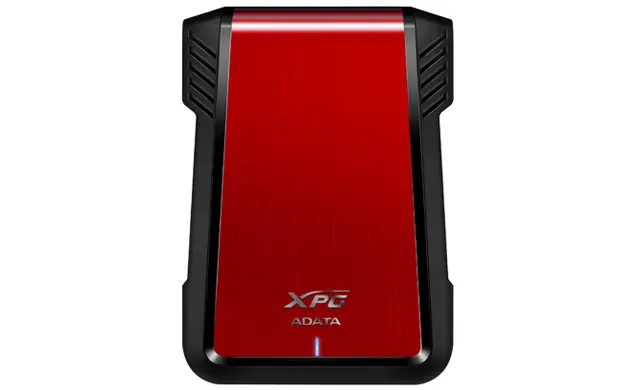
ADATA EX500 2.5-inch HDD/SSD Enclosure Serial ATA III Black and Red


Short description


Cheapest delivery:
Unisend LV
Product information
Description
The ADATA EX500 2.5-inch HDD/SSD Enclosure Serial ATA III Black and Red is a reliable and practical external storage solution designed to house internal 2.5-inch hard disk drives and solid-state drives. Built with USB connectivity and support for a single Serial ATA III storage drive, this enclosure effectively transforms internal components into portable external devices. Featuring a striking black and red color scheme, it combines functionality with a distinctive aesthetic suited for everyday computing environments.
Advantages
This HDD/SSD enclosure offers a straightforward way to repurpose internal storage drives, providing users with a portable external storage device for various tasks. Its durable construction helps protect the installed drive during transport, while the standard Serial ATA III interface ensures reliable data transfer speeds when connected to a compatible computer system. The design accommodates standard 2.5-inch form factor drives, making it a versatile addition to any hardware toolkit.
Suitable for
- Turning internal 2.5-inch HDDs and SSDs into portable external storage
- Backing up important documents, photos, and personal files
- Transferring large datasets between multiple computers
- Expanding computer storage capacity quickly and easily
This enclosure may not be suitable for 3.5-inch desktop hard drives, as it is physically sized exclusively for 2.5-inch storage devices. Additionally, it does not support multiple drives simultaneously since it is engineered to house only one storage drive at a time.
Key specifications
- Product type: HDD/SSD enclosure
- Storage drive size: 2.5 inches
- Supported storage drive interfaces: Serial ATA III
- Number of storage drives supported: 1
- USB connectivity: Yes
- Product colour: Red, Black
To use the enclosure, open the housing according to the manufacturer instructions and insert a compatible 2.5-inch Serial ATA III HDD or SSD into the internal connector. Ensure the drive is properly seated and secure the enclosure housing. Connect the enclosure to a computer using a suitable USB cable. The operating system should automatically recognize the connected storage drive, allowing you to format it if necessary and begin transferring or accessing files immediately.
What to consider before purchase
- Verify that your existing hard drive or solid-state drive conforms to the 2.5-inch form factor
- Check that your drive utilizes the Serial ATA III interface
- Confirm that your computer system features available USB ports for connectivity
Usage recommendations: Handle the enclosure with care during drive installation to avoid damaging the internal connectors. Disconnect the storage drive safely through your operating system before unplugging the USB cable to prevent potential data corruption.
Features
- Product type:
- HDD/SSD enclosure
- USB connectivity:
- Yes
- Number of storage drives supported:
- 1
- Storage drive size:
- 2.5
- Product colour:
- Red, Black
- Supported storage drive interfaces:
- Serial ATA III
Stock data
| Warehouse | Stock | Delivery to the store | Store Price | |
| EU85 | 20 | 07.12.2026 | 11.49 € | Add to cart |
- 11.49 €Stock: 20Delivery Date: 07.12.2026Warehouse: EU85Add to cart
| Warehouse | Stock | Delivery to the store | Store Price | |
| BT11 | 11 | 11.12.2026 | 12.99 € | Add to cart |
- 12.99 €Stock: 11Delivery Date: 11.12.2026Warehouse: BT11Add to cart


