


Label printer Brother QL-700


Short description


Cheapest delivery:
Unisend LV

Esto — pay in 6 equal parts
Product information
Description
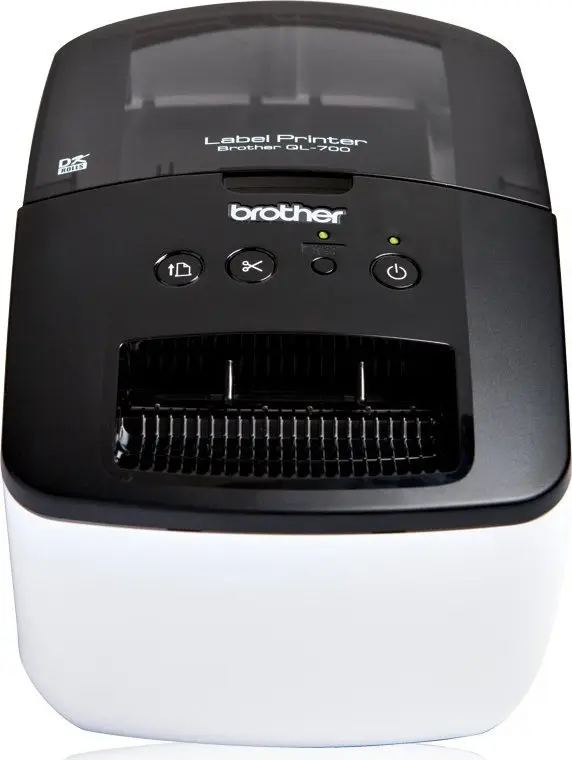
The Brother QL-700 is a professional, high-speed label printer designed for busy offices and home workspaces. It uses direct thermal printing and supports a maximum print resolution of 300 x 300 DPI with a print speed of up to 150 mm/sec (about 93 labels per minute). The QL-700 prints on DK paper and continuous rolls, handles labels up to 62 mm wide and 59 mm high, and includes an automatic cutter for clean, finished edges.
Advantages
The QL-700 delivers fast, reliable label production for a variety of office needs, from file folders and envelopes to DVDs and shipping labels. Its high print speed and automatic cutter speed up large projects, while support for continuous rolls enables banners and signs up to 3 ft (about 91 cm). Built-in Editor Lite (Plug and Label) lets you type and print labels without installing software, and the included P-touch Editor enables more advanced label design. The printer also supports cloud postage printing through pbSmartPostage™ for printing exact postage from your desktop.
Suitable for
- Printing file and folder labels
- Address and postage labels
- Shipping and package labeling
- DVD and media labelling
- Banners and signs on continuous rolls (up to 3 ft)
Key specifications
- Print technology: Direct thermal
- Maximum printing width: 62 mm
- Maximum print height: 59 mm
- Print resolution: up to 300 x 300 DPI
- Print speed: 150 mm/sec (approx. 93 labels/min)
- Media type: DK paper and continuous rolls
- Automatic cutter: Yes
- Ethernet LAN: No
- Wi‑Fi: No
- Product colour: Black, White
- Weight: 1.1 kg
How to use
Install a DK roll or continuous paper according to the user guide, connect the Brother QL-700 to a PC via USB, and power the unit on. For quick one-off labels, press the Editor Lite button to launch the built-in Plug and Label interface and type your text without installing software. For more advanced layouts and templates, install the included P-touch Editor software to design and print labels. Use the automatic cutter to finish each label, and select continuous-roll mode when printing banners or elongated labels.
Usage recommendations
Use genuine Brother DK media for optimal print quality and cutter performance. For postage printing via pbSmartPostage™, ensure an active subscription and an internet-connected PC. When producing long banners, verify the roll length and label layout in P-touch Editor before printing to avoid waste.
Features
- Ethernet LAN:
- No
- Wi-Fi:
- No
- Maximum printing width:
- 62 mm
- Print technology:
- Direct thermal
- Built-in barcodes:
- UPC-E, CODABAR (NW-7), EAN128, EAN13, EAN8, Interleaved 2/5, PDF417, POSTNET, UPC-A
- Product colour:
- Black, White
Product comparison
This comparison examines the Label printer Brother QL-700 alongside similar variants of the same series as well as the more advanced Label printer Brother QL-800 alternative. All products belong to the desktop label printer category and share key foundations: direct thermal printing technology, the absence of built-in Wi-Fi and Ethernet LAN interfaces, and a maximum printing width of approximately 62 mm. The differences among the QL-700 variants primarily stem from regional model codes or supply packaging with identical core performance, whereas the QL-800 introduces a higher vertical resolution and extended barcode support.
⚙️ The following table compares the most relevant technical characteristics, including printing technology, resolution, print speed, maximum tape width, and network interfaces, to highlight the core similarities and differences across the options.
| Comparison parameter | Label printer Brother QL-700 | Label printer Brother QL-700 (QL700RF1) | Label printer Brother QL-700 (QL700ZW1) | Label printer Brother QL-700 (QL700ZG1) | Label printer Brother QL-700 (QL700YJ1) | Label printer Brother QL-800 (QL800YJ1) | Practical significance |
|---|---|---|---|---|---|---|---|
| Print technology | Direct thermal | Direct thermal | Direct thermal | Direct thermal | Direct thermal | Direct thermal | All models use a clean thermal printing process that requires no ink or toner cartridges. |
| Print resolution | 300 x 300 DPI | 300 x 300 DPI | 300 x 300 DPI | 300 x 300 DPI | 300 x 300 DPI | 300 x 600 DPI | The QL-800 offers higher vertical resolution for sharper text and cleaner graphic details. |
| Print speed | 150 mm/sec | 150 mm/sec | 150 mm/sec | 150 mm/sec | 150 mm/sec | 148 mm/sec | Print speeds are virtually identical, ensuring rapid label output across all choices. |
| Maximum printing width | 62 mm | 62 mm | 62 mm | 62 mm | 62 mm | 60.96 mm | The print width is nearly the same, accommodating standard labeling tapes for typical applications. |
| Network interfaces (Wi-Fi / LAN) | No / No | No / No | No / No | No / No | No / No | No / No | None of the reviewed devices feature wireless connectivity or a wired network port. |
◎ The suitability table below evaluates user needs and usage scenarios to help determine which product best fits specific requirements.
| Use case | Recommended product | Why |
|---|---|---|
| Standard home or office labeling | Label printer Brother QL-700 | Delivers efficient thermal printing at 150 mm/sec with reliable resolution for daily labeling tasks without unnecessary complexity. |
| High-detail labeling and advanced barcodes | Label printer Brother QL-800 | Provides a higher vertical print resolution (300 x 600 DPI) and support for a wider variety of barcode types. |
Choosing between the various Label printer Brother QL-700 modifications depends mainly on availability, as their functional capabilities and specifications are identical. The Label printer Brother QL-800 is best suited for users who need enhanced print resolution and broader barcode compatibility for more demanding labeling workflows.
Stock data
| Warehouse | Stock | Delivery to the store | Store Price | |
| WH355 | 10 | 07.12.2026 | 101.49 € | Add to cart |
- 101.49 €Stock: 10Delivery Date: 07.12.2026Warehouse: WH355Add to cart
| Warehouse | Stock | Delivery to the store | Store Price | |
| WH109 | 10 | 21.12.2026 | 126.49 € | Add to cart |
- 126.49 €Stock: 10Delivery Date: 21.12.2026Warehouse: WH109Add to cart
Customer reviews
Customer questions
How much does the Label printer Brother QL-700 cost, and is it available for purchase?
If I order this product today, when will I receive my order?
What payment options are available?
Can Label printer Brother QL-700 be purchased with a lease?
- Select the product on the website and add it to your cart;
- When placing your order, choose the payment method “Installments”;
- Fill in the required details for the lending partner;
- Receive a decision within a few minutes.


