{{ totalProductsCount }}

In cart {{totalProductsCount}} item(s)

Total:
{{sum | formatAmount}}

Your cart is empty

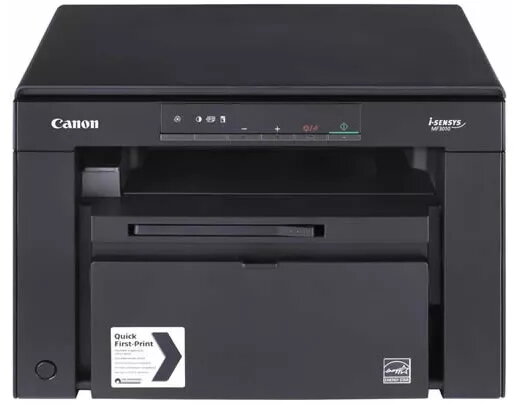
header-product Multifunction Printer Canon i-SENSYS MF3010 Laser Mono
297.99 €

Multifunction Printer Canon i-SENSYS MF3010 Laser Mono

Multifunction Printer Canon i-SENSYS MF3010 Photo 1
Keep track of price changes You keep track of price changes
Watch the price drop

Leave your address - as soon as the price of the product goes down, you'll know about it right away

You keep track of price changes

Multifunction Printer Canon i-SENSYS MF3010 Laser Mono

{{email}}
You keep track of price changes

Multifunction Printer Canon i-SENSYS MF3010 Laser Mono

{{email}}
{{selectedOffer && selectedOffer.price | formatAmount}}

Short description

The Canon i-SENSYS MF3010 is a compact multifunction printer that offers laser printing, mono copying, and color scanning. With a maximum print resolution of 1200 x 600 DPI and a speed of 18 ppm, it efficiently handles your printing needs. It supports A4 paper size and features a user-friendly design, making it ideal for home or small office use.
Available for order: 7 pcs.
Warranty: 2 Years
SKU: 4184422
free shipment

Cheapest delivery:

Unisend LV

Pick-up points

Unisend LV

Cost

1.79 €

Deliver

{{selectedOffer.parcelStationDeliveryString}}

Customer service center
2b. Kengaraga str., Riga, Latvia, LV-1063
11.08.2026 {{selectedOffer.officeDeliveryString}}
free
Courier Delivery Please note that in case of a large parcel additional delivery costs may apply!
14.08.2026 {{selectedOffer.courierDeliveryString}}
From 7.23 € (Weight: 8.20 kg)
Parcel couriers
Unisend LV / Venipak Pickup LV / Venipak Locker LV / Latvijas Pasts pakomāts / DPD Paku skapis / Omniva LV / Latvijas Pasts nodaļa
14.08.2026 {{selectedOffer.parcelStationDeliveryString}}
From 1.79 €
0 credit

pay in 3 equal parts

today

0 €

afterward

3 mth. х 99.33 €

overpayment

0 €

All payment Methods:
Bank transfer, Bank cards on-line, Apple Pay, Google Pay, Installment
36 months installment: from 8.28 euros per month
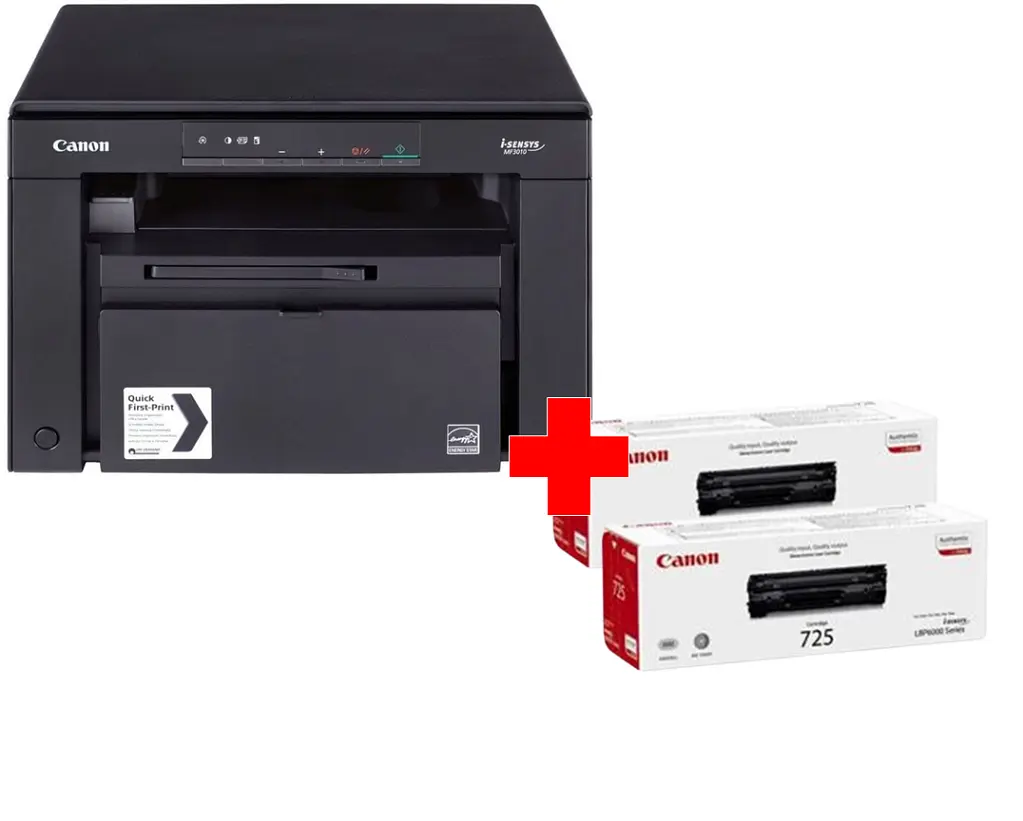
Together cheaper
{{product.price | formatAmount}}
{{product.title}}
{{productBundle.reference.specialPrice | formatAmount}}
{{productBundle.title}}
{{productBundlePreviousPrice | formatAmount}}
{{productBundleSpecialPrice | formatAmount}}

You saving {{productBundleYouSave | formatAmount}}

Product information

Description

The Canon i-SENSYS MF3010 is a compact mono laser 3-in-1 that combines printing, copying and colour scanning in a single desktop unit. Designed for home and small office use, it delivers up to 18 ppm black-and-white output, a First Print Out Time of 7.8 seconds and enhanced print resolution up to 1200 x 600 dpi. The device uses an All-In-One cartridge that houses toner, drum and cleaning units for easy replacement, and connects via USB 2.0.

Advantages

The MF3010 offers a space-saving modern design with an easy-to-read vertical display for convenient operation from a seated position. It provides fast mono printing and quick first-page output, colour scanning for document archiving, and maintenance-free cartridge replacement. Energy-efficient operation (Energy Star compliant, TEC 0.6 kWh, sleep mode 1.4 W) helps lower running costs and power consumption.

Suitable for

  • Home users who need printing, scanning and copying in one compact unit
  • Small offices with moderate mono print volumes (up to the stated monthly duty cycle)
  • Users who prioritise energy efficiency and simple maintenance

Key specifications

  • Print technology: Laser (mono)
  • Print speed (A4, black, normal): 18 ppm
  • First Print Out Time (black): 7.8 seconds
  • Maximum print resolution: 1200 x 600 dpi
  • Copying: Mono, maximum copy resolution 600 x 600
  • Scanning: Colour, optical resolution 600 x 600
  • Maximum paper size: A4
  • Interfaces: USB 2.0
  • Weight: 8.2 kg
  • Typical monthly duty cycle: up to 8000 pages
  • Product colour: Black

How to use

Place the MF3010 on a stable desktop and connect it to your computer using the supplied USB 2.0 cable. Install the driver and bundled MF Toolbox software to enable scanning to email or searchable PDF. Use the vertical display to select print, copy or scan functions and adjust settings such as resolution and number of copies. Replace the All-In-One cartridge when prompted to restore full print quality—cartridge replacement is designed to be quick and clean.

Usage recommendations

For reliable results, use authentic Canon laser cartridges and keep the device in a well-ventilated, dust-free environment. Regularly update drivers from Canon to maintain compatibility and use the MF Toolbox for efficient scanning workflows.

Specifications

Market positioning: Under which category can the device be positioned in the market, e.g. camera phone.
Home & Office
Internal memory: The amount of memory, usually measured in bytes (e.g. MB, GB), which is installed in the system's hardware.
64 MB
Ethernet LAN: An Ethernet LAN (Local Area Network) interface is present, for a wired conection via a cable.
No
Wi-Fi: Popular technology that allows an electronic device to exchange data or connect to the internet wirelessly using radio waves.
No
Maximum ISO A-series paper size: The maximum paper size the device can handle, defined by ISO A-series.
A4
Total output capacity:
100 sheets
Total input capacity:
150 sheets
Number of print cartridges: The amount of print cartridges. A print cartridge is a container holding a quantity of ink which is inserted into a inkjet printer mechanism.
1
Maximum duty cycle: The maximum number of prints/copies made by a printer/copier in a fixed period.
8000 pages per month
Faxing: To send an exact copy of a document made by electronic scanning and transmitted as data by telecommunications links.
No
Scanner type: Indicates the type of scanner this product is.
Flatbed scanner
Optical scanning resolution: How many pixels a scanner can see. Most commonly, this is measured in dots per inch (dpi).For example, a typical flatbed scanner will use a scanning head with 300 sensors per inch, so it can sample 300 dots per inch (dpi) in one direction. To scan in the other direction, it will move the scanning head along the page, stopping 300 times per inch, so it can scan 300 dpi in the other direction as well. This scanner would have an optical resolution of 300 x 300 dpi. Some manufacturers stop the scanning head more frequently as it moves down the page, so their machines have resolutions of 300 x 600 dpi or 300x1200 dpi.
600 x 600
Duplex scanning: Feature of computer scanners and multifunction printers (MFPs) that allows the automatic scanning of a sheet of paper on both sides.
No
Scanning: To convert a document or picture into digital form for storage or processing on a computer, by scanning it using a scanner.
Colour scanning
Maximum copy resolution: The greatest amount of detail that can be produced by a copy of a document.
600 x 600
Duplex copying:
No
Copying: Description of copying function (colour or monochrome).
Mono copying
Print speed (black, normal quality, A4/US Letter): The print speed of a printer for black & white A4 pages, normal quality. The exact speed varies depending on the system configuration, software program, and document complexity.
18 ppm
Maximum resolution: Maximum printing resolution.
1200 x 600
Printing: Producing a paper copy of information stored on a computer.
Mono printing
Print technology: Indicates the method used to print by this product.
Laser
Product colour: The colour e.g. red, blue, green, black, white.
Black
ISO A-series sizes (A0...A9): Different sizes of paper from A0 (big) to A9 (small). A4 is the most common size used for printing documents.
A4, A5
Paper tray media types:
Card stock, Coated paper, Envelopes, Labels, Plain paper, Recycled paper, Transparencies
Printing colours: The colours that can be produced by the printer.
Black
All features

Other features

Duplex printing: Feature of computer printers and multifunction printers (MFPs) that allows the printing of a sheet of paper on both sides (automatically or manually)
No

Logistics data

Harmonized System (HS) code:
84433100

Weight & dimensions

Weight: Weight of the product without packaging (net weight). If possible, the net weight is given including standard accessories and supplies. Please note that sometimes the manufacturer leaves out the weight of accessories and/or supplies.
8.2 kg
Height: The measurement of the product from head to foot or from base to top.
254 mm
Depth: The distance from the front to the back of something.
276 mm
Width: The measurement or extent of something from side to side.
372 mm

Sustainability

Sustainability certificates:
ENERGY STAR

Operational conditions

Operating relative humidity (H-H):
20 - 80
Operating temperature (T-T): The minimum and maximum temperatures at which the product can be safely operated.
10 - 30

System requirements

Linux operating systems supported: 8 RT. Linux (9.4, 9.5), Red Hat Enterprise Linux 5.0 (supported with a pre-built package); SUSE Linux (10.3, 11.0, 11, 11.1, 11.2), Fedora (9, 9.0, 10, 10.0, 11.0, 11, 12, 12.0), Ubuntu (8.04, 8.04.1, 8.04.2, 8.10, 9.04, 9.10, 10.04), Debian (5.0, 5.0.1, 5.0.2, 5.0.3)
Yes
Mac operating systems supported: Mac operating systems e.g. OS X can be used with the device.
Mac OS X 10.4 Tiger, Mac OS X 10.5 Leopard, Mac OS X 10.6 Snow Leopard, Mac OS X 10.7 Lion
Windows operating systems supported: Windows vesions wich can be used with the device.
Windows 2000, Windows 2000 Professional, Windows 7 Enterprise, Windows 7 Enterprise x64, Windows 7 Home Basic, Windows 7 Home Basic x64, Windows 7 Home Premium, Windows 7 Home Premium x64, Windows 7 Professional, Windows 7 Professional x64, Windows 7 Starter, Windows 7 Starter x64, Windows 7 Ultimate, Windows Vista Business, Windows Vista Business x64, Windows Vista Enterprise, Windows Vista Enterprise x64, Windows Vista Home Basic, Windows Vista Home Basic x64, Windows Vista Home Premium, Windows Vista Home Premium x64, Windows Vista Ultimate, Windows Vista Ultimate x64, Windows XP Home, Windows XP Home x64, Windows XP Professional, Windows XP Professional x64

Power

AC input frequency:
50 - 60
AC input voltage: The voltage of the AC electricity that is inputted into the product.
220 - 240
Energy Star Typical Electricity Consumption (TEC):
0.6 kWh/week
Power consumption (standby): The amount of electricity that is consumed when the product is on standby.
1.4 W
Power consumption (PowerSave):
450 W
Power consumption (average operating):
450 W
Power consumption (max): The maximum amount of power used by the device.
960 W

Design

Market positioning: Under which category can the device be positioned in the market, e.g. camera phone.
Home & Office
Product colour: The colour e.g. red, blue, green, black, white.
Black

Performance

Sound power level (standby):
43 dB
Sound pressure level (printing):
65.3 dB
Card reader integrated: A card reader is a device that enables reading and, in some cases, writing data to and from a memory card.
No
Internal memory: The amount of memory, usually measured in bytes (e.g. MB, GB), which is installed in the system's hardware.
64 MB

Network

Ethernet LAN: An Ethernet LAN (Local Area Network) interface is present, for a wired conection via a cable.
No
Wi-Fi: Popular technology that allows an electronic device to exchange data or connect to the internet wirelessly using radio waves.
No

Ports & interfaces

USB 2.0 ports quantity: Number of USB 2.0 ports (connecting interfaces) in the device. USB 2.0 was released in April 2000 (now called "Hi-Speed"), adding higher maximum signaling rate of 480 Mbit/s (effective throughput up to 35 MB/s or 280 Mbit/s), USB 2.0 ports are usually black.
1
USB port: The device features a socket into which a USB cable can be plugged.
Yes
Standard interfaces: Most common industry-standard communication protocols ranging from RS-232, RS-422, RS-423, RS-485, and LVDS to USB.
USB 2.0

Paper handling

Paper tray media weight:
60 - 163
Custom media width:
76 - 216
Custom media length:
127 - 356
Envelopes sizes:
10, B5, C5, DL
Non-ISO print media sizes:
Executive, Statement
ISO B-series sizes (B0...B9):
B5
ISO A-series sizes (A0...A9): Different sizes of paper from A0 (big) to A9 (small). A4 is the most common size used for printing documents.
A4, A5
Paper tray media types:
Card stock, Coated paper, Envelopes, Labels, Plain paper, Recycled paper, Transparencies
Maximum print size: The maximum size that an image can be printed with a good resolution.
216 x 356 mm
Maximum ISO A-series paper size: The maximum paper size the device can handle, defined by ISO A-series.
A4

Input & output capacity

Total output capacity:
100 sheets
Total input capacity:
150 sheets

Features

Page description languages:
UFRII-LT
Printing colours: The colours that can be produced by the printer.
Black
Number of print cartridges: The amount of print cartridges. A print cartridge is a container holding a quantity of ink which is inserted into a inkjet printer mechanism.
1
Digital sender: Device similar to a scanner which converts paper documents into digital information for emailing, archiving, document management and more.
No
Maximum duty cycle: The maximum number of prints/copies made by a printer/copier in a fixed period.
8000 pages per month

Fax

Duplex faxing:
No
Faxing: To send an exact copy of a document made by electronic scanning and transmitted as data by telecommunications links.
No

Scanning

Scan drivers:
TWAIN, WIA
Greyscale levels:
256
Output colour depth:
24
Input colour depth: Colour depth of the input into the product. The colour depth is either the number of bits used to indicate the color of a single pixel, in a bitmapped image or video frame buffer, or the number of bits used for each color component of a single pixel. High-end laptops have 24-bit colour depth.
24
Scanner type: Indicates the type of scanner this product is.
Flatbed scanner
Maximum scan area:
A4 / Letter (216 x 297)
Maximum scan resolution:
9600 x 9600
Optical scanning resolution: How many pixels a scanner can see. Most commonly, this is measured in dots per inch (dpi).For example, a typical flatbed scanner will use a scanning head with 300 sensors per inch, so it can sample 300 dots per inch (dpi) in one direction. To scan in the other direction, it will move the scanning head along the page, stopping 300 times per inch, so it can scan 300 dpi in the other direction as well. This scanner would have an optical resolution of 300 x 300 dpi. Some manufacturers stop the scanning head more frequently as it moves down the page, so their machines have resolutions of 300 x 600 dpi or 300x1200 dpi.
600 x 600
Duplex scanning: Feature of computer scanners and multifunction printers (MFPs) that allows the automatic scanning of a sheet of paper on both sides.
No
Scanning: To convert a document or picture into digital form for storage or processing on a computer, by scanning it using a scanner.
Colour scanning

Copying

N-in-1 copy function (N=):
2
Copier resize:
50 - 200
Maximum number of copies:
9 copies
Time to first copy (black, normal):
12 s
Copy speed (black, normal quality, A4):
18 cpm
Maximum copy resolution: The greatest amount of detail that can be produced by a copy of a document.
600 x 600
Duplex copying:
No
Copying: Description of copying function (colour or monochrome).
Mono copying

Printing

Economical printing: Whether or not the product is equipped with features that allow economical printing.
Yes
Print margins (top, bottom, right, left):
5 mm
Time to first page (black, normal):
7.8 s
Warm-up time: Time needed before printing after power switched on.
10 s
Print speed (black, normal quality, A4/US Letter): The print speed of a printer for black & white A4 pages, normal quality. The exact speed varies depending on the system configuration, software program, and document complexity.
18 ppm
Maximum resolution: Maximum printing resolution.
1200 x 600
Printing: Producing a paper copy of information stored on a computer.
Mono printing
Print technology: Indicates the method used to print by this product.
Laser

Description

Machine translation. Load original

Similar products

{{product.title}} Show details Hide details

{{highlightedFeature.featureTitle}}:

{{getProductFeatureValueById(product, highlightedFeature.featureId)}}

{{product.price | formatAmount}}
Might be useful
{{product.manufacturerName}}
{{product.categoryName}}
{{product.title}}
{{product.specialPrice}}
{{product.price}}

Customer reviews

Customer questions

FAQ

How much does the Multifunction Printer Canon i-SENSYS MF3010 cost, and is it available for purchase?

The price is 297.99 € (valid at the time of publication and already includes all taxes). The item is available for order — 7 pcs. are in stock, and you can place your purchase right now with delivery across Latvia and Europe or choose pickup at the Riga collection point. We offer favorable purchase terms, including the option to split the payment into convenient monthly installments. Availability and price are updated in real time, so we recommend placing your order in advance.

If I order this product today, when will I receive my order?

If you place your order today, delivery will be as fast and convenient as possible. You will be able to pick up your order on 11.08.2026 at the Riga pickup point or choose delivery across Latvia and Europe. We carefully inspect every purchase and pack it securely for safe transportation.

What payment options are available?

AiO.lv offers several payment methods: Bank transfer, Bank cards on-line, Apple Pay, Google Pay, Installment. All transactions are 100% secure and encrypted.

Can Multifunction Printer Canon i-SENSYS MF3010 be purchased with a lease?

Yes, the purchase is available both on credit and with an interest-free installment plan. We work with leading banks and leasing companies in Latvia, allowing you to make your purchase on convenient terms — with a minimal down payment and a repayment period from 3 to 36 months. You can apply for credit or installments for the Multifunction Printer Canon i-SENSYS MF3010 online, and the application process is as simple as possible:
  • Select the product on the website and add it to your cart;
  • When placing your order, choose the payment method “Installments”;
  • Fill in the required details for the lending partner;
  • Receive a decision within a few minutes.
For more information about available payment options, interest-free installment terms, and credit conditions in Latvia, please visit the Payment page.

Can this product be purchased for a company (with VAT)?

Yes. AiO.lv works with legal entities in Latvia and across Europe. The product price already includes VAT. For certain product categories, as well as for companies from other EU countries with a valid VAT number, a 0% VAT rate may apply. We issue the invoice immediately after the order is placed, support electronic BIS invoices, and automatically generate all necessary accounting documents. You can complete the purchase for a company online — simply select the company profile and choose bank transfer as the payment method during checkout.

What is the warranty period?

All Canon products come with an official 2 Years warranty. It covers all manufacturing defects and malfunctions that may occur during use. The warranty is valid at all authorized Canon service centers and through AiO.lv

Can the product be returned after purchase?

Yes, you can return the product within 14 days of purchase if you bought it as a consumer (not a legal entity). Returns are possible without giving any reason — the main condition is that the product retains its original appearance and full set of accessories. We will make the process as simple and convenient as possible: just contact our customer support team, and we will help you arrange the return.

Where should I contact for warranty service?

For warranty-related questions you can contact the AiO.lv (SIA VSPRO) customer support team. We will assist with consultation, warranty claim processing, and coordination with certified service centers.

How can I tell if this product suits my needs?

When making a choice, we recommend paying attention to the key features: market positioning, internal memory, ethernet lan, wi-fi, maximum iso a-series paper size, total output capacity, total input capacity, number of print cartridges, maximum duty cycle, faxing, scanner type, optical scanning resolution, duplex scanning, scanning, maximum copy resolution, duplex copying, copying, print speed (black, normal quality, a4/us letter), maximum resolution, printing, print technology, product colour, iso a-series sizes (a0...a9), paper tray media types, printing colours, compatibility with your devices or usage conditions, material quality, functionality, and warranty terms. These characteristics will help you determine how well the model meets your needs.
warranty
14-Day Return Policy We are confident in our quality, but if the purchase doesn’t fit — you have 14 days to return the product with peace of mind.
shipping
Fast Delivery Get your orders as quickly as possible — right to your door, parcel lockers, or pickup points across Latvia and the EU.
payment
Secure Payment Pay the way you prefer: cash, VISA, MasterCard, Apple Pay, Google Pay, bank transfer, or 0% installment plan.
warranty
Quality Since 2008 AiO.lv has been on the market for over 18 years and has earned trust — with more than 6000 genuine positive reviews on Google.