


Converter M.2 Key M to 1× SFF-8654 4i DELOCK 64361
Short description

Cheapest delivery:
Unisend LV
Product information
Description
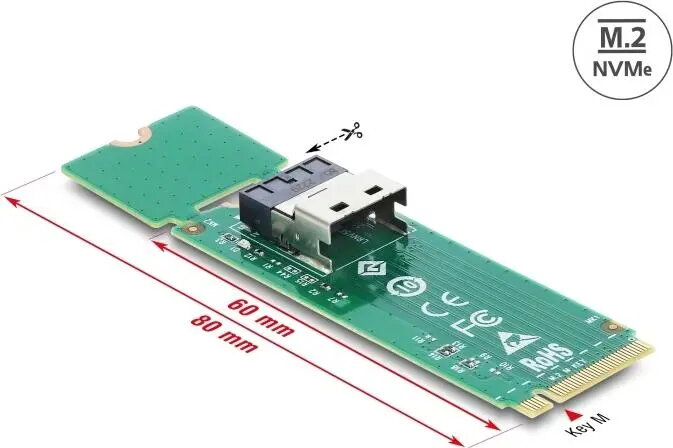
DELOCK M.2 Key M to 1× SFF-8654 4i converter provides a compact hardware interface adapter that allows an M.2 Key M NVMe module to be connected to a single SFF-8654 4i port. The adapter is designed for systems that use SFF-8654 4i cabling or backplanes and enables integration of M.2 NVMe storage into workstations, servers or storage enclosures where a direct M.2 socket is not available. The form-factor conversion preserves NVMe protocol compatibility while adapting the physical connector and signal routing.
Advantages
This converter offers a straightforward mechanical and electrical interface for integrating M.2 Key M NVMe modules into systems with SFF-8654 4i connections. The adapter eliminates the need for custom cabling or expensive backplane replacements and simplifies upgrades by providing a direct connection path. It maintains NVMe performance characteristics through a designed signal mapping and supports a compact installation footprint suitable for constrained server or chassis environments.
Suitable for
- Integrating M.2 NVMe drives into servers or storage enclosures with SFF-8654 4i ports
- Upgrading workstations to use high-performance M.2 NVMe storage via SFF-8654 4i cabling
- Testing or validating M.2 NVMe modules on systems that provide only SFF-8654 4i connectors
- Replacing incompatible connectors during hardware migrations or retrofits
Key specifications
- Interface input: M.2 Key M for NVMe modules
- Interface output: single SFF-8654 4i connector
- Protocol support: NVMe over PCIe lanes (signal mapping for PCIe/NVMe)
- Form factor: compact inline adapter suitable for chassis and backplane integration
- Mounting: designed for inline connection between M.2 module and SFF-8654 4i cabling/backplane
How to use
Insert the M.2 Key M NVMe module into the M.2 slot of the converter, ensuring correct orientation and that the module is seated firmly. Connect the SFF-8654 4i cable or backplane connector to the adapter's SFF-8654 4i port. Secure the assembly as required by your chassis or backplane to prevent strain on the connectors. Power on the system and verify that the NVMe device is detected by the host firmware or operating system. If necessary, check BIOS/UEFI or driver settings to enable NVMe support and verify lane mapping.
Usage recommendations
Use with compatible NVMe modules and SFF-8654 4i cabling rated for your system's PCIe generation. Avoid unnecessary mechanical stress on the adapter and follow anti-static precautions when handling the M.2 module. Ensure firmware and drivers are up to date to achieve supported performance and stability.
Stock data
| Warehouse | Stock | Delivery to the store | Store Price | |
| WH94 | 41 | 07.12.2026 | 36.49 € | Add to cart |
- 36.49 €Stock: 41Delivery Date: 07.12.2026Warehouse: WH94Add to cart
| Warehouse | Stock | Delivery to the store | Store Price | |
| EU4 | 41 | 21.12.2026 | 40.99 € | Add to cart |
| WH109 | 41 | 21.12.2026 | 43.99 € | Add to cart |
- 40.99 €Stock: 41Delivery Date: 21.12.2026Warehouse: EU4Add to cart
- 43.99 €Stock: 41Delivery Date: 21.12.2026Warehouse: WH109Add to cart


