


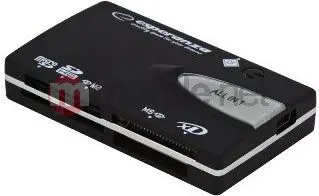
Card Reader Esperanza EA129 USB 2.0



Short description

Cheapest delivery:
Unisend LV
Product information
Description
The Esperanza EA129 USB 2.0 card reader is a compact, portable device that provides access to a variety of memory card formats. Designed for straightforward plug-and-play use, it connects via USB 2.0 to transfer photos, videos and documents between memory cards and computers. The small footprint and simple interface make it convenient for travel, studio work or everyday file management.
Advantages
The card reader offers broad compatibility with common memory card types, allowing users to read and write files without installing drivers on most operating systems. USB 2.0 connectivity delivers reliable transfer rates for typical photo and file workloads while maintaining low power consumption. Its lightweight construction and compact size make it easy to carry and store, and the straightforward single-port design reduces setup complexity.
Подходит для
- Importing and exporting photos from digital cameras and action cams
- Transferring video clips and audio files between devices
- Backing up documents and media from removable memory cards
- Quickly accessing files while traveling or on remote shoots
Key specifications
- Interface: USB 2.0 for connection to host devices
- Supported media: multiple common removable memory card formats (SD, microSD, and similar types)
- Power: bus-powered via USB, no external adapter required
- Physical: compact and lightweight, pocket-friendly housing
- Compatibility: plug-and-play functionality with most modern operating systems
How to use
Insert a compatible memory card into the appropriate slot on the Esperanza EA129 card reader, then connect the reader to an available USB port on your computer. The operating system should recognize the device as a removable drive, allowing you to open, copy, move or delete files using standard file manager tools. When file transfers are complete, use the system’s safe removal or eject feature before disconnecting the reader to avoid data corruption.
Usage recommendations
For optimal performance, use well-maintained memory cards and avoid removing the card during active transfers. When working with large video files, allow transfers to complete fully and consider backing up important media to a secondary storage location. Store the card reader in a dry, dust-free place to prolong its service life.
Product comparison
Comparing the Card Reader Esperanza EA129 USB 2.0 with alternatives such as Card Reader Conceptronic BIAN SD USB 3.0, Card Reader ICY BOX IB-CR200-C USB 2.0 Anthracite, Card Reader Ugreen 50704 USB 3.2 Gen 1 Type-C Grey, Card Reader RaidSonic IB-CR301-C3 USB 3.2 Gen 1 Type-C Black, and LogiLink Card Reader USB 3.2 with Case Micro SD CR0049 highlights a shared practical purpose of providing quick file access from memory cards for photographers and mobile users. The primary differences lie in their connection interfaces, supported card formats, and physical design aspects.
⚙️ The table below compares characteristics such as the connection interface, supported memory card formats, installation type, and design features to evaluate speed and compatibility.
| Feature | Card Reader Esperanza EA129 USB 2.0 | Card Reader Conceptronic BIAN SD USB 3.0 | Card Reader ICY BOX IB-CR200-C USB 2.0 Anthracite | Card Reader Ugreen 50704 USB 3.2 Gen 1 Type-C Grey | Card Reader RaidSonic IB-CR301-C3 USB 3.2 Gen 1 Type-C Black | LogiLink Card Reader USB 3.2 with Case Micro SD CR0049 | Practical significance |
|---|---|---|---|---|---|---|---|
| Interface | USB 2.0 | USB 3.2 Gen 1 | USB 2.0 | USB 3.2 Gen 1 Type-C | USB 3.2 Gen 1 Type-C | USB 3.2 | Models featuring USB 3.2 and USB-C deliver significantly faster data transfer speeds when handling large files. |
| Installation type | External | External | External | External | External | External (with case) | All options are portable external devices designed for plug-and-play convenience on the go. |
| Card support | Various formats | MicroSD, SD, SDHC, SDXC | Multiple formats | MicroSD, SD and more | Various formats | Micro SD | Broad format support offers high versatility, whereas LogiLink is specifically tailored for Micro SD cards. |
◎ The table below evaluates which product is more suitable for different user needs and usage scenarios.
| Use case | Recommended product | Why |
|---|---|---|
| Standard file access on legacy setups | Card Reader Esperanza EA129 USB 2.0 | Provides reliable compatibility with standard USB 2.0 ports for everyday file retrieval tasks. |
| High-speed workflow with modern laptops | Card Reader Ugreen 50704 USB 3.2 Gen 1 Type-C Grey | Equipped with USB-C and USB 3.2 speeds to ensure rapid data transfer with contemporary computing devices. |
| On-the-go Micro SD card usage | LogiLink Card Reader USB 3.2 with Case Micro SD CR0049 | Features a compact protective case making it a convenient choice exclusively for Micro SD cards. |
Card Reader Esperanza EA129 USB 2.0 is ideal for users with standard speed requirements working with traditional USB ports. If you require higher transfer speeds and modern Type-C connectivity, alternatives featuring USB 3.2 will be a better fit.


