


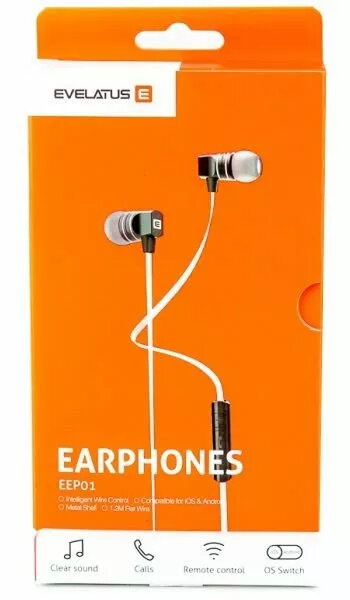
Evelatus Universal Hands Free EEP01 with mic White — in-ear headset, wired, single mic
Short description

Cheapest delivery:
Unisend LV
Product information
Description
Evelatus Universal Hands Free EEP01 with mic in white is a wired in-ear headset designed for basic hands‑free communication and casual media playback. The compact earbuds fit into the ear canal and the single integrated microphone on the cable supports voice pickup for phone calls and simple voice assistant commands. The headset uses a standard audio connector compatible with many smartphones and audio devices that accept wired headsets.
Advantages
The headset provides a compact in-ear design that is lightweight and easy to carry. A single inline microphone enables voice calls and basic voice control without additional adapters. Wired connection eliminates the need for battery charging and offers consistent audio transmission with minimal latency. The neutral white finish matches a wide range of devices and personal styles.
Suitable for
- Hands-free phone calls and voice chats
- Online meetings and conference calls
- Listening to music, podcasts and videos on compatible devices
- Basic voice assistant interactions (where supported by device)
Key specifications
- Form factor: in-ear wired headset
- Microphone: single inline microphone on cable for voice pickup
- Connection: standard wired audio jack compatible with devices that support headset microphones
- Color: white
- Use cases: voice calls, media playback, voice assistant control
How to use
Insert the earbuds into your ears, adjusting for a comfortable fit. Plug the headset into the device’s compatible audio jack. Use the connected device’s call controls or inline microphone button (if present) to answer and end calls or to trigger basic voice assistant functions. Adjust the device volume for listening level and position the microphone near the mouth for clearer voice pickup during calls.
Usage recommendations
For best voice clarity, ensure the microphone is unobstructed and oriented toward the mouth. Keep the ear tips clean and replace them if they become worn. When using with different devices, check that the device’s audio jack supports headsets with inline microphones or use a compatible adapter if needed.


