


Product specification Flood water leak sensor Gosund ST19 ZigBee smart water leak detector
Description
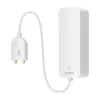
Gosund ST19 smart flood/water leak sensor is a ZigBee-enabled detector designed to identify standing water and send instant notifications to a paired hub or mobile app. The compact, battery-powered sensor monitors floors and appliance areas to help reduce the risk of water damage from leaks, overflows or system failures. It is compatible with Gosund and Tuya apps and operates on the 2.4 GHz ZigBee (IEEE 802.15.4) network.
Advantages
The Gosund ST19 offers flexible installation with a 1 m cable, low power consumption (8 µA standby) and long service life up to 6,000 activation cycles on two AAA batteries. Its compact size and discreet appearance allow placement in kitchens, bathrooms, basements or near washing machines without affecting interior aesthetics. The red LED indicator provides clear status feedback and the device includes a low-battery alarm. Certified to CE-RED and RoHS standards, it supports reliable ZigBee connectivity.
Suitable for
- Monitoring floors near washing machines and dishwashers
- Basement and cellar leak detection
- Bathrooms and kitchen floor protection
- Under sinks, near water heaters and drains
Key specifications
- Manufacturer: Gosund
- Model: ST19
- Connectivity: ZigBee 2.4 GHz (IEEE 802.15.4)
- Power: 2 × AAA (LR03) 1.5 V alkaline batteries
- Battery life: up to 6,000 activation cycles
- Standby current: 8 µA
- Alarm current: 70–120 mA
- Dimensions (sensor): 71 × 25 × 20 mm; cable length: 1 m
- Weight: 61 g (without batteries)
- Operating temperature: 0 °C to 40 °C
- Operating humidity: 20%–85% RH
- Storage temperature: 0 °C to 60 °C
- Storage humidity: 0%–90% RH
- Material: ABS
- LED indicator: red
- Certifications: CE-RED, RoHS
- Supported apps: Gosund, Tuya
How to use
Place the Gosund ST19 sensor flat on the floor in the location most at risk of flooding, using the 1 m cable to position the detection probe where water would first appear. Insert two AAA batteries and pair the sensor with a ZigBee hub or add it via the Gosund or Tuya mobile app following the app pairing instructions. The red LED indicates device status; when water is detected the sensor triggers an alert to the hub and sends a notification to the connected app.
Usage recommendations
Install the sensor on a level surface where water is likely to collect, avoid placing it on uneven or elevated surfaces, and keep it within the ZigBee network range of your hub. Replace batteries when the low-battery alarm appears and test the device periodically to ensure proper operation. Do not expose the sensor to temperatures or humidity levels outside the specified ranges.


