


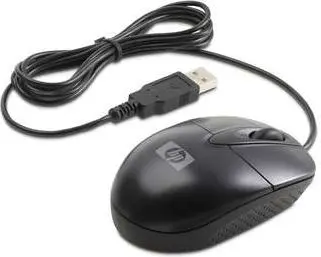
HP RH304AA Office Ambidextrous USB Type-A Optical Mouse with 2 Buttons and Wheel in Black


Offer for a legal entity, non-cash payment.
Short description


Cheapest delivery:
Unisend LV
Product information
Description
The HP RH304AA Office Ambidextrous USB Type-A Optical Mouse with 2 Buttons and Wheel in Black is a wired peripheral designed to provide reliable cursor control for daily desktop tasks and general computing needs. Featuring a classic black finish, this office mouse combines a practical optical movement detection technology with a straightforward interface to support routine work environments.
Advantages
The ambidextrous form factor ensures comfortable usage for both left-handed and right-handed individuals, making it a versatile choice for shared workstations. The reliable optical sensor delivers precise tracking on various standard desktop surfaces without requiring complex setup procedures. Thanks to the wired USB Type-A connection, users benefit from a stable and consistent power source and data transmission without worrying about battery replacement or wireless signal dropouts. The inclusion of two responsive buttons and a convenient scroll wheel facilitates efficient document navigation and web browsing.
Suitable for
- Daily office work and administrative tasks
- General web browsing and document reading
- Shared workstations requiring an ambidextrous mouse
- Standard desktop computer setups
This mouse may not be suitable for advanced gaming requirements that demand high-DPI adjustments, programmable macro buttons, or specialized gaming sensors. Additionally, users who prefer a wireless workspace or require Bluetooth connectivity will need to look for alternative peripheral options.
Key specifications
- Ambidextrous form factor
- Optical movement detection technology
- Wired USB Type-A interface
- 2 buttons with a scroll wheel
- Cable-powered source
- Black product colour
How to use
To begin using the HP RH304AA mouse, simply insert the USB Type-A cable into an available USB port on your desktop computer or laptop. The operating system will automatically recognize the standard plug-and-play device without requiring additional driver installations. Place the mouse on a flat, clean surface or a mousepad to ensure optimal optical tracking performance. Use the left and right buttons for standard clicking actions and the central wheel for smooth vertical scrolling through pages and documents.
What to consider before purchase
- Check that your computer or device has an available USB Type-A port
- Verify that a wired connection meets your workspace and mobility preferences
- Confirm that a standard two-button and scroll wheel configuration suits your daily application needs
Usage recommendations: Keep the optical sensor area on the underside of the mouse clean and free from dust or debris to maintain accurate cursor movement over extended periods of use.
Features
- Quantity per pack:
- 1 pc(s)
- Power source:
- Cable
- Form factor:
- Ambidextrous
- Buttons quantity:
- 2
- Scroll type:
- Wheel
- Movement detection technology:
- Optical
- Device interface:
- USB Type-A
- Purpose:
- Office
- Product colour:
- Black
Stock data
| Warehouse | Stock | Delivery to the store | Store Price | |
| WH357 | 29 | 07.12.2026 | 35.49 € | Add to cart |
- 35.49 €Stock: 29Delivery Date: 07.12.2026Warehouse: WH357Add to cart
| Warehouse | Stock | Delivery to the store | Store Price | |
| EU6 | 33 | 16.12.2026 | 20.49 € | Add to cart |
| WH109 | 1 | 21.12.2026 | 24.49 € | Add to cart |
- 20.49 €Stock: 33Delivery Date: 16.12.2026Warehouse: EU6Add to cart
- 24.49 €Stock: 1Delivery Date: 21.12.2026Warehouse: WH109Add to cart


