


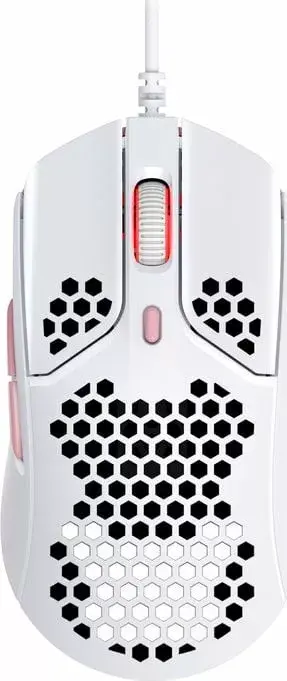
HyperX Pulsefire Haste Wired Gaming Mouse White HMSH1-A-WT/G with 16000 DPI Sensor
Offer for a legal entity, non-cash payment.
Short description


Cheapest delivery:
Unisend LV
Product information
Description
The HyperX Pulsefire Haste Wired Gaming Mouse White is a wired computer mouse designed for precise gaming and daily use. Featuring an optical sensor with up to 16,000 DPI, it delivers accurate tracking for both fast movements and fine adjustments. The stable wired connection ensures reliable signal transmission without the need for batteries. Built in a distinct white housing, this peripheral seamlessly integrates into modern setups while offering reliable performance and ergonomic handling.
Advantages
This wired gaming mouse provides exceptional tracking accuracy through its high-resolution optical sensor supporting up to 16,000 DPI, making it suitable for both rapid cursor swipes and meticulous micro-adjustments. The continuous wired connection eliminates input lag and removes the necessity for recharging or replacing batteries, ensuring uninterrupted operation during critical gaming sessions or intensive work hours. Its lightweight white chassis offers a visually striking aesthetic that complements contemporary desktop environments while maintaining durability and user comfort.
Suitable for
- Fast-paced competitive gaming requiring precise cursor movement
- Daily office tasks and web browsing
- Users preferring a reliable wired connection without battery maintenance
- Modern white-themed desktop setups
When it may not be suitable
This mouse may not be suitable for users who strictly require a wireless setup for travel or desk clutter reduction. Additionally, individuals seeking an ambidextrous design with side buttons on both sides or those who prefer heavy mice with adjustable weights might find other models more appropriate.
Key specifications
- Wired computer mouse design
- Optical sensor with up to 16,000 DPI resolution
- White color finish
- Part of the HyperX Pulsefire product line
How to use
Connect the wired cable of the mouse into an available USB port on your computer. The operating system will automatically recognize the device and install the necessary generic drivers for basic functionality. For advanced customization of DPI settings and button mapping, you can download and install the official software provided by the manufacturer. Keep the optical sensor on the underside clean from dust and debris to maintain optimal tracking precision on your desk surface or mousepad.
What to consider before purchase
- Ensure your desk setup has adequate space for a wired connection
- Verify that the white finish matches your existing computer peripherals
- Check if the maximum DPI settings meet your specific gaming or working requirements
For best performance, use the mouse on a flat, high-friction mousepad and keep the cable routed securely to prevent unnecessary tension during rapid movements.


