


IBM Laptop HDD/SSD caddy Silver for ThinkPad T60 T61 R60 R61 Z60 Z61 X60 X61
Offer for a legal entity, non-cash payment.
Short description


Cheapest delivery:
Unisend LV
Product information
Description
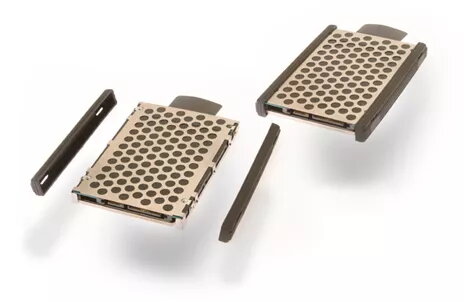
The IBM Laptop HDD/SSD caddy in silver is designed for secure internal hard drive mounting in classic ThinkPad models. This durable mounting bracket with rubber rails ensures proper alignment and vibration dampening for 2.5-inch storage drives, making it an essential component for laptop upgrades and drive replacements in older ThinkPad systems.
Advantages
This mounting caddy provides a reliable and secure way to install a 2.5-inch hard disk drive or solid-state drive into compatible laptops. The integrated rubber rails help absorb shocks and reduce vibrations, protecting the storage drive during daily use. Its precise dimensions ensure a correct fit inside the designated drive bay, allowing for straightforward installation without modification.
Suitable for
- Upgrading classic IBM ThinkPad laptops with a new HDD or SSD
- Replacing a lost, damaged, or worn-out original hard drive caddy
- Maintaining or restoring vintage ThinkPad notebooks
When it may not be suitable
This caddy is not compatible with laptop models that use 1.8-inch storage drives instead of 2.5-inch drives. It is also unsuitable for modern laptops outside of the specified classic ThinkPad generation.
Key specifications
- Product type: Laptop HDD/SSD caddy
- Product colour: Silver
- Drive size compatibility: 2.5-inch
- Weight: 200 g
- Included components: Caddy bracket and rubber rails
How to use
To install a storage drive, slide the 2.5-inch HDD or SSD into the silver metal caddy bracket, ensuring that the mounting screw holes align correctly. Attach the rubber rails along the sides of the drive for secure cushioning. Insert the assembled unit gently into the laptop drive bay until it connects firmly to the internal interface, then secure it with the appropriate screws.
What to consider before purchase
- Verify that your specific laptop model is listed among the compatible ThinkPad series
- Confirm that your existing storage drive measures 2.5 inches rather than 1.8 inches
- Check that you have the correct screws required to secure the bracket inside the laptop chassis
Usage recommendations: Handle the caddy and storage drive with care to avoid static discharge. Ensure the drive is fully seated in the bracket before inserting it into the laptop to prevent damage to the internal connectors.
Features
- Product type:
- Laptop HDD/SSD caddy
- Product colour:
- Silver


