


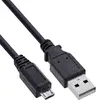
Product specification InLine Micro-USB 2.0 Cable USB-A to Micro-B 3m Black
Description
The InLine Micro-USB 2.0 Cable USB-A to Micro-B 3m Black is a reliable connectivity solution designed for everyday data transfer and device charging. Featuring a standard USB-A male connector on one end and a Micro-B male connector on the other, this 3-meter cable provides extended reach to connect your portable electronics to computers, wall chargers, or power banks.
Advantages
The generous three-meter length offers exceptional flexibility and freedom of movement, allowing you to comfortably use your connected devices while they are charging or syncing across a room or office space. Built with quality materials, this InLine cable ensures a stable and consistent connection performance, minimizing signal loss and supporting efficient power delivery and data synchronization for your electronics.
Suitable for
- Charging smartphones, tablets, and e-readers
- Connecting digital cameras and portable media players to a computer
- Transferring photos, music, and documents between devices
- Powering various Micro-USB enabled accessories and small gadgets
When it may not be suitable
This cable is not designed for fast charging protocols that require specialized high-wattage connections unless explicitly supported by your specific charger and device combination. Additionally, the USB 2.0 interface is not suitable for heavy-duty video output or high-speed data transfers required by modern external solid-state drives.
Key specifications
- Cable type: USB 2.0
- Connector A: USB-A male
- Connector B: Micro-B male
- Cable length: 3 meters
- Color: Black
- Primary functions: Data transfer and device charging
How to use
To use the cable, insert the USB-A male connector into an available USB port on your computer, USB wall adapter, or external power bank. Then, plug the Micro-B male connector into the charging or data port of your compatible electronic device. Ensure both connectors are fully inserted for a secure connection and optimal performance during charging or file transfer.
What to consider before purchase
- Verify that your device is equipped with a Micro-USB port rather than USB-C or Lightning
- Consider whether the 3-meter length is appropriate for your setup, as longer cables can sometimes result in slightly slower charging speeds depending on the power source
- Check your device and charger specifications to ensure compatibility with standard USB 2.0 transfer speeds
Usage recommendations
For optimal longevity and performance, avoid tightly wrapping or bending the cable at sharp angles, and always pull by the connector housing rather than the cord when unplugging it from your devices.


