


Interface Card Inter-Tech 88885366
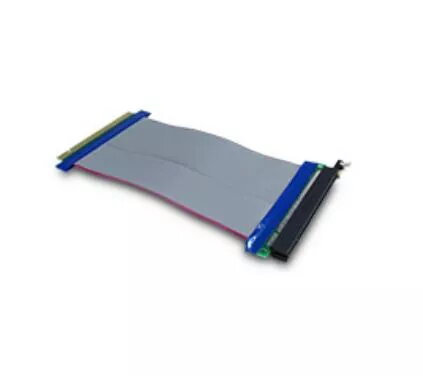
Short description

Cheapest delivery:
Unisend LV
Product information
Description
The Inter-Tech 88885366 is a PCIe internal interface card designed to provide reliable data transfer and expand connectivity options inside desktop systems. With a compact form factor and blue-and-grey finish, the card installs in a PCI Express slot to add an internal interface for peripherals or controllers. It is intended for use in standard ATX, micro-ATX, and similar tower cases where an additional internal connection is required.
Advantages
The card offers a direct PCIe host interface for low-latency communication and stable throughput. Its internal design minimizes external cabling and maintains a tidy system interior. The neutral blue and grey color scheme supports compatibility with a wide range of system builds and does not obstruct airflow when installed correctly. The product is engineered for consistent operation under typical desktop conditions and for integration with compatible motherboards that provide PCIe expansion.
Подходит для
- Расширение внутренних интерфейсов настольного компьютера
- Подключение внутренних периферийных устройств и контроллеров
- Замена или обновление существующих внутренних карт в корпусе
- Сборки с требованием аккуратной внутренней проводки и стабильного соединения
Key specifications
- Host interface: PCIe
- Installation type: Internal, fits PCI Express slot
- Compatibility: Standard desktop motherboards with available PCIe slot
- Product colour: Blue, Grey
- Form factor: Low-profile / full-height bracket compatibility depending on system (verify before installation)
How to use
Power down the computer and disconnect it from the mains before installing the interface card. Open the computer case, locate an available PCIe slot and remove the corresponding expansion slot cover. Carefully align the card with the slot and press it down until it is fully seated in the PCIe connector, then secure it to the case with the retention screw. Reassemble the case and reconnect power. After booting, verify that the system detects the new internal interface and install any required drivers or firmware provided by the device or motherboard vendor.
Usage recommendations
Ensure BIOS/UEFI settings allow the use of the PCIe slot and verify driver availability for your operating system. Avoid forcing the card into the slot; if resistance occurs, power down and recheck alignment. Use electrostatic discharge (ESD) precautions during handling and keep airflow around the card unobstructed for reliable operation.
Features
- Internal:
- Yes
- Host interface:
- PCIe
Stock data
| Warehouse | Stock | Delivery to the store | Store Price | |
| WH94 | 200 | 08.12.2026 | 23.99 € | Add to cart |
- 23.99 €Stock: 200Delivery Date: 08.12.2026Warehouse: WH94Add to cart
| Warehouse | Stock | Delivery to the store | Store Price | |
| WH109 | 288 | 22.12.2026 | 28.49 € | Add to cart |
- 28.49 €Stock: 288Delivery Date: 22.12.2026Warehouse: WH109Add to cart


