


Interface Card Inter-Tech KT015
Short description

Cheapest delivery:
Unisend LV
Product information
Description
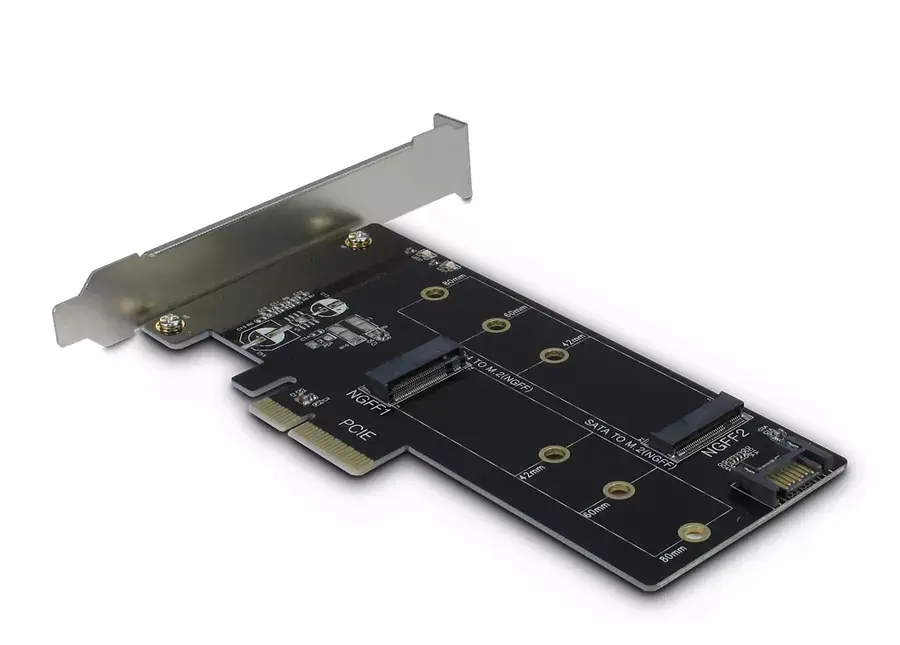
The INTER-TECH Interface Card KT015 is an internal PCIe adapter that allows installation of two M.2 SSDs: one M.2 PCIe (up to M.2 2280) connected via PCIe x4 for up to 32 Gbit/s, and one M.2 SATA (42/60/80 mm) connected via a SATA data cable for up to 6 Gbit/s. The adapter is designed for mounting into a free PCIe slot and includes mounting screws and a small screwdriver.
Advantages
The KT015 supports simultaneous connection of a high-speed M.2 PCIe SSD and an M.2 SATA SSD, providing both NVMe-level throughput and legacy SATA compatibility in a single PCIe card. It is compact, fits standard PCIe slots, and comes with the necessary mounting hardware for a straightforward installation. The adapter's PCIe host interface and dual output support (M.2 and SATA) enable flexible storage expansion.
Suitable for
- Adding a high-speed NVMe (M.2 PCIe) SSD to a desktop system
- Adding an M.2 SATA SSD (42/60/80 mm) for additional storage
- Systems requiring both PCIe and SATA M.2 drive support without using separate adapters
- Home or office PCs with an available PCIe slot
Key specifications
- Host interface: PCIe (PCIe x4 for M.2 PCIe SSD)
- Supported M.2 sizes (SATA): 42 mm, 60 mm, 80 mm
- Data transfer rate: up to 32 Gbit/s (M.2 PCIe), up to 6 Gbit/s (M.2 SATA via SATA cable)
- Output interfaces: M.2, SATA
- Internal: Yes
- Product colour: Silver, Black
- Weight: 0.055 kg
- Includes mounting screws and small screwdriver
How to use
Fix each M.2 SSD to the appropriate slot on the adapter using the supplied screws: install the NVMe (M.2 PCIe) SSD into the PCIe x4 slot and secure it, and install the M.2 SATA SSD into the designated M.2 slot and connect its SATA data cable to the adapter. Insert the adapter into an available PCIe slot on the motherboard and secure the card to the chassis. Connect any required SATA power/data from the system where applicable, then power on the computer and verify drive recognition in the operating system.
Usage recommendations
Ensure your motherboard has an available PCIe slot and that the system BIOS/UEFI supports NVMe devices. Use appropriate anti-static precautions during installation and verify which M.2 slot is designated for PCIe vs SATA on the adapter before inserting drives.
Features
- Internal:
- Yes
- Host interface:
- PCIe
- Output interface:
- SATA, M.2


