


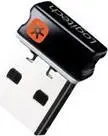
Logitech Unifying Nano USB Receiver Spare for Mouse and Keyboard in Black
Offer for a legal entity, non-cash payment.
Short description


Cheapest delivery:
Unisend LV
Product information
Description
The Logitech Unifying Nano USB Receiver is a compact replacement wireless receiver designed for compatible Logitech mice and keyboards. This tiny USB receiver allows you to connect up to six compatible wireless devices using a single USB port on your computer, helping to reduce cable clutter and save valuable port space. It is an ideal solution for replacing a lost or broken receiver to restore full wireless functionality to your existing computer setup.
Advantages
This wireless receiver features a compact nano design that can safely remain plugged into a laptop or desktop computer even during transport. Utilizing Advanced 2.4 GHz wireless technology, it provides a powerful and reliable connection with minimal latency and dropouts. The multi-device connectivity allows users to pair multiple mice and keyboards to a single receiver, streamlining workspace organization and freeing up USB ports for other accessories.
Suitable for
- Replacing a lost or damaged original receiver for Logitech mice and keyboards
- Connecting up to six compatible wireless input devices to one USB port
- Laptop users who need a low-profile receiver that can stay plugged in during travel
- Creating a multi-device desktop setup with fewer cables and free USB ports
When it may not be suitable
This receiver is not compatible with non-Unifying Logitech devices or products from other manufacturers that rely on different wireless protocols. It also cannot be used to connect devices that require a standard Bluetooth connection without Unifying support.
Key specifications
- Device type: Mouse and keyboard USB receiver
- Brand compatibility: Logitech Unifying devices
- Connectivity: RF wireless 2.4 GHz
- Product colour: Black
- Interface: USB
How to use
To use the receiver, plug it into an available USB port on your computer. Download and open the Logitech Unifying software if you need to pair a new or replacement device. Follow the on-screen instructions provided by the software, which typically involves turning the compatible mouse or keyboard off and back on to establish a secure connection. Once paired, the device is ready for regular use.
What to consider before purchase
- Verify that your existing mouse or keyboard displays the orange Unifying logo to ensure compatibility
- Check that you have an available standard USB port on your computer
- Confirm whether you need to pair a single device or manage multiple compatible peripherals
Usage recommendations: Leave the receiver plugged into your computer's USB port to avoid loss or damage during daily transport, and use the official Logitech Unifying software for straightforward device pairing and management.
- Interface:
- RF Wireless
- Package weight:
- 38.1 g
- Compatibility:
- Unifying
- Connectivity technology:
- Wireless
- Product colour:
- Black
- Device type:
- Mouse / Keyboard
- Package depth:
- 203 mm
- Package height:
- 7 mm
- Package width:
- 207 mm
- Master (outer) case height:
- 222 mm
- Master (outer) case width:
- 214.3 mm
- Brand compatibility:
- Logitech
- Product type:
- USB receiver
- Master (outer) case gross weight:
- 1913 g
- Master (outer) case length:
- 376.2 mm
Product comparison
The reviewed product Logitech USB Receiver Unifying is a compact wireless receiver designed to connect mice and keyboards, while the alternative products from the same brand serve completely different purposes: Logitech 994-000082 SmartDock Initial Service Configuration and Setup is a professional configuration service for conference rooms, and Logitech Keys-To-Go 2 Keyboard is an ultra-slim portable wireless keyboard with a protective cover for mobile devices. Due to their fundamentally different purposes, these items are not direct substitutes.
⚙️ The table below compares the product type, purpose, core components, and use cases for each item.
| Parameter | Logitech USB Receiver Unifying | Logitech SmartDock Initial Service Setup | Logitech Keys-To-Go 2 Keyboard | Practical significance |
|---|---|---|---|---|
| Product type | USB receiver | Professional setup service | Portable wireless keyboard | The products perform entirely different tasks and belong to separate categories. |
| Main purpose | Connecting compatible wireless mice and keyboards to a computer | Initial configuration and deployment service for conference room solutions | Mobile typing on the go using tablets and smartphones | The receiver unifies peripherals and saves ports, the service sets up meeting spaces, and the keyboard enables typing anywhere. |
| Target audience | Office and home PC users | IT specialists and businesses setting up collaboration spaces | Mobile professionals, students, and travelers | The choice depends entirely on the current need: connecting peripherals, deploying meeting room hardware, or buying a keyboard. |
◎ The table below evaluates the suitability of each product for different use cases.
| Use case | Recommended product | Why |
|---|---|---|
| Connecting a wireless mouse or keyboard to a PC | Logitech USB Receiver Unifying | This device is specifically designed for wireless pairing of compatible peripherals and reducing port clutter. |
| Deploying a video conferencing system in a meeting room | Logitech SmartDock Initial Service Setup | This product is a dedicated deployment service tailored for professional conference room hardware. |
| Typing on the go with a tablet or smartphone | Logitech Keys-To-Go 2 Keyboard | This is a standalone portable keyboard with an integrated protective cover designed for mobile users. |
Logitech USB Receiver Unifying differs fundamentally from the alternative brand offerings and is intended specifically for users who need to connect compatible wireless mice and keyboards to their computer. This product is ideal for consolidating devices through a single port, whereas the alternatives focus on entirely different tasks such as professional room setup or mobile typing.


