


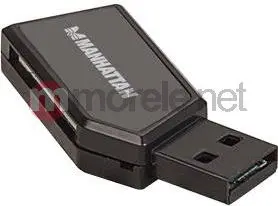
Card reader MANHATTAN USB-A Mini 24-in-1 USB 2.0 480 Mbps, black, supports SD/SDHC/SDXC/MicroSD/MMC


Short description


Cheapest delivery:
Unisend LV
Product information
Description
The MANHATTAN USB-A Mini 24-in-1 card reader is a compact, plug-and-play USB 2.0 device for reading and writing up to 24 flash memory card formats. With Hi-Speed transfers up to 480 Mbps, it supports SD, SDHC, SDXC, MicroSD, microSDHC, microSDXC and MMC cards. The small black housing (25 × 49 × 9 mm) requires no external power or adapters and works with Windows and Mac OS as specified by the manufacturer.
Advantages
This Mini 24-in-1 card reader provides broad card compatibility in a pocket-sized design and uses USB mass-storage functionality to transfer photos, videos, music and documents without connecting the original media device. Plug-and-play operation eliminates driver installation in most systems, and the device conserves camera or phone battery power by avoiding a direct device-to-PC connection.
Suitable for
- Transferring photos and videos from memory cards to a computer
- Backing up music and documents stored on flash cards
- Using multiple card formats with one compact reader while travelling
Key specifications
- Interface: USB 2.0 (Hi-Speed), up to 480 Mbps
- Supported formats: SD / SDHC / SDXC / MicroSD / microSDHC / microSDXC / MMC (total 24 formats)
- Dimensions: 25 × 49 × 9 mm
- Colour: Black
- Plug-and-play: Yes (Windows, Mac OS as per manufacturer)
- Power: Bus-powered (no external supply required)
- Packaging & warranty: Single-piece blister; 3-year warranty
How to use
Insert the compatible memory card into the correct slot of the MANHATTAN Mini 24-in-1 card reader, then connect the reader to a computer USB-A port. The reader will appear as a removable mass-storage device, allowing you to copy, move or delete files using your operating system’s file manager. Safely eject the card or device from the computer before removing the card to avoid data corruption.
Usage recommendations
For reliable transfers, use the latest operating system updates and avoid removing the card during file operations. If you work with large files frequently, consider using USB 3.0 or native high-speed card readers for faster throughput, though this device is suitable for typical photo, video and document transfers.
Features
- Internal:
- No


