


Product specification Mouse Matias M20W PTB Mac USB-A White
Description
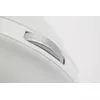
The Matias M20W PTB Mac USB-A White is a wired white mouse designed specifically for Mac users seeking a straightforward, reliable pointing device. It provides a compact ergonomic shape, accurate optical tracking and a smooth mechanical scroll wheel. The plug-and-play USB-A connection requires no driver installation on compatible macOS systems and the rigid outer shell and durable switches are built for everyday use in office and home environments.
Advantages
The Matias M20W offers stable USB-A connectivity and immediate compatibility with Mac systems, eliminating setup overhead. Its ergonomic profile supports comfortable long-term use, while precise tracking improves cursor control for detailed tasks. The scroll wheel is engineered for consistent movement, and the overall build emphasizes durability for frequent clicking and transport.
Suitable for
- Office productivity and document editing on Mac computers
- Web browsing and general everyday computer use
- Home office setups and shared workstations
- Users who prefer wired USB-A connection over wireless mice
Key specifications
- Interface: USB-A wired connection
- Color: White
- Design: Ergonomic right/ambidextrous-inspired shape for comfortable use
- Sensor: Optical tracking for precise cursor control
- Scroll: Mechanical scroll wheel with smooth rotation
- Buttons: Left and right click with durable switches
- Compatibility: macOS-compatible plug-and-play operation
- Construction: Rigid outer shell designed for everyday use
How to use
Connect the Matias M20W to an available USB-A port on a Mac computer. The mouse is recognized automatically by macOS and is ready to use without additional drivers in most configurations. Position the mouse on a flat, clean surface or a mouse pad for optimal tracking performance. Use the left and right buttons for standard click functions and the scroll wheel to navigate documents and web pages. Adjust macOS pointer speed and scrolling preferences in System Settings if finer control is required.
Usage recommendations
For best performance, use on a non-reflective surface or a dedicated mouse pad; keep the optical sensor area free of dust and debris. If using with USB-C only Mac models, use a compatible USB-A adapter. Regularly check system pointer and scrolling settings to match personal comfort and task requirements.


