


Mouse Media-Tech RATON PRO RF Wireless



Discount 16%
You save: 1.50 €
The discount is valid from 02.11.2026 to 30.11.2026Short description


Cheapest delivery:
Unisend LV
Product information
Description
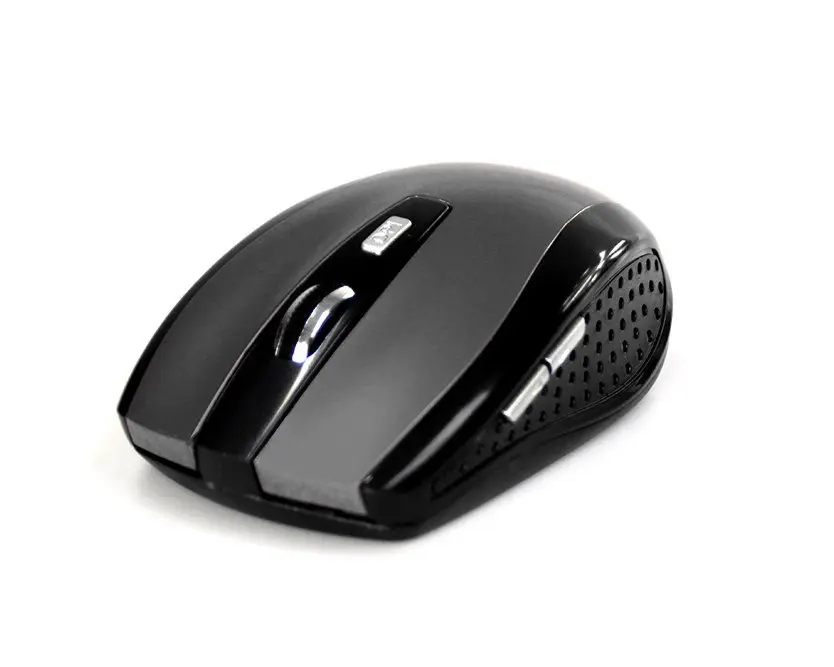
RATON PRO is a wireless, ergonomically shaped ambidextrous mouse for laptops and PCs, equipped with an RF nano receiver and an optical sensor with 1600 DPI resolution. The compact black design includes five press buttons and a scroll wheel, and the receiver can remain plugged into a USB port during transport to reduce the risk of loss or damage.
Advantages
The Media-Tech RATON PRO offers an ambidextrous form factor suitable for both left- and right-handed users, a high-resolution 1600 DPI optical sensor for accurate pointer control, and a compact “nano” RF receiver that stays in the USB port. Its five-button layout and scroll wheel provide convenient navigation for office tasks, while battery power keeps the design wireless and portable.
Suitable for
- Office work and daily computer tasks
- Use with laptops and desktop PCs
- Left- and right-handed users
- Portable setups where a small, detachable receiver is needed
Key specifications
- Form factor: Ambidextrous
- Interface: RF Wireless (nano receiver)
- Movement detection: Optical
- Resolution: 1600 DPI
- Buttons: 5 pressed buttons + scroll wheel
- Colour: Black
- Weight: 0.053 kg
How to use
Insert the RF nano receiver into an available USB port on your laptop or PC. Install batteries according to the polarity markings, then switch the mouse on if a power switch is present. The operating system should automatically detect the device; no additional drivers are typically required. Use the scroll wheel and buttons for navigation and set pointer speed through your computer’s mouse settings if needed.
Usage recommendations
For consistent tracking and battery life, use the mouse on a clean, flat surface and replace batteries with the recommended type when cursor responsiveness decreases. Keep the nano receiver in the USB port or store it in a safe place during transport to avoid loss.
Features
- Power source:
- Batteries
- Form factor:
- Ambidextrous
- Buttons quantity:
- 5
- Scroll type:
- Wheel
- Movement resolution:
- 1600 DPI
- Movement detection technology:
- Optical
- Device interface:
- RF Wireless
- Purpose:
- Office
- Product colour:
- Black
Product comparison
We are comparing the wireless Mouse Media-Tech RATON PRO RF Wireless with several similar alternatives from the same brand, Media-Tech. All these devices are designed for office work or basic daily tasks, featuring an optical sensor and a scroll wheel, yet the primary differences lie in the connection type (wireless versus wired), sensor resolution, button count, form factor, and design.
⚙️ The technical specification comparison covers the mouse connection interfaces, power sources, sensor resolution in DPI, button quantities, ergonomic form factors, product colors, and intended purposes.
| Specification | Mouse Media-Tech RATON PRO RF Wireless | Mouse Media-Tech Raton Pro R RF Wireless | Mouse Media-Tech Raton Pro K RF Wireless | Mouse Media-Tech PLANO Office USB Type-A | Mouse Media-Tech MT1091MO USB Type-A | Mouse Media-Tech COBRA PRO X-LIGHT MT1117 USB Type-A | Practical significance |
|---|---|---|---|---|---|---|---|
| Device interface | RF Wireless | RF Wireless | RF Wireless | USB Type-A | USB Type-A | USB Type-A | The RATON PRO model provides wireless freedom, whereas the alternatives rely on a wired connection via a USB cable. |
| Power source | Batteries | Batteries | Batteries | Cable | Cable | Cable | Wireless mice require battery replacements, while wired alternatives draw power directly from the USB port without needing batteries. |
| Movement resolution | 1600 DPI | 1600 DPI | 1600 DPI | 800 DPI | 800 DPI | 1200 DPI | The RATON PRO offers a higher sensor resolution of 1600 DPI for smoother and more precise movement compared to the 800 DPI or 1200 DPI alternatives. |
| Buttons quantity | 5 | 5 | 5 | 3 | 3 | 3 | The RATON PRO features five buttons for enhanced navigation, while the other mice in this comparison have three buttons. |
| Form factor | Ambidextrous | Ambidextrous | Ambidextrous | Ambidextrous | Right-hand | Right-hand | The ambidextrous shape suits both left and right-handed users, whereas some alternatives are exclusively molded for right-handed users. |
| Product colour | Black | Red, Black | Black | Black | Gold, Black | Black | Various color options allow you to match the mouse to your desktop aesthetic. |
| Purpose | Office | Office | Office | Office | Office | Gaming | Most models are optimized for office productivity, but the COBRA PRO version is built specifically for gaming applications. |
◎ The evaluation of user needs and usage scenarios helps determine which mouse best matches your working habits, mobility requirements, and desktop setup.
| Use case | Recommended product | Why |
|---|---|---|
| Wireless office work with extra navigation buttons | Mouse Media-Tech RATON PRO RF Wireless | This model offers wireless convenience, five buttons, and a higher 1600 DPI resolution tailored for efficient office tasks. |
| Office desk setup with a red visual accent | Mouse Media-Tech Raton Pro R RF Wireless | Shares the exact technical specifications of the main model but comes in a distinct black and red finish. |
| Standard wireless ambidextrous mouse | Mouse Media-Tech Raton Pro K RF Wireless | Nearly identical to the base model in a professional solid black look for everyday office environments. |
| Simple wired ambidextrous mouse | Mouse Media-Tech PLANO Office USB Type-A | Ideal for users who prefer a wired connection and a straightforward three-button layout suitable for both hands. |
| Wired solution tailored for right-handed users | Mouse Media-Tech MT1091MO USB Type-A | Designed specifically for right-handed users who prefer the reliability of a wired cable connection. |
| Basic gaming use | Mouse Media-Tech COBRA PRO X-LIGHT MT1117 USB Type-A | The only gaming-focused mouse in the selection, featuring a wired connection and a distinct gaming design. |
It is recommended to choose the Mouse Media-Tech RATON PRO RF Wireless if you need wireless freedom, an ambidextrous shape suitable for any hand, five convenient buttons, and a precise 1600 DPI sensor for everyday office work. Alternative models are more suitable if you prefer a traditional wired connection, right-handed ergonomics, or a device built for gaming applications.
Stock data
| Warehouse | Stock | Delivery to the store | Store Price | |
| BT33 | 6 | Wednesday | Fast shippingDiscount 16% 7.49 € | Add to cart |
| EU1 | 19 | 02.12.2026 | 9.49 € | Add to cart |
| WH353 | 6 | 07.12.2026 | 9.99 € | Add to cart |
- Fast shippingDiscount 16%7.49 €Stock: 6Delivery Date: WednesdayWarehouse: BT33Add to cart
- 9.49 €Stock: 19Delivery Date: 02.12.2026Warehouse: EU1Add to cart
- 9.99 €Stock: 6Delivery Date: 07.12.2026Warehouse: WH353Add to cart


