


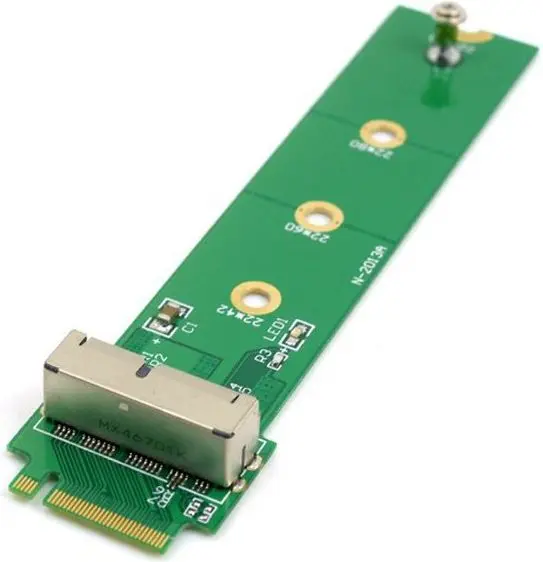
MicroStorage MacBook 12+16pin to M.2 Adapter Controller
Short description

Cheapest delivery:
Unisend LV
Product information
Description
The MicroStorage MacBook 12+16pin to M.2 Adapter Controller is a specialized hardware component engineered to connect M.2 storage drives to proprietary MacBook 12+16pin interfaces. This adapter controller provides a practical solution for storage expansion and hardware integration in compatible Apple laptops, enabling users to upgrade their internal storage capabilities using standard M.2 solid-state drives.
Advantages
This adapter controller facilitates seamless hardware integration by bridging standard M.2 drives with specific Apple proprietary connections. It allows users to effectively expand or upgrade the internal storage capacity of compatible MacBooks without relying strictly on original manufacturer components. The unit is designed for reliable data transmission and stable physical installation within supported laptop chassis.
Suitable for
- Upgrading internal storage on compatible MacBook models
- Integrating standard M.2 drives into Apple proprietary interfaces
- Hardware maintenance and repair tasks involving laptop storage replacement
When it may not be suitable
This adapter controller is not compatible with MacBook models that utilize standard SATA interfaces or newer soldered storage solutions. It is also unsuitable for users without technical experience in laptop disassembly and hardware installation.
Key specifications
- Host interface: MacBook 12+16pin proprietary connection
- Drive interface: M.2 solid-state drive support
- Brand: MicroStorage
- Category: I-O Adapters and Controllers
How to use
Installation requires opening the compatible MacBook chassis and disconnecting the battery to prevent electrical damage. Carefully insert the M.2 drive into the adapter slot, secure it according to the design, and connect the adapter assembly into the MacBook 12+16pin port. Ensure all connections are secure before reassembling the laptop and initializing the storage drive through the operating system.
What to consider before purchase
- Verify the exact MacBook model and manufacturing year for interface compatibility
- Check the physical dimensions and keying of the M.2 drive to ensure proper fit
- Ensure access to appropriate tools required for laptop disassembly
Usage recommendations: Handle the adapter and connected electronic components with ESD wrist straps or on anti-static surfaces to prevent electrostatic discharge damage. Confirm drive compatibility before performing data migration or operating system installation.


