


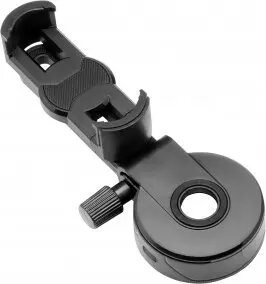
Adapter Redleaf SOM-2 for mounting smartphones on spotting scopes, telescopes and microscopes
Short description

Cheapest delivery:
Unisend LV
Product information
Description
Redleaf SOM-2 adapter is designed to securely mount smartphones to optical instruments such as spotting scopes, telescopes and microscopes. The adapter creates a stable mechanical connection between a phone and the eyepiece, allowing aligned imaging for digiscoping, astrophotography and microscopy. It fits common eyepiece diameters and includes adjustable alignment features to accommodate different phone sizes and camera positions while maintaining optical axis stability during image capture.
Advantages
The SOM-2 adapter provides a robust clamp mechanism that holds a smartphone firmly in place and reduces vignetting by enabling precise alignment with the eyepiece. Its adjustable mounting system supports a wide range of phone thicknesses and camera placements without requiring tools for basic setup. The adapter's construction is intended to minimize play and rotation, improving image sharpness and consistency when acquiring photos or videos through optical devices.
Suitable for
- Digiscoping with spotting scopes for wildlife and birding photography
- Astrophotography using amateur telescopes
- Microscopy imaging for education and field documentation
- Fieldwork documentation when using portable optical scopes
Key specifications
- Compatibility: fits standard eyepiece diameters used on spotting scopes, telescopes and microscopes
- Adjustment: lateral and rotational alignment to center smartphone camera over the eyepiece
- Phone support: accommodates a range of smartphone widths and camera positions
- Mounting: tool-free clamp for attaching to eyepiece with secure locking
- Material: durable lightweight construction to reduce added load on optical instruments
How to use
Attach the adapter to the eyepiece by opening the clamp and sliding it over the eyepiece barrel until it seats securely; then lock the clamp to prevent rotation. Place your smartphone into the adjustable cradle and align the phone camera with the eyepiece by adjusting the adapter's lateral and rotational controls until the viewfinder image is centered and free of vignetting. Fine-tune focus and exposure using the phone camera app and, if available, enable grid or focus aids for accurate framing. When finished, unlock the clamp and remove the phone and adapter.
Usage recommendations
For best results, use the SOM-2 on a stable tripod-mounted spotting scope or telescope to reduce motion blur. Start with the lowest magnification and center the image before increasing magnification. Secure the smartphone in the cradle and check alignment after any movement; use the phone's manual focus or exposure lock for consistent imaging during sequences.


