


Product specification USB 3.0 hub Renkforce RF-USBH-250 with integrated USB‑C plug, grey
Description
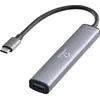
Renkforce RF-USBH-250 is a compact USB 3.0 hub with an integrated USB‑C plug in a grey finish. It expands a single USB‑C port into multiple SuperSpeed USB 3.0 ports, enabling connection of external drives, keyboards, mice and printers. The hub is designed for plug-and-play operation and supports high-speed data transfer for everyday peripheral extension on laptops, tablets and desktop computers.
Advantages
The integrated USB‑C plug eliminates the need for a separate cable, keeping the setup compact and reducing cable clutter. SuperSpeed USB 3.0 ports provide significantly higher data transfer rates compared with USB 2.0, improving file copy and backup tasks. Its small footprint and lightweight construction make the hub easy to carry and position alongside portable devices, while the grey housing provides a neutral appearance that matches many devices.
Suitable for
- Connecting external hard drives and SSDs for file transfer and backups
- Adding wired keyboards and mice to laptops or tablets with USB‑C ports
- Connecting USB printers or multifunction devices
- Extending available ports on compact laptops and ultrabooks
Key specifications
- Interface: USB 3.0 (SuperSpeed) downstream ports
- Host connection: integrated USB‑C plug
- Compatibility: supports USB peripherals such as storage devices, input devices and printers
- Data transfer: SuperSpeed USB 3.0 rates (up to theoretical USB 3.0 throughput)
- Housing: compact, lightweight grey casing
- Power: bus-powered from the host USB‑C port (no external power supply required for typical peripheral use)
How to use
Insert the integrated USB‑C plug into a compatible USB‑C port on your laptop, tablet or desktop. Connect desired USB devices to the hub’s USB 3.0 ports. The hub supports plug-and-play, so devices should be recognized automatically by most modern operating systems without additional drivers. For high-power or multiple power-hungry devices, verify that the host port provides sufficient power or use directly powered peripherals when necessary.
Usage recommendations
Use the hub on a stable surface and avoid excessive bending of the integrated plug. For sustained high-speed data transfers, connect storage devices to the hub’s USB 3.0 ports and ensure the host supports USB 3.0 mode. If you need to connect multiple power-demanding devices simultaneously, consider using externally powered hubs or connect those devices individually to powered ports to ensure reliable operation.


