


Internal Multi-Card Reader Writer StarTech.com 35FCREADBK3


Offer for a legal entity, non-cash payment.
Short description

Cheapest delivery:
Unisend LV
Product information
Description
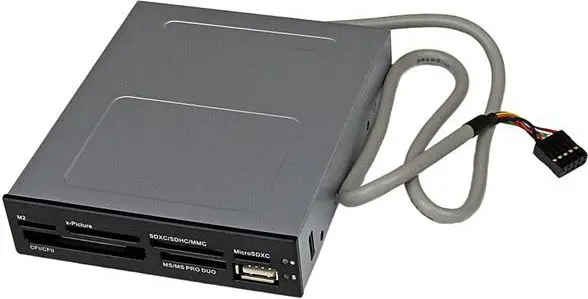
The StarTech.com Internal Multi-Card Reader Writer 35FCREADBK3 provides front-panel access to 22 common flash memory card formats from a standard 3.5" drive bay. Designed for desktop computers, this internal USB 2.0 reader supports cards such as CompactFlash, Secure Digital (SD/miniSD/microSD/SDHC/SDXC), MultiMediaCard variants, MemoryStick families and xD Picture cards, allowing quick transfer of photos, music and other files between portable devices and a PC.
Advantages
This internal card reader fits into a standard 3.5" bay and connects via an internal USB interface, enabling read/write access to a wide range of popular memory cards from a single unit. It supports simultaneous access to multiple different card types (except two cards of the exact same format), simplifying file transfers between cards. The unit is compact (105 x 130 x 25 mm), finished in black, and covered by a 2-year StarTech.com warranty with free lifetime technical support.
Suitable for
- Transferring photos from digital cameras to a desktop computer
- Copying music and media from portable players
- Backing up or restoring files from various memory cards
- Users who need multi-format card access in a single internal bay
Key specifications
- Model: StarTech.com 35FCREADBK3
- Interface: Internal USB 2.0
- Supported card types: CF (Type I), SD/miniSD/microSD/SDHC/SDXC, MMC variants (RS-MMC, MMCmobile, MMCplus, MMCmicro, HC-MMC), MemoryStick families (MS, MS Duo, M2, MS PRO Duo, MS PRO-HG Duo, MS-ROM), xD Picture Card
- Form factor: 3.5" drive bay internal reader
- Dimensions: 105 x 130 x 25 mm
- Weight: 0.164 kg
- Colour: Black
- Warranty: 2 years (StarTech.com) with free lifetime technical support
How to use
Install the reader into a standard 3.5" front drive bay and connect its internal USB cable to a free motherboard USB header. Insert the appropriate memory card into the corresponding slot on the front panel; the PC will detect the card as a removable drive allowing file browsing, copying and deletion through the operating system's file manager. To copy files between cards, insert two different supported card types and use file manager copy/paste or drag-and-drop operations.
Usage recommendations
Use clean, undamaged cards and gently insert them into the correct slot to avoid contact or slot damage. Do not remove a card while data transfer is in progress—use the operating system's safe removal/eject function before physically removing the card.
Features
- Internal:
- Yes

Stock data
| Warehouse | Stock | Delivery to the store | Store Price | |
| WH355 | 10 | 07.12.2026 | 31.99 € | Add to cart |
- 31.99 €Stock: 10Delivery Date: 07.12.2026Warehouse: WH355Add to cart
| Warehouse | Stock | Delivery to the store | Store Price | |
| EU9 | 3 | 07.12.2026 | 22.99 € | Add to cart |
| WH15 | 5 | 07.12.2026 | 23.99 € | Add to cart |
| WH109 | 3 | 21.12.2026 | 27.99 € | Add to cart |
- 22.99 €Stock: 3Delivery Date: 07.12.2026Warehouse: EU9Add to cart
- 23.99 €Stock: 5Delivery Date: 07.12.2026Warehouse: WH15Add to cart
- 27.99 €Stock: 3Delivery Date: 21.12.2026Warehouse: WH109Add to cart


