


StarTech.com x4 PCI Express 3.0 to M.2 PCIe NVMe SSD Adapter Red


Offer for a legal entity, non-cash payment.
Short description

Cheapest delivery:
Unisend LV
Product information
Description
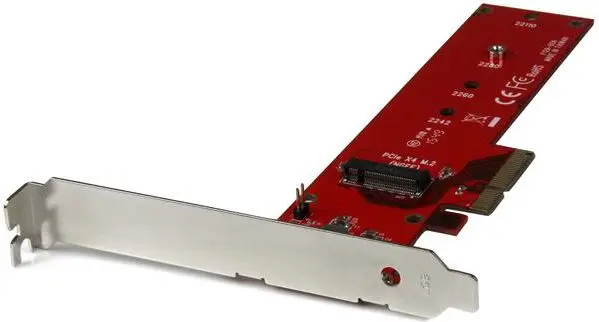
Connect a PCIe M.2 SSD (NVMe or AHCI) to a desktop computer via an x4 PCI Express slot to achieve ultra-fast data access. The StarTech.com PEX4M2E1 adapter lets you mount a 4-lane M.2 PCIe SSD (M key), such as Samsung 950 Pro or SM951, directly onto a PCIe card to expand internal storage and improve system performance. The adapter supports PCIe 3.0 and is backward compatible with PCIe 2.0 and 1.0.
Advantages
The adapter supports PCIe 3.0 x4 M.2 NVMe and PCIe-AHCI drives and accepts common M.2 sizes 2242, 2260, 2280 and 22110, enabling high-speed connections up to the maximum throughput of a 4-lane PCIe link. It includes both full-height and half-height/low-profile brackets for installation in standard and small form-factor PCs. The PEX4M2E1 is compatible with Windows and Mac systems and is backed by a two-year warranty and lifetime technical support from StarTech.com.
Suitable for
- Adding an M.2 PCIe NVMe or AHCI SSD to a desktop with an available x4 (or larger) PCIe slot
- Upgrading system boot or application storage for improved performance
- Small form-factor builds using the included low-profile bracket
- Systems with PCIe 3.0 motherboards (also works with PCIe 2.0/1.0)
Key specifications
- Manufacturer: StarTech.com, Model: PEX4M2E1
- Interface: PCI Express x4 host; M.2 (M key) PCIe/NVMe or PCIe-AHCI
- PCIe version: Compatible with PCIe 3.0, backward compatible with PCIe 2.0 and 1.0
- Supported M.2 sizes: 2242, 2260, 2280, 22110 (42, 60, 80, 110 mm)
- Form factors included: Full-height bracket and half-height/low-profile bracket
- Data rate: up to 8 Gbit/s per lane (subject to SSD and motherboard capability)
- Compatible OS: Windows and Mac (refer to manufacturer for specific OS versions)
- Warranty: 2-year limited warranty with free lifetime technical support
How to use
Turn off and unplug the computer before installation. Install the M.2 PCIe SSD onto the adapter card, securing it with the appropriate standoff for the drive length. Insert the adapter into an available x4 (or larger) PCIe slot on the motherboard and fasten the bracket to the case. Reassemble the PC, power it on, and verify the drive is recognized in the system BIOS/UEFI and the operating system. If necessary, initialize, partition and format the new drive using your OS tools.
Usage recommendations
Use the adapter with PCIe 3.0-capable motherboards and PCIe x4 M.2 NVMe SSDs to achieve optimal performance. Ensure the system BIOS/UEFI supports NVMe drives and that the chosen M.2 SSD is compatible with an M key PCIe interface. For small form-factor systems, install the included low-profile bracket before inserting the card.
Features
- Internal:
- Yes
- Host interface:
- PCIe
- Output interface:
- M.2

Stock data
| Warehouse | Stock | Delivery to the store | Store Price | |
| WH186 | 2 | Thursday | 35.49 € | Add to cart |
| WH355 | 17 | 07.12.2026 | 35.99 € | Add to cart |
| WH94 | 38 | 07.12.2026 | 41.99 € | Add to cart |
- 35.49 €Stock: 2Delivery Date: ThursdayWarehouse: WH186Add to cart
- 35.99 €Stock: 17Delivery Date: 07.12.2026Warehouse: WH355Add to cart
- 41.99 €Stock: 38Delivery Date: 07.12.2026Warehouse: WH94Add to cart
| Warehouse | Stock | Delivery to the store | Store Price | |
| EU9 | 39 | 07.12.2026 | 32.49 € | Add to cart |
| WH15 | 23 | 07.12.2026 | 33.99 € | Add to cart |
| WH109 | 38 | 21.12.2026 | 39.49 € | Add to cart |
- 32.49 €Stock: 39Delivery Date: 07.12.2026Warehouse: EU9Add to cart
- 33.99 €Stock: 23Delivery Date: 07.12.2026Warehouse: WH15Add to cart
- 39.49 €Stock: 38Delivery Date: 21.12.2026Warehouse: WH109Add to cart


