


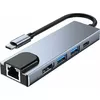
Product specification Docking station Tech-Protect V3-HUB 5-in-1 Gray — multiport USB-C hub with 5 functions
Description
Tech-Protect V3-HUB 5-in-1 Gray is a compact docking station that expands a single USB-C port into five functions. Designed for laptop and tablet users, this multiport USB-C hub provides additional connectivity for peripherals, external storage, displays and power delivery in a portable, space-saving form factor. The neutral gray finish complements professional and home workspaces while making it easy to carry when traveling.
Advantages
The docking station consolidates multiple connections into one USB-C interface, reducing cable clutter and simplifying device setup. It supports simultaneous use of connected peripherals and external drives, enabling quick access to files and accessories without swapping cables. Its compact size and plug-and-play operation make it suitable for mobile use and flexible desk arrangements.
Suitable for
- Expanding ports on laptops and tablets with a single USB-C port
- Connecting external storage devices such as SSDs and HDDs
- Attaching keyboards, mice and other USB peripherals
- Connecting external displays for presentations or extended desktop
- Travel and remote work where compact, multiport connectivity is needed
Key specifications
- Type: multiport USB-C docking station (5-in-1)
- Primary function: expand one USB-C port into multiple ports
- Connectivity options: ports for peripherals, external storage, displays and charging (exact port types depend on model)
- Form factor: compact, portable hub with fixed cable or integrated USB-C connector
- Finish: gray
How to use
Connect the Tech-Protect V3-HUB to a host device using its USB-C connector. Once connected, attach required peripherals—such as external drives, USB accessories or a display—to the hub’s corresponding ports. The hub is designed for plug-and-play operation with most modern laptops and tablets that support USB-C connectivity; some functions (for example, video output or power delivery) may require host device support for USB-C Alt Mode or Power Delivery. Safely eject external storage from the host operating system before disconnecting the hub.
Usage recommendations
For reliable performance, connect high-power devices through a powered USB port or use a separate power source if the host device cannot supply sufficient power. Avoid heavy mechanical stress on the hub connector and store the hub in a protective pouch while traveling.


