


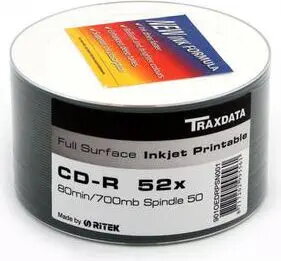
Blank CD-R Disc Traxdata 700 MB 52x 50 pcs — writable optical media
Short description

Cheapest delivery:
Unisend LV
Product information
Description
Traxdata blank CD-R discs provide a standard 700 MB / 80-minute writable format in a spindle of 50 pieces. These CD-Rs support up to 52x maximum write speed and are compatible with a wide range of CD burners, CD-ROM drives, car stereos and legacy CD players. The discs are suitable for storing data archives, creating audio CDs and distributing files in a long-lasting physical format.
Advantages
These Traxdata writable discs offer a universal 700 MB capacity and 52x write speed that balance recording time and compatibility. The 50-pack spindle reduces packaging waste and provides a convenient, cost-effective supply for repeated recording tasks. The discs conform to standard CD-R specifications, making them readable on most CD players and computer optical drives without additional formatting.
Suitable for
- Backing up documents, photos and small data archives
- Creating audio CDs for car stereos and home CD players
- Distributing software installers or drivers on physical media
- Storing project files or presentations for offline access
Key specifications
- Capacity: 700 MB (80 minutes)
- Maximum write speed: 52x
- Disc type: CD-R (recordable once)
- Pack quantity: 50 discs
- Compatibility: CD burners, CD-ROM drives, car stereos and most legacy CD players
- Form factor: 120 mm optical disc
How to use
Place a blank Traxdata CD-R into a compatible CD burner tray and use your computer's recording software to select the disc-at-once or track-at-once mode as required. Choose the desired write speed (up to 52x) — using a lower speed can improve compatibility with older players. Finalize (close) the disc after burning if you want it to be readable on standalone CD players. Label the disc surface with an appropriate non-solvent permanent marker and store discs vertically in a cool, dry place away from direct sunlight.
Usage recommendations
For reliable results, verify finished burns using your software's verification feature and avoid using abrasive markers or labels on the recorded surface. Store unused discs in the original spindle until needed and handle discs by the edges to reduce fingerprints and scratches.


