Save time and money with our discounts!

{{ totalProductsCount }}
In cart {{totalProductsCount}} item(s)
In cart {{totalProductsCount}} item(s)
Total:
{{sum | formatAmount}}
Your cart is empty
Webcams with delivery today
Get it Today
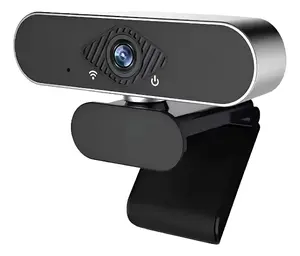
Riff
Webcam Riff RF-1080P Full HD 1080p PC with built-in microphone and multifunctional base
Delivery: Today
13.49 €
Get it Today
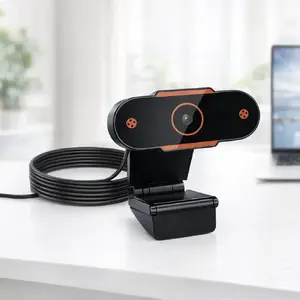
Riff
Webcam Riff Universal Full HD PC Video 480p with built-in microphone and multifunctional base
Delivery: Today
13.99 €
Web cameras are compact digital cameras designed to capture video and still images for real-time communication, recording, and streaming. They connect to computers or mobile devices via USB, USB-C, or integrated interfaces and often include built-in microphones, autofocus, and adjustable mounting options. Web cameras are used in home and office environments, education, telemedicine, content creation, video conferencing, and live streaming where direct visual communication or footage capture is needed. Users select web cameras based on image quality, frame rate, field of view, audio capabilities, and compatibility with operating systems and conferencing apps. Many models prioritize ease of setup, low-latency video transmission, and plug-and-play operation to meet routine communication and recording needs.
Types of Web cameras
Common types of web cameras vary by form factor, feature set, and intended use:
- Built-in laptop cameras — Integrated into laptop lids for basic video calls and lightweight portability.
- External USB webcams — Standalone units that connect via USB or USB-C, offering a range of resolutions and mounting options.
- Conference room cameras — Wide-angle or PTZ (pan-tilt-zoom) units designed for meeting rooms with multi-participant coverage.
- Streaming and content-creation cameras — Higher-resolution webcams or camera interfaces supporting 60 fps, software controls, and improved low-light performance.
- Specialty webcams — Models with privacy shutters, built-in ring lights, dual microphones, or hardware-based background removal for specific needs.
What are Web cameras used for?
Web cameras serve multiple practical purposes across personal and professional contexts:
- Video conferencing and remote meetings for business and education.
- Live streaming and video content creation on platforms like streaming services and social media.
- Telehealth consultations and remote patient monitoring where visual examination is required.
- Online interviews, webinars, and virtual events that require reliable visual presence.
- Recording tutorials, product demonstrations, or user-generated videos for documentation and training.
Key Differences between Web cameras
Key differences determine suitability for specific tasks and environments:
- Resolution — Common options include 720p, 1080p (Full HD), and 4K; higher resolution improves detail but may require more bandwidth and system resources.
- Frame rate — Typical 30 fps is adequate for standard calls; 60 fps or higher is useful for smoother motion in streaming or action content.
- Field of view (FOV) — Narrow FOV focuses on a single speaker; wide FOV captures groups or more background context.
- Low-light performance — Sensors and lenses with better low-light capability reduce noise and improve image quality in dim environments.
- Audio features — Built-in microphones vary in quality; external microphones or multi-mic arrays offer better clarity and noise reduction.
- Mounting and adjustability — Clip-on, tripod-ready, or PTZ mechanisms affect placement flexibility and framing control.
- Connectivity and compatibility — USB-A, USB-C, or HDMI capture devices influence setup complexity and device compatibility.
How to Choose Web cameras?
Select a web camera by matching technical specifications and practical needs:
- Identify primary use — Choose higher resolution and frame rate for streaming or content creation; basic models suffice for standard video calls.
- Consider environment — Select a camera with good low-light performance or built-in lighting for dim rooms.
- Check compatibility — Confirm drivers and OS support for Windows, macOS, Linux, or mobile platforms and required conferencing apps.
- Evaluate audio needs — If built-in microphones are insufficient, plan for an external microphone or a camera with multi-mic arrays.
- Assess mounting options — Ensure the camera can be clipped, mounted on a tripod, or installed in a conference room as needed.
- Balance budget and features — Prioritize the features most relevant to your use case, such as resolution, FOV, or low-light capability.
Which webcams with delivery today are the most popular and affordable in 2026?
The full list of popular models at affordable prices is available on this page. In 2026, the following models show high demand and an excellent price-to-quality ratio:
- Webcam Riff RF-1080P Full HD 1080p PC with built-in microphone and multifunctional base for 13.49€
- Webcam Riff Universal Full HD PC Video 480p with built-in microphone and multifunctional base for 13.99€
- Web camera STUART CAM HD WiFi Camera — 1080p resolution, night vision for 28.49€
- Trust GXT 1259 Webcam Full HD 1920x1080 2 MP Black Pole Clamp for 36.99€
- webcam Logitech Brio 100 for 37.99€
Why is it worth buying webcams with delivery today at AiO.lv?
At the AiO.lv online store, you can place an order at a great price with delivery across Latvia — to Riga, Daugavpils, Liepaja, Jurmala, Ventspils, and other cities, as well as throughout Europe. We offer products from leading manufacturers: Acer, Cisco, creative labs, Dell, HAMA, HP, KINGSTON, Lenovo, Logitech, Microsoft, NINTENDO, Philips, RAIDSONIC, SANDBERG, Sony, TARGUS, TRUST, VERBATIM, A4Tech, Asus. When you shop with us, you get:
- official warranty and guaranteed quality;
- convenient payment options (including installment and credit);
- fast and reliable delivery across Latvia and to any EU country.
FAQ
Where can you find a webcams with delivery today with cheap prices?
You can buy cheaper at the AiO.lv online store. We offer competitive prices and regular discounts, so you always have the chance to find a great deal.
What is the delivery time for webcams with delivery today?
If you place your order today, delivery will take between 1 and 5 business days depending on the chosen method.
How long is the warranty period for webcams with delivery today?
Our store provides an official manufacturer’s warranty ranging from 12 to 36 months, depending on the model and brand. If needed, you can always contact our customer service department or the manufacturer’s authorized service center for support.
Are webcams with delivery today purchasable with leasing?
Yes, if the selected product costs more than €50. You can learn more about installment purchase options and the terms of application on the Payment page.
Can webcams with delivery today be purchased for a company (with VAT)?
Yes. AiO.lv works with legal entities in Latvia and throughout Europe. All product prices are shown with VAT included. In certain cases, a 0% VAT rate may apply — for example, when purchasing from other EU countries with a valid VAT number. We issue an invoice immediately after the order is placed, support BIS electronic invoices, and automatically generate all required accounting documents. To complete a purchase for a company, simply select the company profile during checkout.


