
Save time and money with our discounts!
In cart {{totalProductsCount}} item(s)
Your cart is empty
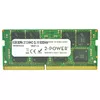
2-Power 16GB DDR4 2133MHZ CL15 SoDIMM Memory 1x8GB
The 2-Power 16GB DDR4 2133MHz CL15 SoDIMM Memory upgrades laptop performance by increasing available RAM. This module is supplied as a single 8GB SoDIMM stick (1x8GB) operating at 2133 MHz with CAS latency CL15. It is intended to improve responsiveness, enable smoother multitasking and faster application loading without replacing the entire machine. 2-Power guarantees compatibility and backs the memory with a lifetime warranty.
Provides a straightforward way to expand laptop memory capacity with a DDR4 SoDIMM module that balances speed and latency. The 2133 MHz clock and CL15 timing deliver reliable performance for everyday multitasking and heavier workloads. As a single 8GB module, it allows flexible upgrade paths (e.g., adding a second module for dual-channel operation). The product includes a manufacturer lifetime warranty and compatibility assurance from 2-Power.
Power off the laptop and disconnect all power sources, including the battery if removable. Open the access panel according to the device manufacturer’s instructions, locate the SoDIMM slot(s) and gently insert the module at a 30-degree angle until the gold contacts are fully seated, then press down until the side latches click into place. Replace the access panel, reconnect power and boot the system; check BIOS or operating system memory settings to confirm the new module is recognized and running at the expected speed.
For best results, install memory modules in matched pairs to enable dual-channel operation when supported by the laptop. Verify the laptop’s maximum supported memory and compatible speeds in the manufacturer specifications before installation. If uncertain about compatibility, consult 2-Power compatibility information or the device manual.
{{highlightedFeature.featureTitle}}:
{{getProductFeatureValueById(product, highlightedFeature.featureId)}}
{{ productComparisonGenerationError }}