Dreame vacuums for fast and efficient cleaning!
In cart {{totalProductsCount}} item(s)
Your cart is empty
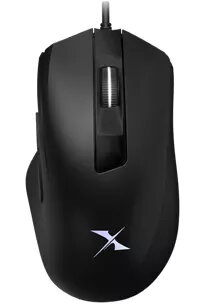
Mouse BLOODY X5 Max USB Type-A Ambidextrous
The BLOODY X5 Max USB Type-A Ambidextrous is a wired gaming mouse designed for both left- and right-handed users. It offers a maximum movement resolution of 10000 DPI, four physical buttons plus a scroll wheel, multi-colour RGB illumination and a black exterior. Built with adjustable on-board performance switches, the X5 Max provides precision control over sensitivity, lift-off distance and report rate to adapt to different play styles and setups.
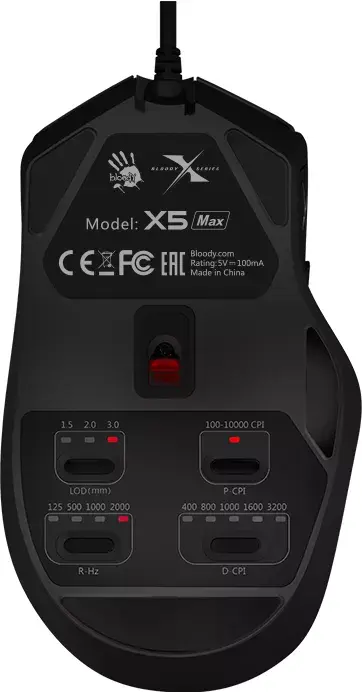
The mouse integrates four on-board adjustable performance switches for P-CPI, D-CPI, LOD (Lift Off Distance) and report rate, allowing immediate tuning without software. A dedicated customizable CPI button enables quick cycling and fine adjustment of CPI using the scroll wheel, with a one‑step reset to a default CPI. Three manual LOD levels and four report rate options enable matching sensor response to your surface and reflex preferences. Texturized rubber side grips and an AFC-style button structure improve hold and consistent click feedback for palm, claw or fingertip grips. RGB lighting with multiple effects adds visibility and aesthetic customization while maintaining a functional, wired USB Type-A connection.
Connect the mouse to a computer via the USB Type-A cable. Use the P-CPI button to cycle through preset CPI levels; press and hold the P-CPI button for three seconds to enter CPI tuning mode, then scroll the wheel upward to increase CPI or downward to decrease CPI. Press P-CPI again to confirm the selected CPI; to reset CPI to 1000, press left, middle and right buttons simultaneously for five seconds. Press the LOD button to cycle between the three lift-off distance settings (1.5 mm, 2.0 mm, 3.0 mm). Use the report rate switch to select the preferred polling rate among 125, 500, 1000 and 2000 Hz. Change RGB lighting effects by pressing the fourth and fifth buttons together and scrolling the wheel to select and save the desired effect.
For best tracking, use the mouse on a low-friction gaming surface and test CPI settings at your typical desktop and in-game sensitivity to find a comfortable balance between speed and precision. Start with the default CPI and adjust in small increments; pair the chosen CPI with an appropriate report rate (higher rates for fast-paced competitive play). Select the LOD that prevents unwanted cursor movement when lifting the mouse but still allows deliberate repositioning. Clean the mouse feet and sensor area periodically to maintain consistent tracking performance.
{{highlightedFeature.featureTitle}}:
{{getProductFeatureValueById(product, highlightedFeature.featureId)}}