Save time and money with our discounts!
In cart {{totalProductsCount}} item(s)
Your cart is empty
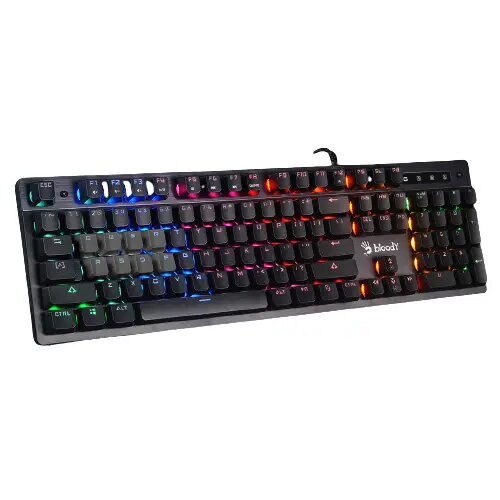
Wired Gaming Keyboard A4Tech BLOODY B500N Full-size USB QWERTY US English LED Backlight Black
The A4Tech BLOODY B500N is a wired full-size (100%) gaming keyboard with a US English QWERTY layout and a USB interface. It combines a standard numeric keypad and a centered LED backlight system across all keys. The keyboard uses A4Tech’s patented Mecha‑Like Switch design to reproduce a tactile, clicky feel similar to mechanical switches while employing a cushioned rubber dome. Built for wired reliability, the BLOODY B500N offers fast key response, customizable lighting and practical features for everyday typing and gaming sessions.
The Mecha‑Like Switch provides a tactile and audible feedback that closely resembles mechanical key action while retaining a softer dome cushion. A 7‑color, 5‑zone neon backlight with adjustable brightness and effect settings allows visual customization. The keyboard supports 1000 Hz report rate and 1 ms key response for minimal input lag. Electronically sealed circuits and drainage paths improve resistance to spills, and anti‑slippery lifts plus a screw‑reinforced spacebar enhance physical durability and stability. Game mode disables the Windows key to prevent interruptions during play.
Connect the keyboard to a computer USB port using the attached 1.8 m cable; the device is plug‑and‑play for basic operation. Use the FN key combinations to change lighting modes (FN + F12), adjust brightness (FN + Up/Down), and change lighting speed (FN + = / -). Enable Game Mode by pressing FN + F8 to disable Windows keys during gameplay. For advanced customization, install the Bloody KeyDominator software from the manufacturer’s website to assign macros and program key functions.
For stable performance, connect the keyboard directly to a rear-panel USB port or a powered USB hub. Keep the drainage paths clear and avoid prolonged exposure to liquids; if a spill occurs, disconnect immediately and allow the unit to dry. Use the KeyDominator software for macro creation and profile management, and adjust polling rate or in-game input settings if needed to match game requirements.
{{highlightedFeature.featureTitle}}:
{{getProductFeatureValueById(product, highlightedFeature.featureId)}}
{{ productComparisonGenerationError }}