
Filters you can trust. Pure water every day.
In cart {{totalProductsCount}} item(s)
Your cart is empty
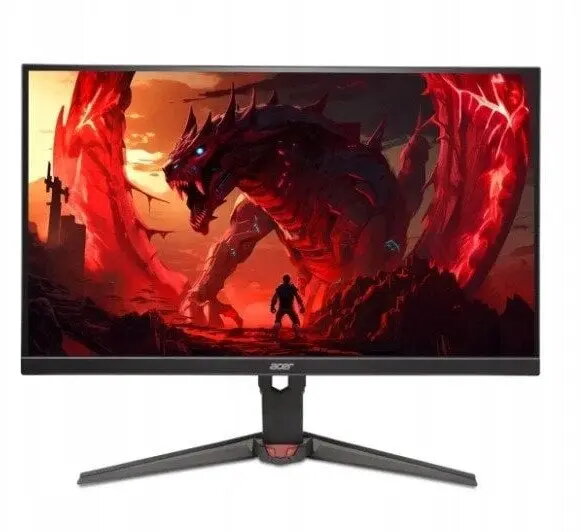
Monitor Acer XV240YP6BIPR 23.8" IPS Full HD 144Hz
The Acer XV240YP6BIPR 23.8" IPS Full HD 144Hz is a slim, performance-oriented monitor designed to deliver clear visuals and responsive motion for gaming and multimedia. Its 23.8-inch IPS panel provides Full HD (1920×1080) resolution with wide viewing angles and accurate color reproduction. A 144Hz refresh rate reduces motion blur and improves the smoothness of fast-moving content, while the panel's IPS technology preserves color fidelity at different viewing positions. The monitor's minimalist design and compact footprint suit desktop setups where space and visual clarity matter.
The IPS panel ensures consistent color and wide viewing angles, supporting accurate image reproduction for games, video and everyday tasks. The 144Hz refresh rate offers smoother motion rendering compared with standard 60Hz displays, reducing perceived input lag and motion artifacts in fast scenes. The Full HD resolution balances image sharpness and system performance, making this monitor suitable for systems without high-end graphics cards. The physical design accommodates modern workspaces and gaming stations without drawing unnecessary attention.
Connect the monitor to your computer using the supported video input (DisplayPort or HDMI as available on your system) and set the output resolution to 1920×1080 in your operating system display settings. To enable the full 144Hz refresh rate, open your graphics driver control panel or OS display settings and select 144Hz as the display refresh frequency. Adjust brightness, contrast and color settings on-screen to match your ambient lighting and viewing preferences. Position the monitor at eye level and maintain an appropriate viewing distance to reduce eye strain during extended use.
For best results in games, pair the monitor with a graphics card capable of producing high frame rates at Full HD. Use DisplayPort for the most reliable high-refresh-rate connection when available, and enable any adaptive sync features supported by your GPU to reduce tearing. Regularly update display drivers and firmware where applicable, and calibrate color settings if precise color accuracy is required for content creation.
{{highlightedFeature.featureTitle}}:
{{getProductFeatureValueById(product, highlightedFeature.featureId)}}
{{ productComparisonGenerationError }}
