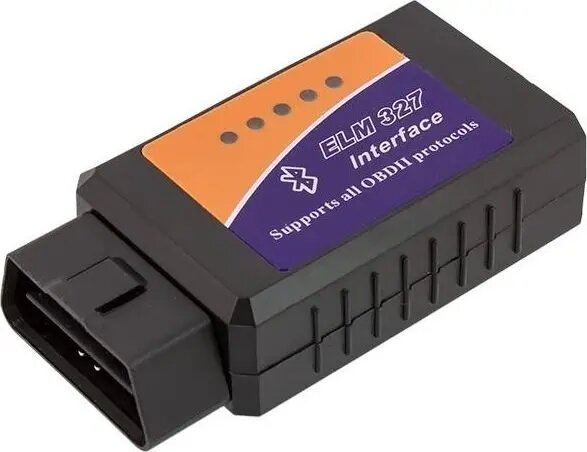
The Apte 654-uniw is a universal OBD2 Bluetooth diagnostic interface designed to provide vehicle owners with an accessible way to monitor their car's health. By utilizing the reliable ELM327 chipset, this device establishes a wireless connection between your vehicle's onboard diagnostic port and your Android smartphone or PC. It serves as a practical tool for retrieving diagnostic trouble codes, monitoring real-time engine performance, and accessing basic vehicle data without the need for expensive professional equipment.
Advantages
This diagnostic interface offers significant convenience through its wireless Bluetooth connectivity, eliminating the need for cumbersome cables during vehicle inspections. It is highly compatible with a wide range of third-party diagnostic software, allowing users to choose the interface that best suits their needs. The device is compact and easy to store, making it a perfect addition to any glove box for quick troubleshooting on the go. Its ability to read and clear engine fault codes helps users understand potential issues before visiting a mechanic, potentially saving time and maintenance costs.
Suitable for
- Reading and clearing engine diagnostic trouble codes
- Monitoring live sensor data such as RPM, coolant temperature, and fuel pressure
- Performing routine vehicle health checks
- DIY automotive troubleshooting and maintenance
This device may not be suitable for professional workshop environments requiring deep access to proprietary manufacturer-specific modules like ABS, SRS, or transmission systems. It is also not compatible with vehicles manufactured before the OBD2 standard was implemented, nor does it support non-standard diagnostic protocols used by some specific car brands.
Key specifications
- Connectivity: Bluetooth
- Chipset: ELM327
- Compatibility: Android and Windows PC
- Interface: Standard 16-pin OBD2 connector
- Functionality: Read/clear fault codes and live data streaming
To use the Apte 654-uniw, simply plug the device into the OBD2 port located under your vehicle's dashboard. Once connected, enable Bluetooth on your smartphone or computer and pair it with the interface. Open your preferred OBD2 diagnostic application, select the Bluetooth device in the app settings, and wait for the connection to establish. Once linked, you can begin scanning for codes or viewing live engine parameters directly on your screen.
What to consider before purchase
- Verify that your vehicle is OBD2 compliant
- Ensure your smartphone or PC supports Bluetooth connectivity
- Check if your preferred diagnostic app is compatible with ELM327 devices
- Confirm the location of the OBD2 port in your specific vehicle model
Always ensure the vehicle ignition is in the correct position as required by your diagnostic software before attempting to read data. Do not leave the device plugged in for extended periods when the vehicle is not in use to prevent potential battery drain.