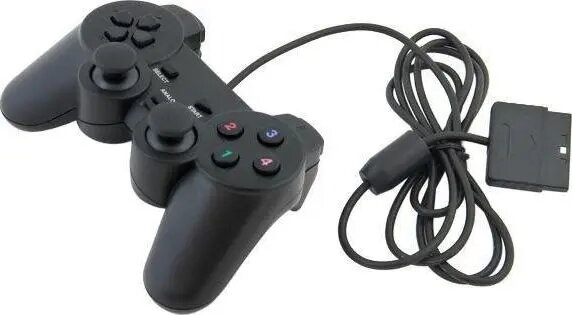
The Aptel AK117A Dual Shock game controller is a reliable wired peripheral specifically engineered for the Sony PlayStation 2 console. It offers a classic gaming experience with a familiar button layout, ensuring seamless compatibility with the extensive library of PS2 titles. The controller is built to provide consistent performance, featuring responsive buttons and precise analog sticks that allow for accurate movement and control during gameplay.
Advantages
This controller stands out due to its ergonomic design, which fits comfortably in the hands during extended gaming sessions, reducing fatigue. The integrated vibration feedback system adds a layer of immersion by reacting to in-game events, providing tactile sensations that bring the action to life. With its wired connection, users benefit from a stable and lag-free gaming experience, eliminating the need for batteries or charging.
Suitable for
- Playing classic Sony PlayStation 2 games
- Action, adventure, and sports gaming genres
- Replacement for original or worn-out controllers
- Local multiplayer gaming sessions
When it may not be suitable
This controller is designed exclusively for the Sony PlayStation 2 console and is not compatible with modern gaming platforms, PCs, or other console generations without the use of specialized third-party adapters. It is a wired device, so it may not be ideal for users who prefer the freedom of wireless connectivity.
Key specifications
- Wired connection for stable performance
- Dual analog sticks for precise control
- Integrated vibration feedback functionality
- Ergonomic design for comfortable grip
- Standard PlayStation button layout
How to use
To use the Aptel AK117A, simply insert the controller connector into the designated controller port on the front of your Sony PlayStation 2 console. Once securely connected, the console will automatically recognize the device upon startup. You can then navigate the console menu and launch your games using the directional pad or analog sticks. The vibration feature will activate automatically in games that support force feedback.
What to consider before purchase
- Ensure your console has a functional controller port
- Verify that your preferred games support analog and vibration features
- Consider the length of the cable to ensure it reaches your seating position
Usage recommendations
To maintain the longevity of your controller, avoid pulling on the cable and store it in a cool, dry place when not in use. Clean the surface periodically with a soft, dry cloth to remove dust and debris.