Dreame vacuums for fast and efficient cleaning!
In cart {{totalProductsCount}} item(s)
Your cart is empty
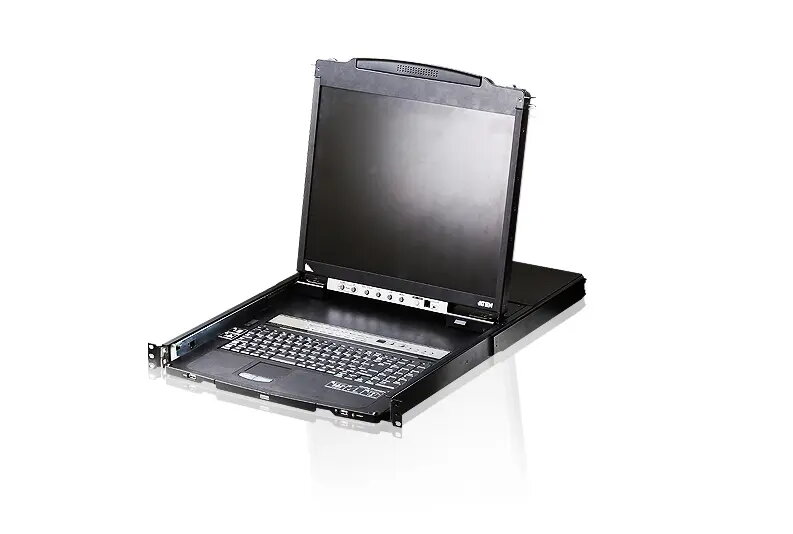
Rack console ATEN CL5808N 48.3 cm (19") LCD, USB mouse, French AZERTY keyboard, 1U
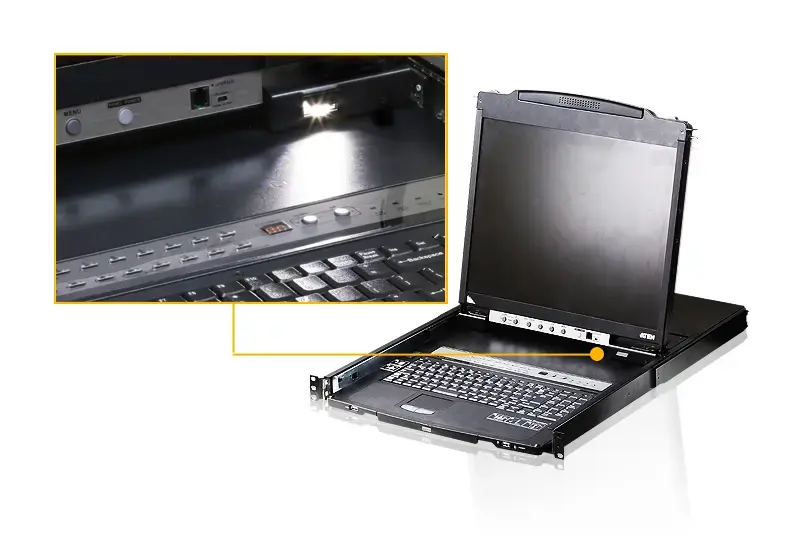
ATEN CL5808N is a 1U rack console with a 48.3 cm (19") LCD display and an integrated French AZERTY keyboard, designed for convenient local management of servers and network equipment in standard 19" racks. The unit provides a USB mouse port and supports both PS/2 and USB connections for attached computers. With a slim slideaway design, the keyboard/touchpad and display modules move independently to save rack space while maintaining quick access to system control. Typical power consumption is 25 W with an input current of 1 A, and the physical dimensions are 680.4 mm (W) × 44 mm (H) × 480 mm (D).
The CL5808N offers space-efficient design by allowing the keyboard/touchpad module to retract and the 19" LED-backlit display to rotate back toward the rack, minimizing intrusion into aisle space. It supports operation with PS/2 and USB keyboards and mice and provides a rear external console port for optional external access. The console supports daisy-chaining of additional compatible KVM switches so a single console can control multiple systems, while on-screen display (OSD) and front-module port selection buttons enable straightforward local switching and monitoring.
Mount the CL5808N into a standard 19" rack occupying 1U of rack space and connect the console to target servers using the appropriate KVM cabling for PS/2 or USB ports. Use the integrated AZERTY keyboard and USB mouse port for local control; the keyboard/touchpad module can be slid out for use and retracted when not needed, and the display can be rotated back to sit flush with the rack. Switch between connected computers with the station and port selection pushbuttons on the keyboard module or use the Port Up/Port Down buttons on the monitor module when the keyboard is retracted. For larger installations, daisy-chain additional compatible KVM switches to expand the number of controllable systems.
Install the console in a ventilated rack location and ensure cable routing does not obstruct the slide and rotation movement. Verify that connected servers support the chosen keyboard/mouse interface (PS/2 or USB) and keep firmware updated for interoperability with daisy-chained KVM units.
{{highlightedFeature.featureTitle}}:
{{getProductFeatureValueById(product, highlightedFeature.featureId)}}
{{ productComparisonGenerationError }}