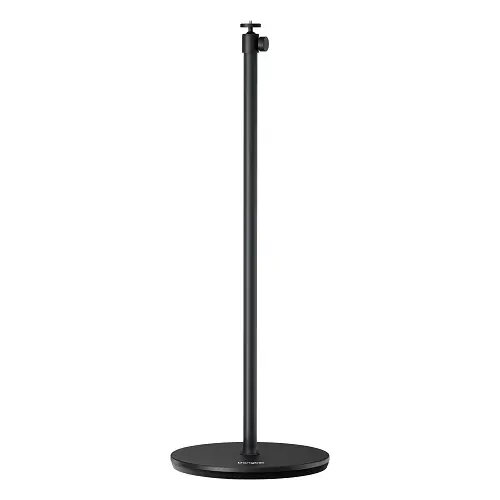
The Betench Limited Projector Floor Stand for Dangbei is a premium mounting solution engineered to provide exceptional stability and flexibility for your home cinema setup. Designed specifically to accommodate Dangbei projectors, this stand ensures that your device remains securely positioned, allowing you to achieve the perfect viewing angle in any room. Its robust construction and thoughtful design make it an essential accessory for users looking to enhance their projection experience with a reliable and adjustable base.
Advantages
This floor stand offers significant versatility through its three-section design, which allows for precise height adjustments to suit various room layouts. The inclusion of a 360-degree horizontal rotation and a 90-degree tilt adjustment provides complete control over the projection direction, enabling you to project images from the floor to the ceiling with ease. The weighted base, equipped with anti-slip pads, ensures maximum stability while protecting your flooring from scratches. Furthermore, the integrated cable management system keeps your entertainment area organized by concealing unsightly wires, while the durable metal and aluminum alloy construction minimizes vibrations for a steady, high-quality image.
Suitable for
- Home cinema setups for living rooms or bedrooms
- Temporary projection installations in meeting rooms
- Achieving specific projection heights for wall or ceiling displays
- Users requiring a stable, vibration-free base for Dangbei projectors
When it may not be suitable
This stand is not compatible with the Dangbei DBOX02 Pro model. Additionally, it may not be suitable for environments with extremely limited floor space, as the 325 mm base requires a flat and stable surface to ensure safety and prevent tipping.
Key specifications
- Maximum load capacity: 7 kg
- Horizontal rotation: 360°
- Tilt adjustment: 90°
- Mounting interface: Standard 1/4" screw thread
- Height options: 205 mm, 505 mm, or 1005 mm
- Base diameter: 325 mm
- Material: Metal, aluminum alloy, and plastic
- Total weight: 6 kg
How to use
To assemble the stand, connect the desired combination of metal rods to the weighted base, ensuring each section is securely tightened. Attach the ball head to the top of the rod assembly. Mount your projector onto the 1/4" screw thread, ensuring it is firmly fastened. Use the cable routing holes in the rods to guide your power and signal cables for a clean look. Once assembled, adjust the height and angle using the integrated tilt and rotation mechanisms to align the projection with your screen or wall.
What to consider before purchase
- Verify your projector model compatibility, specifically noting it does not fit the DBOX02 Pro.
- Ensure you have enough floor space for the 325 mm diameter base.
- Check that your projector features a standard 1/4" mounting thread.
- Confirm that the total weight of your projector does not exceed the 7 kg limit.
Usage recommendations
For the best stability, always place the stand on a flat, level surface. When adjusting the tilt or rotation, support the projector with one hand to prevent sudden movements. Regularly check that all screw connections remain tight to maintain optimal performance and safety.