
Leave your address - as soon as the price of the product goes down, you'll know about it right away
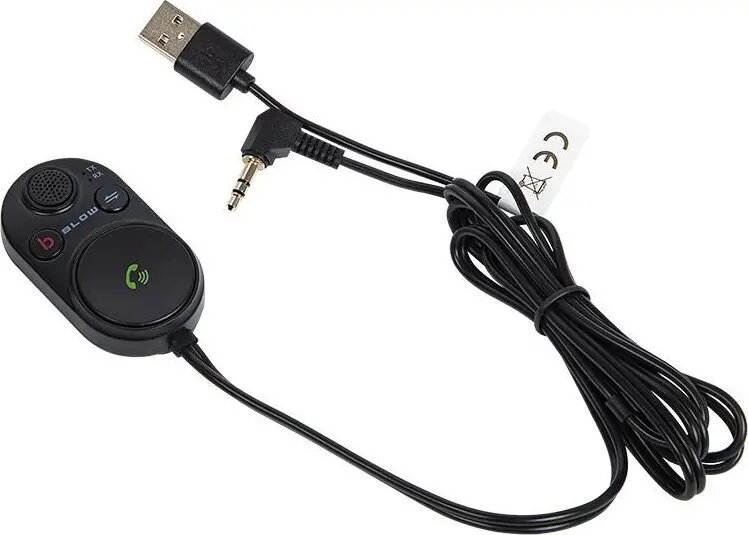
FM transmitter BLOW 22063 with Bluetooth, 3.5mm jack and USB for car audio
In cart {{totalProductsCount}} item(s)
Your cart is empty
FM transmitter BLOW 22063 with Bluetooth, 3.5mm jack and USB for car audio
Leave your address - as soon as the price of the product goes down, you'll know about it right away
FM transmitter BLOW 22063 with Bluetooth, 3.5mm jack and USB for car audio
The BLOW 22063 FM transmitter provides a practical way to play audio from smartphones, tablets or MP3 players through a car radio. It connects to a vehicle’s audio system by broadcasting audio on an FM frequency and supports wireless streaming via Bluetooth and wired connection via a 3.5 mm jack. The unit also accepts USB power, allowing charging of a mobile device while using the transmitter. This solution is intended for cars that lack a built-in Bluetooth audio interface or an auxiliary input.
The transmitter combines Bluetooth streaming, a 3.5 mm wired input and USB power in a compact device designed for in-car use. Bluetooth pairing enables hands-free audio playback from mobile devices without running additional cables across the cabin. The 3.5 mm jack provides a direct wired option for older players or devices with limited Bluetooth support. USB power ensures the connected device can be charged while streaming, maintaining battery level during longer trips.
Plug the FM transmitter into the vehicle’s power outlet or USB port as applicable, connect your phone or player via Bluetooth pairing or a 3.5 mm cable, tune the car radio to an unused FM frequency and set the transmitter to the same frequency. Start playback on the connected device and adjust volume on both the device and the car radio for optimal sound. If needed, connect the USB cable to charge the device while streaming. Follow the device’s basic pairing instructions and ensure the chosen FM frequency has minimal local interference for best audio quality.
Choose a clear FM frequency with low local radio interference and secure the transmitter in a stable position to avoid cable strain. For the most reliable connection, pair devices before driving and use the wired 3.5 mm input when Bluetooth latency or compatibility is a concern. Use USB power to maintain device battery level during extended trips.
{{highlightedFeature.featureTitle}}:
{{getProductFeatureValueById(product, highlightedFeature.featureId)}}