Save time and money with our discounts!
In cart {{totalProductsCount}} item(s)
Your cart is empty
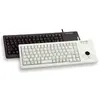
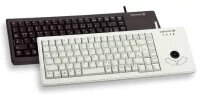
Cherry G84-5400 Compact Keyboard with Trackball, USB, Black
The Cherry G84-5400 is a professional-grade compact keyboard designed for environments where space is at a premium. Featuring an integrated optical trackball with two dedicated mouse buttons, this device allows for precise cursor control without the need for an external mouse. Its low-profile design and robust construction make it a reliable input solution for industrial, commercial, and professional workstation applications.
This keyboard utilizes high-quality Cherry ML technology with Gold Crosspoint contacts, ensuring a tactile and precise keystroke feel that remains consistent over time. The device is engineered for durability, supporting over 20 million actuations per key, which makes it suitable for continuous, heavy-duty usage. Its compact footprint and low build height allow for seamless integration into 19-inch rack systems and restricted workspaces. Furthermore, the keyboard is lightweight and offers plug-and-play functionality, requiring no specialized software for basic operation, while also supporting advanced features like Code Set 3 and UnifiedPOS for specialized industrial setups.
This keyboard may not be suitable for users who prefer full-sized mechanical keyboards with long key travel, as the Cherry ML switches offer a flatter, more compact typing experience. Additionally, it is not designed for high-performance gaming or ergonomic setups that require a split-keyboard layout or wrist support.
To use the Cherry G84-5400, simply connect the USB cable to an available port on your computer or terminal. The operating system will automatically detect the device using standard drivers. Use the optical trackball located on the right side of the keyboard to navigate the cursor, and utilize the two buttons below the trackball for left and right-click functions. You may adjust the tilt of the keyboard by attaching or detaching the provided pluggable feet to suit your ergonomic preference.
For optimal performance in industrial environments, ensure the trackball sensor is kept clean from dust and debris. If you require specialized key functions, utilize the programmable key features to map shortcuts that improve your workflow efficiency.
{{highlightedFeature.featureTitle}}:
{{getProductFeatureValueById(product, highlightedFeature.featureId)}}
{{ productComparisonGenerationError }}