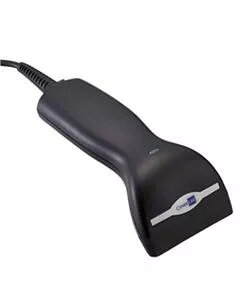
Handheld CCD scanner CIPHERLAB 1000 RS232 is a compact barcode reader designed for reliable 1D barcode capture and easy integration with legacy systems via RS232, USB-HID or USB-VCOM. The scanner is lightweight with an ergonomic shape and a comfortable grip; its cable is routed through the upper half of the housing to reduce stress and extend cable life. The unit includes a programmable decoder with flexible data-editing capabilities, adjustable buzzer volume and tone, LED read indicators, and support for multiple programming modes to tailor output format for specific applications.
Advantages
The CCD-1000 offers high build quality at a low cost, a durable ABS housing and a PVC rubber bezel that protects the glass covering the CCD array. Its fixed, sturdy construction and centrally positioned trigger enable comfortable scanning. Programmable features include configurable code ID, prefix/postfix, data length and placement across up to six data fields, adjustable scan mode and support for negative-code reading and redundancy. The device meets common international certifications and operates across a wide temperature and humidity range.
Suitable for
- Retail point-of-sale barcode scanning
- Inventory and stock-taking in warehouses
- Logistics and data-entry systems that use RS232, USB-HID or USB-VCOM
Key specifications
- Optical system: CCD 2048 pixels
- Reading depth: 0 mm to 10 mm
- Maximum code width: 67 mm
- Reading speed: 100 scans/sec
- Resolution: 3 mil
- Maximum skew angle: 40°; maximum pitch angle: 70°
- Light source: visible red LED, 660 nm
- Minimum PCS: > 0.45
- Interfaces: RS232, Keyboard wedge, USB-HID, USB-VCOM
- Supported 1D symbologies: Code 39, Code 128, EAN-13/UPC-A (with ADDON options), EAN-8, Interleaved 2 of 5, Industrial 2 of 5, Matrix 2 of 5, Codabar, MSI, Plessey, UPCE, Italy/France Pharma Codes, etc.
- Power: +5V ±10%
- Weight: 250 g
- Housing material: ABS plastic with PVC rubber bezel
- Drop resistance: 1 m onto concrete
- Operating temperature: 0 °C to 50 °C
- Operating humidity: 20% to 90% non-condensing
- Storage temperature: -20 °C to 60 °C
- Storage humidity: 10% to 95% non-condensing
- Certifications: FCC Class A, C-Tick, CE, RoHS
How to use
Connect the scanner to your host using the required interface (RS232, USB-HID or USB-VCOM) and install any necessary drivers or configure the terminal type. Use the programming manual to select the desired symbologies, set the data-editing format and arrange data into the available fields. Adjust buzzer volume and tone, LED indicators and scan mode as needed. Position the scanner so the scan window faces the barcode and press the centrally located trigger to read; the LED and buzzer will indicate a successful read.
Usage recommendations
To ensure long-term reliability, route the cable through the scanner’s upper housing as supplied, avoid excessive bending near the connector, keep the PVC bezel and glass clean from dust and liquids, and program only the necessary symbologies to reduce processing overhead. Use within the specified temperature and humidity ranges and avoid drops beyond the rated 1 m to maintain performance.