JBL speakers and headphones for pure and deep sound!
In cart {{totalProductsCount}} item(s)
Your cart is empty
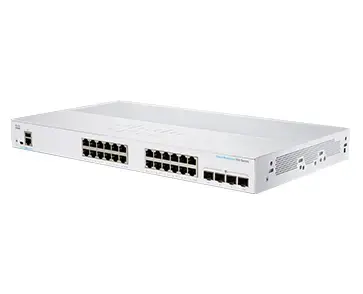
Cisco CBS350-24T-4X Managed L2/L3 Switch with 24 Gigabit Ethernet Ports and 4 10G SFP+ Uplinks
The Cisco CBS350-24T-4X is a high-performance managed L2/L3 switch designed to provide reliable and scalable network connectivity for professional business environments. Featuring 24 Gigabit Ethernet ports and 4 high-speed 10G SFP+ uplink ports, this device ensures efficient data transfer and robust performance for demanding network applications. It supports advanced networking standards and includes a 16,000 MAC address table, making it a versatile solution for modern office infrastructures that require secure and intelligent traffic management.
This switch offers a comprehensive set of management features that allow for precise control over network traffic, including advanced Quality of Service (QoS) and static Layer 3 routing capabilities. By offloading internal traffic-handling tasks from the router, the switch improves overall network efficiency and application performance. The inclusion of 10G SFP+ uplinks provides the necessary bandwidth for high-speed data requirements, while the intuitive web-based management interface simplifies configuration and monitoring. Furthermore, the device is built with a focus on security, supporting extensive Access Control Lists to protect critical business transactions and data.
This switch may not be the ideal choice for environments requiring Power over Ethernet (PoE) capabilities, as this specific model does not provide power to connected devices. Additionally, for extremely large enterprise data centers that require high-density modular switching or specialized industrial-grade hardware, other Cisco product lines may be more appropriate.
To begin using the Cisco CBS350-24T-4X, mount the device in a standard 19-inch rack using the included hardware. Connect your network devices to the Gigabit Ethernet ports using standard Ethernet cables and utilize the SFP+ ports for high-speed uplinks to your core network or servers. Once powered on, access the switch's management interface via a web browser to configure VLANs, security settings, and QoS parameters. The intuitive dashboard allows for straightforward setup of network services, ensuring that your infrastructure is optimized for your specific business needs.
For optimal performance, ensure that the switch is installed in a well-ventilated area to maintain proper operating temperatures. Regularly update the firmware through the management interface to benefit from the latest security patches and feature enhancements.
{{highlightedFeature.featureTitle}}:
{{getProductFeatureValueById(product, highlightedFeature.featureId)}}
{{ productComparisonGenerationError }}