Dreame vacuums for fast and efficient cleaning!
In cart {{totalProductsCount}} item(s)
Your cart is empty
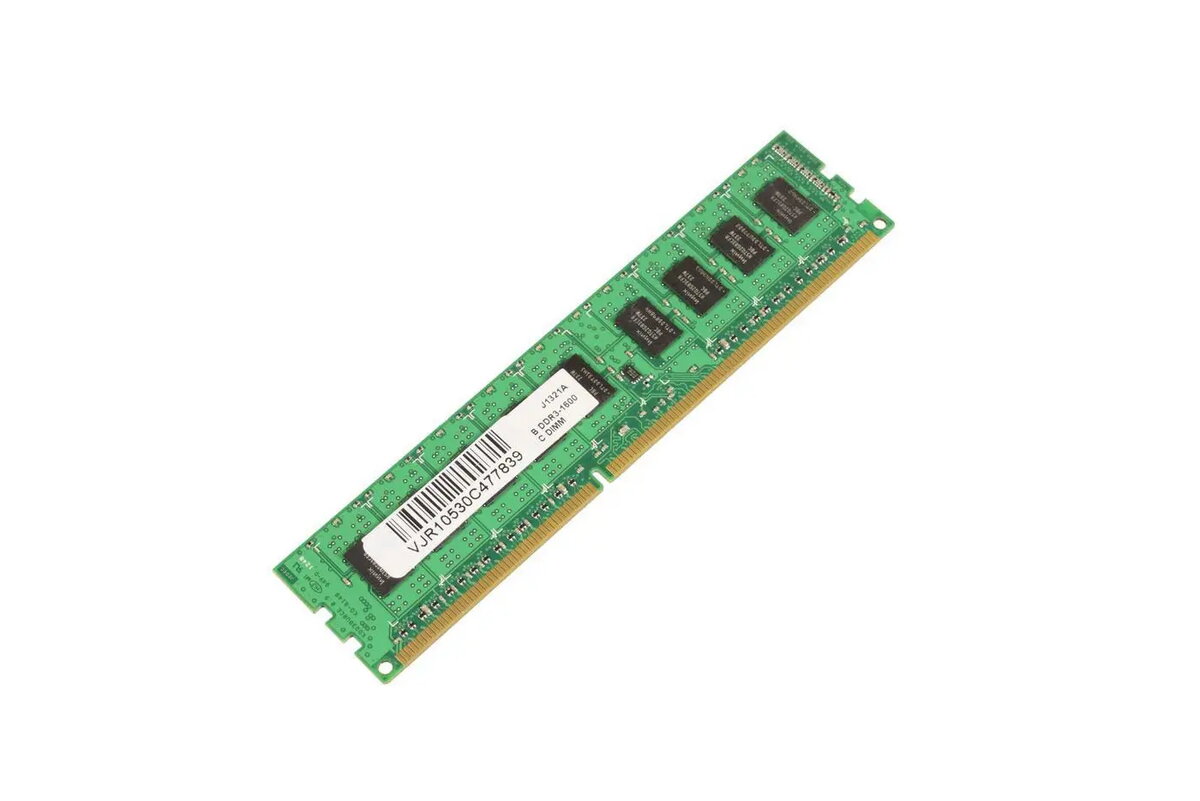
CoreParts MMH9716/4GB 4GB DDR3 1600MHz ECC Memory Module
The CoreParts 4GB DDR3 1600MHz ECC memory module is a high-quality component engineered to enhance the performance and stability of PC and server systems. Designed to meet rigorous standards, this module utilizes original chipsets to ensure seamless compatibility and reliable operation in demanding computing environments. By providing 4GB of memory, it serves as an effective upgrade for workstations that require consistent data integrity and efficient multitasking capabilities.
This memory module offers significant benefits for professional computing setups, primarily through its ECC (Error Correction Code) functionality, which detects and corrects common data corruption issues to maintain system uptime. The use of high-end, certified components ensures that the module matches the performance characteristics of original hardware, providing a stable and dependable solution for long-term use. Its compatibility with various server and PC architectures makes it a versatile choice for system administrators and power users looking to optimize their hardware infrastructure.
This module is not compatible with systems that require non-ECC memory or newer memory standards such as DDR4 or DDR5. It is specifically designed for hardware supporting DDR3 technology and ECC error correction, so it will not function in standard consumer laptops or motherboards that lack ECC support.
To install the memory module, ensure the system is powered off and disconnected from the power source. Open the computer or server chassis and locate the available DIMM slots on the motherboard. Align the notch on the memory module with the key in the slot and press down firmly until the side clips snap into place. Once installed, close the chassis, reconnect the power, and boot the system. The BIOS or operating system should automatically detect the new memory capacity.
For optimal performance, it is recommended to install memory modules in matching pairs or sets to take advantage of dual-channel architecture if supported by your motherboard. Always handle the module by its edges to avoid electrostatic discharge damage to the components.
{{highlightedFeature.featureTitle}}:
{{getProductFeatureValueById(product, highlightedFeature.featureId)}}
{{ productComparisonGenerationError }}