
Leave your address - as soon as the price of the product goes down, you'll know about it right away
Cryorig cooling screws set M9 (CR-S04) – mounting hardware for CPU coolers
In cart {{totalProductsCount}} item(s)
Your cart is empty
Cryorig cooling screws set M9 (CR-S04) – mounting hardware for CPU coolers
Leave your address - as soon as the price of the product goes down, you'll know about it right away
Cryorig cooling screws set M9 (CR-S04) – mounting hardware for CPU coolers
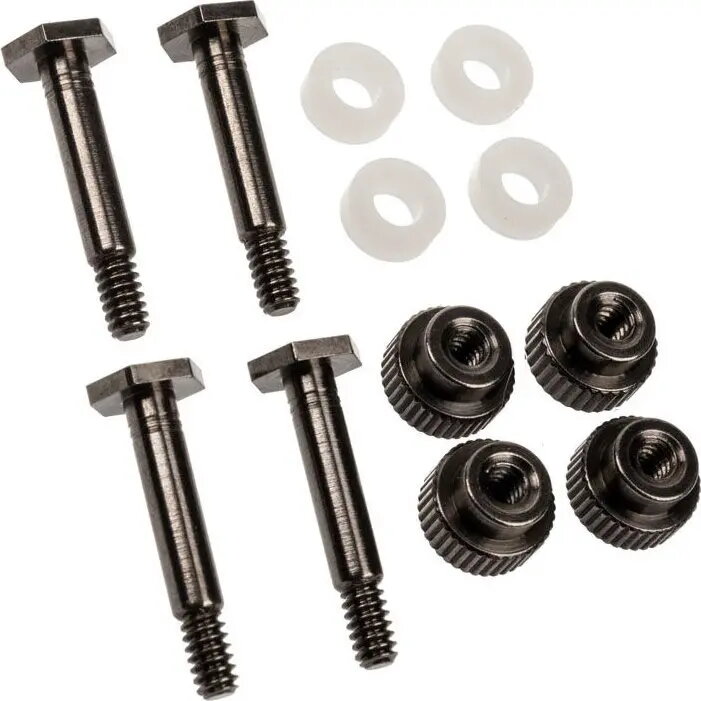
Cryorig cooling screws set M9 (CR-S04) provides replacement mounting hardware for Cryorig CPU coolers. The set includes screws and fasteners designed for secure attachment of cooler assemblies to compatible motherboards and heatsinks, intended for repair, maintenance or upgrade of cooling systems where original fasteners are missing or worn. The components are engineered to match the mounting points and mechanical requirements of compatible Cryorig cooler models, ensuring stable contact between cooler base and CPU surface when installed correctly.
The replacement screws and fasteners are produced to tolerances appropriate for CPU cooler mounting, which helps maintain consistent pressure and alignment of the heatsink. Using a matching hardware set reduces the risk of improper mounting that can cause thermal performance loss or mechanical strain on the motherboard. The set is suitable for restoring full mounting functionality without replacing the entire cooler, making repairs or upgrades more economical and straightforward.
Identify the compatible mounting pattern on your Cryorig cooler and motherboard, remove any existing damaged hardware, and position the cooler over the CPU following manufacturer guidance for thermal paste application and alignment. Install the replacement screws and fasteners in the original mounting locations, applying even, alternating torque to achieve uniform pressure across the cooler base. Do not overtighten; follow the cooler manufacturer's torque recommendations when available. After mounting, verify that the cooler is seated evenly and that there is firm but not excessive contact with the CPU surface.
Use this hardware set only with compatible Cryorig coolers and motherboards. Replace worn or stripped fasteners promptly to maintain thermal contact and prevent movement. When performing mounting or maintenance, follow anti-static precautions and consult the cooler manual for model-specific instructions.
{{highlightedFeature.featureTitle}}:
{{getProductFeatureValueById(product, highlightedFeature.featureId)}}