Filters you can trust. Pure water every day.

{{ totalProductsCount }}
In cart {{totalProductsCount}} item(s)
In cart {{totalProductsCount}} item(s)
Total:
{{sum | formatAmount}}
Your cart is empty
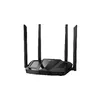 Tabletop Router DAHUA AC12 — Dual-band Wi‑Fi 5 (AC1200), 4× LAN, 4 antennas, black
Product specification Tabletop Router DAHUA AC12 — Dual-band Wi‑Fi 5 (AC1200), 4× LAN, 4 antennas, black
Manufacturer:
DAHUA
Category:
Wireless Routers
Description
DAHUA AC12 is a tabletop dual‑band wireless router (Wi‑Fi 5/802.11ac) offering up to 1200 Mbit/s combined throughput across 2.4 GHz and 5 GHz. It provides RJ‑45 WAN and four Gigabit Ethernet LAN ports (10/100/1000 Mbps), four external antennas for improved coverage and WPA2 security. Designed for home and small office use to deliver stable wired and wireless connectivity.
DAHUA AC12 is a tabletop dual-band wireless router supporting Wi‑Fi 5 (802.11ac) with combined throughput up to 1200 Mbit/s across 2.4 GHz and 5 GHz. The unit provides a dedicated RJ‑45 WAN port and four Gigabit Ethernet LAN ports for wired connections, and four external antennas to enhance wireless coverage. Designed for home and small office environments, the router offers WPA2 security, compact dimensions and a black finish that integrates into most installations.
Advantages
The dual-band design separates 2.4 GHz and 5 GHz traffic to reduce interference and optimise performance for mixed device environments. Four external antennas and support for Wi‑Fi 5 standards improve signal stability and range for typical residential and small office layouts. Gigabit LAN ports enable faster wired transfers and reliable connectivity for desktops, NAS devices or smart home hubs. The router is compact and lightweight, with straightforward cabling and basic security features to meet common networking needs.
Suitable for
- Home internet sharing with multiple smartphones, laptops and smart devices
- Small office networks requiring wired Gigabit connections and wireless access
- Streaming HD video and online conferencing in typical household or small office spaces
- Connecting smart home devices with separated 2.4 GHz and 5 GHz bands
Key specifications
- Wi‑Fi: Dual-band 2.4 GHz and 5 GHz; Wi‑Fi 5 (802.11ac) with backward compatibility to 802.11n/g/b/a
- Maximum WLAN throughput: up to 1200 Mbit/s combined
- Ethernet: 1 × WAN (RJ‑45), 4 × Gigabit LAN ports (10/100/1000 Mbps)
- Antennas: 4 external antennas for improved coverage
- Security: WPA2 wireless security support
- Power: 12 V DC, 1 A power supply requirement
- Physical: Dimensions 222 × 147.4 × 188.4 mm; weight approx. 0.31 kg; colour: black
- Accessories included: power adapter, Ethernet cable, quick start guide, legal and regulatory information
How to use
Place the router in a central location to maximise wireless coverage and connect the ISP modem to the WAN port using the supplied Ethernet cable. Connect wired devices to the Gigabit LAN ports as required and plug in the power adapter to a suitable 12 V DC outlet. Configure the wireless network name (SSID), security type (WPA2) and administrator credentials through the router’s web interface or setup utility, following the quick start guide. For mixed traffic, assign devices to the appropriate band (2.4 GHz for longer range, 5 GHz for higher throughput) to balance load.
Usage recommendations
For optimal performance, position the router elevated and free from large metal objects or thick walls, update firmware when available, and use the 5 GHz band for bandwidth‑intensive tasks such as HD streaming or video calls while reserving 2.4 GHz for devices that need longer range. Regularly change the administrator password and enable WPA2 security to maintain network protection.
Specifications
Wireless LAN features
- Wi-Fi band:
- Dual-band (2.4 GHz / 5 GHz)
- Top Wi-Fi standard:
- Wi-Fi 5 (802.11ac)
- WLAN data transfer rate (max):
- 1200 Mbit/s
- Wi-Fi standards:
- Wi-Fi 4 (802.11n), 802.11g, 802.11b, 802.11a, Wi-Fi 5 (802.11ac)
- Channel bandwidth:
- 80 MHz
- Channels quantity:
- 165 channels
- WLAN data transfer rate (first band):
- 300 Mbit/s
- WLAN data transfer rate (second band):
- 867 Mbit/s
WAN connection
- SIM card slot:
- No
- 3G/4G USB modem compatibility:
- No
- DSL WAN:
- No
- Ethernet WAN:
- Yes
- WAN connection type:
- RJ-45
Ports & interfaces
- USB port:
- No
- Ethernet LAN data rates:
- 100, 1000, 10
- Ethernet LAN (RJ-45) ports:
- 4
- DC-in jack:
- Yes
Network
- Ethernet LAN:
- Yes
- Networking standards:
- IEEE 802.11a, IEEE 802.11ac, IEEE 802.11b, IEEE 802.3u, IEEE 802.11g, IEEE 802.11n, IEEE 802.3, IEEE 802.3ab
- Ethernet LAN interface type:
- Ethernet
- Cabling technology:
- 10/100/1000Base-T(X)
- Receiver sensitivity:
- 5GHz 11ac VHT80_MCS0: -89dbm 11ac VHT80_MCS9:-62dbm 2.4GHz 11n HT20_MCS0: -95dbm 11n HT20_MCS7: -75dbm 11n HT40_MCS0: -92dbm 11n HT40_MCS7: -72dbm
- Automatic channel selection:
- Yes
- Dynamic DNS (DDNS):
- Yes
- VPN Passthrough:
- Yes
Antenna
- Antennas quantity:
- 4
- Antenna gain level (max):
- 5 dBi
- Antenna design:
- External
Security
- Network address translation (NAT):
- Yes
- Security algorithms:
- WPA2, 64-bit WEP, 128-bit WEP, WEP, WPA
- System event log:
- Yes
- Parental control:
- Yes
Protocols
- DHCP client:
- Yes
- DHCP server:
- Yes
Design
- Product type:
- Tabletop router
- Wall mountable:
- Yes
- Indication light:
- Yes
- Product colour:
- Black
Management features
- Quality of Service (QoS) support:
- Yes
- Web-based management:
- Yes
- MIMO:
- Yes
- MU-MIMO technology:
- Yes
Power
- Power consumption (typical): Power consumption in switched-on state expressed in W.
- 12 W
- Output voltage:
- 12
- External power adapter:
- Yes
- Output current:
- 1 A
- Power source type:
- DC
Weight & dimensions
- Weight:
- 0.31 kg
- Height:
- 188.4 mm
- Width:
- 147.4 mm
- Depth:
- 222 mm
Operational conditions
- Operating relative humidity (H-H):
- 0 - 90
- Storage temperature (T-T):
- 20 - 70
- Operating temperature (T-T):
- 0 - 40
Packaging content
- AC adapter included:
- Yes
- Cables included:
- LAN (RJ-45)
- Manual:
- Yes
- Quick start guide:
- Yes
Other features
- Bandwidth (second):
- 5.85 GHz
- Bandwidth (first):
- 2.484 GHz
Packaging data
- Package depth:
- 300 mm
- Package height:
- 70 mm
- Package width:
- 260 mm
- Number of products included:
- 1 pc(s)
Features
- Internal memory:
- 64 MB
- Firmware upgradeable:
- Yes
- Number of simultaneously connected devices (max):
- 32


