
Save time and money with our discounts!
In cart {{totalProductsCount}} item(s)
Your cart is empty
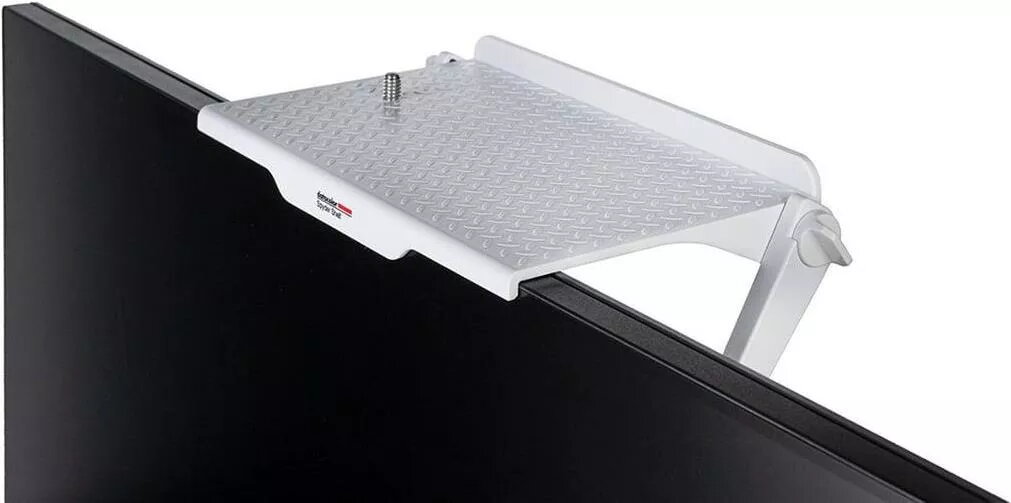
Display calibration tool Datacolor Spyder Shelf SSF100 for accurate monitor positioning and calibration
Datacolor Spyder Shelf SSF100 is an accessory designed to position and support a Datacolor Spyder sensor for accurate and repeatable monitor calibration. The shelf creates a stable mounting point that ensures consistent sensor placement against the display surface, helping to reduce setup variation and improve profiling reliability. It is intended to be used with compatible Datacolor Spyder sensors as part of a color-critical calibration workflow for photography, design, and professional display management.
The Spyder Shelf SSF100 provides a reproducible physical reference that simplifies sensor placement and reduces the chance of misalignment during calibration. Its construction supports stable positioning on a variety of monitor sizes and bezel shapes, which contributes to more consistent measurement results. The accessory is lightweight and easy to attach, facilitating quick setup and repeatable calibration routines for multiple displays.
Position the Spyder Shelf SSF100 on the monitor bezel or edge according to the alignment marks or instructions supplied with your Datacolor Spyder sensor. Place the Spyder sensor on the shelf so that the measurement aperture rests against the screen surface; confirm secure seating and correct orientation before starting the calibration software. Run the standard calibration procedure in the Datacolor application while the sensor is held steadily by the shelf to capture accurate luminance and color measurements. After profiling, remove the sensor and shelf or leave in place for repeat calibrations as needed.
For best results, use the shelf with a compatible Datacolor Spyder sensor and follow the monitor manufacturer’s instructions for positioning. Ensure the monitor is warmed up to its normal operating temperature and brightness, and avoid direct reflections or strong ambient light on the screen during measurement to improve profiling accuracy.
{{highlightedFeature.featureTitle}}:
{{getProductFeatureValueById(product, highlightedFeature.featureId)}}
{{ productComparisonGenerationError }}