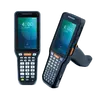
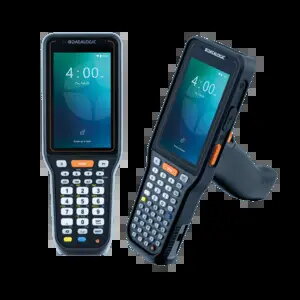
The Datalogic Skorpio X40-X45 is a robust mobile computer engineered for high-performance data collection in demanding industrial and retail environments. Equipped with a 2D long-range scanner, this device excels at capturing barcodes from significant distances, ensuring efficiency in large warehouses and busy retail floors. It features a 10.5 cm capacitive display and runs on the Android 15 operating system, providing a modern, intuitive interface for professional applications. With its durable design, including IP65 and IP67 ratings and MIL-STD 810H certification, it is built to withstand harsh conditions, drops, and exposure to dust and moisture.
Advantages
This mobile computer offers exceptional versatility through its integrated 13 MP camera and advanced connectivity options, including Wi-Fi 6E, Bluetooth 5.3, and NFC. The inclusion of a hot-swappable 7000 mAh battery ensures continuous operation throughout long shifts without the need for downtime. The functional numeric keypad and ergonomic pistol grip design facilitate comfortable, high-speed data entry and scanning. Furthermore, the device is powered by an octa-core processor with 6GB of RAM and 128GB of flash storage, delivering the processing power required for complex inventory management and logistics software.
Suitable for
- Inventory management in large warehouses
- Logistics and supply chain tracking
- Retail floor operations and price verification
- Asset management and tracking
- Field service and maintenance tasks
This device may not be suitable for environments requiring a lightweight, pocket-sized form factor, as its rugged design and pistol grip make it larger than standard consumer smartphones. It is also likely overkill for simple office tasks that do not require industrial-grade scanning capabilities or extreme environmental durability.
Key specifications
- Display: 10.5 cm (4 inches) capacitive touchscreen, 480x800 resolution
- Scanner: 2D Long Range Imager with Green Spot technology
- Operating System: Android 15 with Google Mobile Services
- Processor: Octa-core 2.4 GHz
- Memory: 6GB RAM, 128GB Flash storage
- Connectivity: Wi-Fi 6E, Bluetooth 5.3, NFC, USB Type-C
- Battery: 7000 mAh, hot-swappable
- Durability: IP65, IP67, MIL-STD 810H
- Camera: 13 MP rear-facing
To use the Datalogic Skorpio X40-X45, ensure the battery is fully charged or swapped with a spare if necessary. Power on the device using the side button and follow the Android setup wizard to configure your network and enterprise applications. Use the pistol grip trigger to activate the 2D scanner, aiming the beam at the barcode until the Green Spot confirms a successful read. The device supports various input methods via the 39-key functional numeric keypad or the on-screen keyboard.
What to consider before purchase
- Verify that your existing warehouse management software is compatible with Android 15.
- Assess whether the long-range scanning capability is necessary for your specific barcode distances.
- Consider the need for additional charging cradles or spare batteries for multi-shift operations.
- Ensure the physical size and weight of the pistol-grip design align with your staff's ergonomic requirements.
For optimal performance and longevity, it is recommended to keep the device firmware updated and use the official Datalogic charging accessories. Regularly clean the scanner window to maintain scanning accuracy and ensure the battery contacts remain free of debris.