
Powerful EcoFlow stations for energy anywhere!
In cart {{totalProductsCount}} item(s)
Your cart is empty
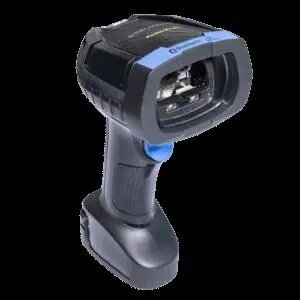
Document capture scanner Datalogic POWERSCAN PBT9600 Bluetooth RFID
Datalogic POWERSCAN PBT9600 Bluetooth RFID is a document capture scanner combining wireless Bluetooth connectivity with RFID reading capability. Designed for mobile and point-of-service environments, the device supports document scanning workflows alongside RFID-based identification and tracking. Its form factor and connectivity options enable flexible placement and hands-free operation where Bluetooth pairing with host systems is required.
The Datalogic POWERSCAN PBT9600 offers integrated Bluetooth communications and RFID reading in a single unit, reducing the need for separate devices. Its design supports mobile use and quick deployment at different points of service, enabling fast capture of document information and tag data. The scanner is intended to fit into workflows that need wireless operation, flexible placement and straightforward integration with existing Bluetooth-capable systems.
Pair the Datalogic POWERSCAN PBT9600 with a compatible Bluetooth host following the host device's Bluetooth pairing procedure. Position the scanner for document capture or RFID reading according to operational needs; the unit supports mobile or stationary placement. Align documents within the scanner's capture area for image or data acquisition and present RFID tags within the reader field to capture tag information. Configure host software or middleware to receive and process both scanned document data and RFID tag data for your workflows.
For reliable operation, ensure the Bluetooth host and scanner are within recommended communication range and that host software is configured to accept both scanned and RFID inputs. Use stable mounting or hands-free arrangements for repetitive tasks and verify RFID tag placement to optimize read accuracy. Follow regular maintenance and cleaning practices for optical surfaces as described in your operational documentation.
{{highlightedFeature.featureTitle}}:
{{getProductFeatureValueById(product, highlightedFeature.featureId)}}
{{ productComparisonGenerationError }}
