
Powerful EcoFlow stations for energy anywhere!
In cart {{totalProductsCount}} item(s)
Your cart is empty
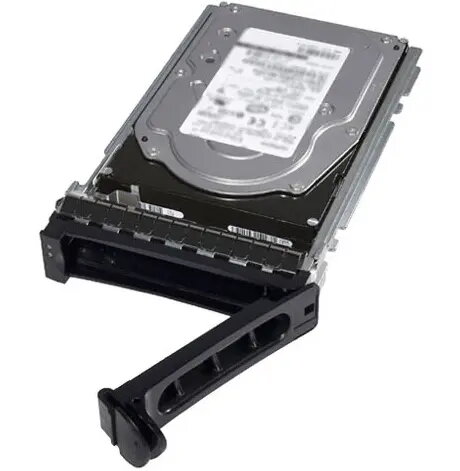
Internal Solid State Drive Dell 0VKT80-RFB 400 GB 2.5" SATA III 6 Gbit/s for Server/Workstation
Dell 0VKT80-RFB is a 400 GB internal solid state drive in a 2.5" form factor with a SATA III 6 Gbit/s interface, designed for use in servers and workstations. The drive provides solid-state storage with fast sequential access and lower latency compared with conventional hard disk drives, making it suitable for operating systems, application installations, and cache tiers in enterprise-class systems. The 2.5" size and SATA III compatibility allow straightforward integration into many rack servers, tower workstations, and storage enclosures that support standard SATA drives.
The Dell 400 GB SATA III SSD offers improved reliability and lower mechanical failure risk due to its solid-state design. It delivers faster read/write response times and improved random I/O performance compared with spinning media, which helps reduce boot times and accelerate application access. The SATA III interface at 6 Gbit/s ensures compatibility with a wide range of server and workstation platforms while enabling higher sustained transfer rates than older SATA revisions.
This 400 GB SATA SSD may not be appropriate where larger capacity is required for bulk storage of large datasets or multimedia files; in such cases higher-capacity SSDs or HDDs should be considered. It may also not be ideal for systems that require NVMe performance or PCIe bandwidth — workloads needing maximum throughput and lowest latency can benefit more from NVMe drives.
Install the SSD into an available 2.5" drive bay or compatible adapter in your server or workstation, and connect to a SATA III port and power cable. Configure the drive in the system BIOS/UEFI or storage controller as required (AHCI mode is common for single-drive setups; consider RAID configuration on supported controllers for redundancy or performance). Initialize and format the drive within the operating system, then migrate or install the OS, applications, or configure it as a cache device according to your storage architecture.
For optimal service life and performance, use the Dell 400 GB SATA SSD for operating system volumes, application installations, or as a cache layer, monitor drive health with vendor or system management tools, and apply firmware updates provided by the system or drive vendor when validated for your platform.
{{highlightedFeature.featureTitle}}:
{{getProductFeatureValueById(product, highlightedFeature.featureId)}}
{{ productComparisonGenerationError }}
