








{{ totalProductsCount }}

In cart {{totalProductsCount}} item(s)

Total:
{{sum | formatAmount}}

Your cart is empty

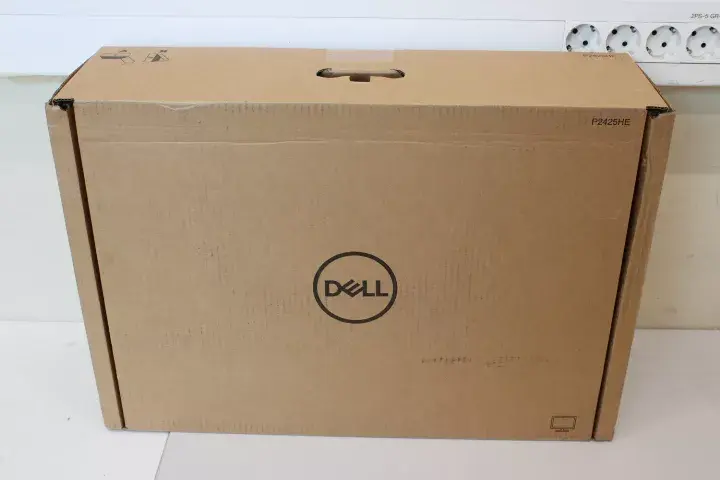
header-product Monitor Dell P2425HE 24" IPS FHD 1920x1080 100Hz 8ms HDMI DP USB-C RJ45 250 cd/m² No Stand (Damaged Packaging)

Monitor Dell P2425HE 24" IPS FHD 1920x1080 100Hz 8ms HDMI DP USB-C RJ45 250 cd/m² No Stand (Damaged Packaging)

Dell P2425HE 24" IPS FHD monitor Photo 1
Dell P2425HE 24" IPS FHD monitor Photo 2
Dell P2425HE 24" IPS FHD monitor Photo 3
Dell P2425HE 24" IPS FHD monitor Photo 4
Dell P2425HE 24" IPS FHD monitor Photo 5
Dell P2425HE 24" IPS FHD monitor Photo 1
Dell P2425HE 24" IPS FHD monitor Photo 2
Dell P2425HE 24" IPS FHD monitor Photo 3
Dell P2425HE 24" IPS FHD monitor Photo 4
Dell P2425HE 24" IPS FHD monitor Photo 5
Out of stock.
View similar!

Short description

Dell P2425HE is a 24-inch IPS monitor with Full HD 1920×1080 resolution, 100 Hz refresh rate and 8 ms response time. It offers connectivity via DisplayPort, HDMI, USB-C, USB-A and an RJ45 port, and a 250 cd/m² brightness level. Supplied without a stand; suitable for desktop setups where a separate mount or arm is used. Packaging is damaged.
Warranty: 2 Years
Stāvoklis: Open box

Open Box - A completely new device without any defects. Opened packaging.

SKU: 11160178

delivery
Information regarding the items availability for purchase will be posted on this site
price
Item cost information will be published on this site
Together cheaper
{{product.price | formatAmount}}
{{product.title}}
{{productBundle.reference.specialPrice | formatAmount}}
{{productBundle.title}}
{{productBundlePreviousPrice | formatAmount}}
{{productBundleSpecialPrice | formatAmount}}

You saving {{productBundleYouSave | formatAmount}}

Product information

Description

Dell P2425HE is a 24-inch IPS monitor with Full HD 1920×1080 resolution, a 100 Hz refresh rate and an 8 ms response time. The panel delivers consistent color and wide viewing angles typical of IPS technology and a 250 cd/m² brightness level suitable for most office and home environments. This unit is supplied without a stand and is intended for use with a separate mounting solution or arm. Packaging is damaged.

Advantages

The monitor combines a 24-inch IPS panel with Full HD clarity and a 100 Hz refresh rate for smoother on-screen motion compared with standard 60 Hz panels. USB-C connectivity enables video, data and power delivery over a single cable when supported by the host device. Multiple input options including DisplayPort and HDMI, plus USB-A ports and an integrated RJ45 port, simplify connectivity in mixed workstation setups. The absence of a stand reduces shipping volume and allows installation on custom mounts or monitor arms.

Suitable for

  • Office workstations and productivity setups with a separate VESA mount or monitor arm
  • Home offices requiring reliable color reproduction and wide viewing angles
  • Multi-input work environments that need USB-C, HDMI and DisplayPort connections
  • Setups that benefit from integrated wired network access via RJ45

Key specifications

  • Screen size: 24 inches
  • Panel type: IPS
  • Native resolution: 1920 × 1080 (Full HD)
  • Refresh rate: 100 Hz
  • Response time: 8 ms
  • Brightness: 250 cd/m²
  • Inputs: DisplayPort, HDMI, USB-C
  • USB ports: USB-A (for peripherals and hub functions)
  • Network: integrated RJ45 port for wired network connectivity
  • Stand: not included (requires separate mount or arm)

How to use

Mount the monitor using a compatible VESA mount or monitor arm; follow the mounting hardware instructions provided separately. Connect video from your computer using DisplayPort, HDMI, or USB-C depending on available ports and desired functionality. If using USB-C, ensure the host device supports video over USB-C to enable single-cable video, data and power delivery. Connect USB-A devices to the monitor’s USB hub as needed and use the RJ45 port for wired network access where supported by the monitor’s USB-C or upstream connection. Adjust display settings through the on-screen menu to set brightness, input source and color parameters to your preference.

Usage recommendations

Because the monitor is supplied without a stand, verify VESA mount compatibility and weight capacity of your arm or bracket before installation. For best image quality, use high-quality video cables and, when available, enable the higher refresh rate in your operating system or graphics control panel. If using USB-C power delivery, confirm your host device’s power requirements to ensure stable operation.

Description

Machine translation. Load original

Similar products

{{product.title}}
Show details Hide details

{{highlightedFeature.featureTitle}}:

{{getProductFeatureValueById(product, highlightedFeature.featureId)}}

{{product.price | formatAmount}}

Product comparison

In this overview, the Dell P2425HE 24" (Damaged Packaging) monitor is compared with several alternative models of a similar class: the standard Dell P2425HE version, the Dell P2425H modification, the white IIYAMA ProLite XUB2492HSU-W6 display, the analogous Dell Pro 24 Plus P2425HE version without a stand, and the multimedia BenQ GW2491 model. All these devices feature a screen diagonal of approximately 24 inches, an IPS panel, and Full HD resolution, but they differ in equipment, connectivity options, and intended use.

⚙️ Below is a comparison of characteristics such as screen size, panel type, resolution, refresh rate, response time, brightness, package contents (presence or absence of a stand and packaging condition), and connection interfaces.

ParameterDell P2425HE (Damag. Pack.)Dell P2425HEDell P2425HIIYAMA ProLite XUB2492HSU-W6Dell Pro 24 Plus P2425HEBenQ GW2491Practical Conclusion
Size and Panel Type24" IPS23.8" IPS24" IPS24" IPS23.8" IPS23.8" IPSAll models provide wide viewing angles and high-quality color reproduction thanks to the IPS matrix.
Resolution and FrequencyFull HD, 100 HzFull HD, 100 HzFull HD, 100 HzFull HD, 100 HzFull HD, 100 HzFull HD, 100 HzThe 100 Hz refresh rate ensures smoother motion display and interface operation compared to basic 60 Hz screens.
Brightness and Response250 cd/m², 8 ms250 cd/m², 8 ms250 cd/m², 8 ms250 cd/m², 0.4 ms250 cd/m², 8 ms250 cd/m², 5 msBrightness is identical across all options, while the response time of IIYAMA and BenQ differs slightly for specific usage scenarios.
Accessories and PortsWithout stand, USB-C, RJ45, DP, HDMI, damag. pack.With stand, HDMI (variable)With stand, USB-C, VGA, DP, HDMI, damag. pack.With ergonomic stand, USB hub, white housingWithout stand, USB-C, RJ45, DP, HDMIWith stand, HDMI, DP, headphone outThe Dell P2425HE (Damag. Pack.) model is supplied without a stand and is designed for use with monitor arms, offering advanced network and video interfaces including USB-C with RJ45.

◎ The table below evaluates the suitability of the devices for various user scenarios, workspaces, and space organization requirements.

Use CaseRecommended ProductWhy
Office work using a monitor armDell P2425HE (Damag. Pack.)Ideally suited for workspaces where a VESA arm is already installed, offering savings due to damaged packaging.
Workspace setup with a laptop via USB-CDell P2425HE (Damag. Pack.) or Dell Pro 24 Plus P2425HEThe presence of USB-C and an RJ45 port turns the monitor into a convenient docking station for wired internet and signal transmission.
Home use and multimediaBenQ GW2491 or IIYAMA ProLite XUB2492HSU-W6Equipped with a standard stand and targeted at everyday home tasks or light interiors.
Standard office with older PCsDell P2425HSupports a traditional VGA port alongside modern interfaces.
The Dell P2425HE 24" (Damaged Packaging) monitor differs from alternatives by including a complete set of professional interfaces (including USB-C and RJ45) and being supplied without a factory stand, making it an optimal choice for offices and home studies with pre-existing monitor arms or desk mounts. Choose this model if you need a modern docking station with a network port and plan to mount it on a VESA bracket, and the condition of the outer packaging is not a priority.
Might be useful
{{product.manufacturerName}}
{{product.categoryName}}
{{product.title}}
{{product.specialPrice}}
{{product.price}}

Customer reviews

Customer questions

FAQ

What payment options are available?

AiO.lv offers several payment methods: Bank transfer. All transactions are 100% secure and encrypted.

Can this product be purchased for a company (with VAT)?

Yes. AiO.lv works with legal entities in Latvia and across Europe. The product price already includes VAT. For certain product categories, as well as for companies from other EU countries with a valid VAT number, a 0% VAT rate may apply. We issue the invoice immediately after the order is placed, support electronic BIS invoices, and automatically generate all necessary accounting documents. You can complete the purchase for a company online — simply select the company profile and choose bank transfer as the payment method during checkout.

What is the warranty period?

All Dell products come with an official 2 Years warranty. It covers all manufacturing defects and malfunctions that may occur during use. The warranty is valid at all authorized Dell service centers and through AiO.lv

Can the product be returned after purchase?

Yes, you can return the product within 14 days of purchase if you bought it as a consumer (not a legal entity). Returns are possible without giving any reason — the main condition is that the product retains its original appearance and full set of accessories. We will make the process as simple and convenient as possible: just contact our customer support team, and we will help you arrange the return.

Where should I contact for warranty service?

For warranty-related questions you can contact the AiO.lv (SIA VSPRO) customer support team. We will assist with consultation, warranty claim processing, and coordination with certified service centers.
warranty
14-Day Return Policy We are confident in our quality, but if the purchase doesn’t fit — you have 14 days to return the product with peace of mind.
shipping
Fast Delivery Get your orders as quickly as possible — right to your door, parcel lockers, or pickup points across Latvia and the EU.
payment
Secure Payment Pay the way you prefer: cash, VISA, MasterCard, Apple Pay, Google Pay, bank transfer, or 0% installment plan.
warranty
Quality Since 2008 AiO.lv has been on the market for over 18 years and has earned trust — with more than 6000 genuine positive reviews on Google.