{{ totalProductsCount }}

In cart {{totalProductsCount}} item(s)

Total:
{{sum | formatAmount}}

Your cart is empty

header-product Rear panel for Dell Full Tower chassis JD7N1 — black, compatible with Full Tower systems
47.49 €

Rear panel for Dell Full Tower chassis JD7N1 — black, compatible with Full Tower systems

Fast shipping
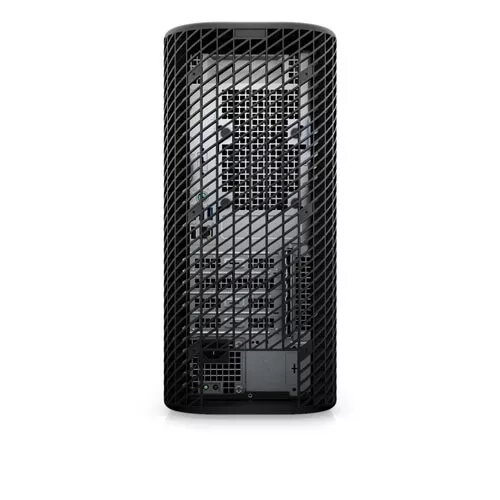
Dell Rear Panel JD7N1 for Full Tower Photo 1
payment

Discount 22%

You save: 13.50 €

The discount is valid from 04.09.2026 to 02.10.2026

Keep track of price changes You keep track of price changes
Watch the price drop

Leave your address - as soon as the price of the product goes down, you'll know about it right away

You keep track of price changes

Rear panel for Dell Full Tower chassis JD7N1 — black, compatible with Full Tower systems

{{email}}
You keep track of price changes

Rear panel for Dell Full Tower chassis JD7N1 — black, compatible with Full Tower systems

{{email}}
Price without discount: 60.99 €
Your Price:
{{selectedOffer.price | formatAmount}}

Short description

Dell JD7N1 rear panel for Full Tower chassis, finished in black. Provides structural support and organized access to motherboard I/O, expansion slots and cable routing for full-size desktop systems. Designed as a replacement or spare part to maintain system integrity and connectivity, suitable for repairs and upgrades of compatible Full Tower builds.
Available for order: 3 pcs.
Warranty: 2 Years
SKU: 10852201
free shipment

Cheapest delivery:

Unisend LV

Pick-up points

Unisend LV

Cost

1.99 €

Deliver

{{selectedOffer.parcelStationDeliveryString}}

Customer service center
2b. Kengaraga str., Riga, Latvia, LV-1063
Wednesday {{selectedOffer.officeDeliveryString}}
free
Courier Delivery Please note that in case of a large parcel additional delivery costs may apply!
05.10.2026 {{selectedOffer.courierDeliveryString}}
From 4.99 € (Weight: 0.66 kg)
Parcel couriers
Unisend LV / Venipak Pickup LV / Venipak Locker LV / DPD Paku skapis / Omniva LV / Latvijas Pasts pakomāts / Latvijas Pasts nodaļa
05.10.2026 {{selectedOffer.parcelStationDeliveryString}}
From 1.99 €
payment
Payment Methods:
Cash payment, Bank transfer, Bank cards on-line, Apple Pay, Google Pay
Together cheaper
{{product.price | formatAmount}}
{{product.title}}
{{productBundle.reference.specialPrice | formatAmount}}
{{productBundle.title}}
{{productBundlePreviousPrice | formatAmount}}
{{productBundleSpecialPrice | formatAmount}}

You saving {{productBundleYouSave | formatAmount}}

Product information

Description

The Dell JD7N1 rear panel for Full Tower chassis is a black replacement part designed to restore or maintain the rear enclosure of compatible full‑size desktop systems. It provides the structural mounting points and cutouts needed for motherboard I/O, expansion cards and connector access while preserving original chassis alignment and cable routing paths. The panel is intended for use when the original rear enclosure is damaged, missing or when rebuilding and upgrading Full Tower systems that require a matching back panel.

Advantages

This rear panel matches the physical dimensions and port cutouts used in compatible Full Tower Dell chassis, ensuring proper alignment of motherboard I/O ports and expansion cards. Its finished black surface maintains a uniform appearance with other chassis components and helps protect internal components from external contact. As a direct replacement part, it simplifies repairs and reduces the need for custom fabrication or modification.

Suitable for

  • Repairing a damaged or missing rear enclosure on compatible Full Tower desktop systems
  • Rebuilding or upgrading full‑size desktop chassis where original panel alignment is required
  • Maintaining correct motherboard I/O and expansion slot alignment during component swaps
  • System assembly and maintenance in repair shops or hobbyist PC builds using compatible Full Tower cases

Key specifications

  • Form factor: Full Tower rear panel compatible with full‑size desktop chassis
  • Color/finish: Black finish to match chassis exterior
  • Cutouts: Standardized openings for motherboard I/O, PCI/PCIe expansion slots and rear connectors
  • Mounting: Preformed mounting points and screw hole patterns for chassis assembly
  • Material: Rigid sheet metal or stamped steel construction for structural support

How to use

To install, power down and unplug the system, then remove the side panels to access the chassis interior. Align the rear panel so that the motherboard I/O and expansion slot openings correspond to the installed components, and secure the panel to the chassis frame using the original screws or compatible fasteners. Confirm that all connectors and expansion cards are accessible and that cable routing is unobstructed before reassembling the side panels and powering the system back on.

Usage recommendations

Verify compatibility with your specific Full Tower chassis model and motherboard layout before installation. Use appropriate ESD precautions and ensure fasteners are tightened to prevent vibration; avoid bending the panel around installed connectors to maintain proper alignment and prevent damage to ports or expansion cards.

All features
Type: Characteristics of the device.
Rear panel
Product colour: The colour e.g. red, blue, green, black, white.
Black
Compatible products: Other products that can be used with this product.
OptiPlex 3080 Mini Tower OptiPlex 5080 Mini Tower OptiPlex 3090 Mini Tower OptiPlex 5090 Mini Tower OptiPlex 3000 Mini Tower OptiPlex 5000 Mini Tower
Compatible chassis type:
Full Tower

Description

Machine translation. Load original

Similar products

{{product.title}}
Show details Hide details

{{highlightedFeature.featureTitle}}:

{{getProductFeatureValueById(product, highlightedFeature.featureId)}}

{{product.price | formatAmount}}

Product comparison

The main product, Rear panel for Dell Full Tower chassis JD7N1, is compared with several alternative chassis components, including matching or closely related Dell Full Tower rear panel options (such as Rear panel for Dell full tower chassis JD7N1, Rear panel Dell XM6YD for Full Tower chassis, and Rear panel for Dell full tower chassis XM6YD), as well as completely different front panel assemblies from other brands (Computer case front panel BitFenix BFC-SNX-500-DBX-SP and Lian Li O11DERGB-4X Front Panel). All of these products belong to the computer chassis and case components category, but they serve different structural purposes and are tailored to entirely different hardware systems.

⚙️ The specifications comparison covers the component type, brand and form factor compatibility, mounting location (rear vs. front), color finish, and primary practical function for system assembly or repair.

Comparison parameterRear panel for Dell Full Tower chassis JD7N1Rear panel for Dell full tower chassis JD7N1 (Alt 1)Rear panel Dell XM6YD for Full Tower chassisRear panel for Dell full tower chassis XM6YD (Alt 2)Computer case front panel BitFenix BFC-SNX-500-DBX-SPLian Li O11DERGB-4X Front PanelPractical significance
Component typeCase rear panelCase rear panelCase rear panelCase rear panelCase front panelCase front panelDetermines installation zone: rear section for connectivity or front section for access and airflow.
Brand compatibilityDellDellDellDellBitFenixLian LiComponents are brand-specific and not interchangeable due to proprietary chassis designs.
Form factorFull TowerFull TowerFull TowerFull TowerFull TowerFull TowerAll items are designed for large full-size cases, but for opposite sides of the enclosure.
PlacementRear panel (I/O and expansion slots)Rear panel (I/O and expansion slots)Rear panel (I/O and expansion slots)Rear panel (I/O and expansion slots)Front panel (fascia)Front panel (mesh ventilation kit)Rear panels handle ports and structural rigidity, while front panels handle aesthetics or cooling.

◎ The suitability analysis evaluates use cases such as precise hardware repairs for specific Dell systems, refurbishment of compatible Full Tower chassis, and customization or thermal enhancement of alternative manufacturer cases.

Use caseRecommended productWhy
Direct repair and restoration of the rear structure in original Dell Full Tower systemsRear panel for Dell Full Tower chassis JD7N1Matches original mounting points and I/O cutout layouts to preserve system integrity.
Replacing a rear panel using an alternative part code for the identical Dell JD7N1 componentRear panel for Dell full tower chassis JD7N1Functions as a direct equivalent to restore the rear enclosure of compatible Dell PCs.
Servicing Dell systems that require a different XM6YD rear panel revisionRear panel Dell XM6YD for Full Tower chassisSuited for compatible Dell Full Tower chassis requiring this specific rear interface layout.
Customizing or repairing the exterior fascia of a BitFenix Full Tower caseComputer case front panel BitFenix BFC-SNX-500-DBX-SPDesigned to replace the front panel of a specific enclosure without replacing the entire chassis.
Upgrading airflow and thermal performance in Lian Li full tower casesLian Li O11DERGB-4X Front PanelDedicated aluminum mesh front kit built to optimize cooling for enthusiast builds.
It is recommended to choose Rear panel for Dell Full Tower chassis JD7N1 when you need to repair or replace the rear enclosure of the corresponding original Dell Full Tower chassis. Alternative Dell panels serve different revisions of the same manufacturer's hardware, whereas BitFenix and Lian Li options address front-panel upgrades for entirely different brands and cannot replace a rear I/O interface.
Might be useful
{{product.manufacturerName}}
{{product.categoryName}}
{{product.title}}
{{product.specialPrice}}
{{product.price}}

Customer reviews

Customer questions

FAQ

How much does the Dell Rear Panel JD7N1 for Full Tower cost, and is it available for purchase?

The price is 47.49 € (valid at the time of publication and already includes all taxes). The item is available for order — 3 pcs. are in stock, and you can place your purchase right now with delivery across Latvia and Europe or choose pickup at the Riga collection point. We offer favorable purchase terms, including the option to split the payment into convenient monthly installments. Availability and price are updated in real time, so we recommend placing your order in advance.

If I order this product today, when will I receive my order?

If you place your order today, delivery will be as fast and convenient as possible. You will be able to pick up your order on Wednesday at the Riga pickup point or choose delivery across Latvia and Europe. We carefully inspect every purchase and pack it securely for safe transportation.

What payment options are available?

AiO.lv offers several payment methods: Cash payment, Bank transfer, Bank cards on-line, Apple Pay, Google Pay. All transactions are 100% secure and encrypted.

Can this product be purchased for a company (with VAT)?

Yes. AiO.lv works with legal entities in Latvia and across Europe. The product price already includes VAT. For certain product categories, as well as for companies from other EU countries with a valid VAT number, a 0% VAT rate may apply. We issue the invoice immediately after the order is placed, support electronic BIS invoices, and automatically generate all necessary accounting documents. You can complete the purchase for a company online — simply select the company profile and choose bank transfer as the payment method during checkout.

What is the warranty period?

All Dell products come with an official 2 Years warranty. It covers all manufacturing defects and malfunctions that may occur during use. The warranty is valid at all authorized Dell service centers and through AiO.lv

Can the product be returned after purchase?

Yes, you can return the product within 14 days of purchase if you bought it as a consumer (not a legal entity). Returns are possible without giving any reason — the main condition is that the product retains its original appearance and full set of accessories. We will make the process as simple and convenient as possible: just contact our customer support team, and we will help you arrange the return.

Where should I contact for warranty service?

For warranty-related questions you can contact the AiO.lv (SIA VSPRO) customer support team. We will assist with consultation, warranty claim processing, and coordination with certified service centers.

Where can I download the instructions for Dell Rear Panel JD7N1 for Full Tower?

You can download the instructions in PDF format from the “Instructions” section on the product description page. The file contains complete information about installation, setup, and usage.

warranty
14-Day Return Policy We are confident in our quality, but if the purchase doesn’t fit — you have 14 days to return the product with peace of mind.
shipping
Fast Delivery Get your orders as quickly as possible — right to your door, parcel lockers, or pickup points across Latvia and the EU.
payment
Secure Payment Pay the way you prefer: cash, VISA, MasterCard, Apple Pay, Google Pay, bank transfer, or 0% installment plan.
warranty
Quality Since 2008 AiO.lv has been on the market for over 18 years and has earned trust — with more than 6000 genuine positive reviews on Google.