
Powerful EcoFlow stations for energy anywhere!
In cart {{totalProductsCount}} item(s)
Your cart is empty
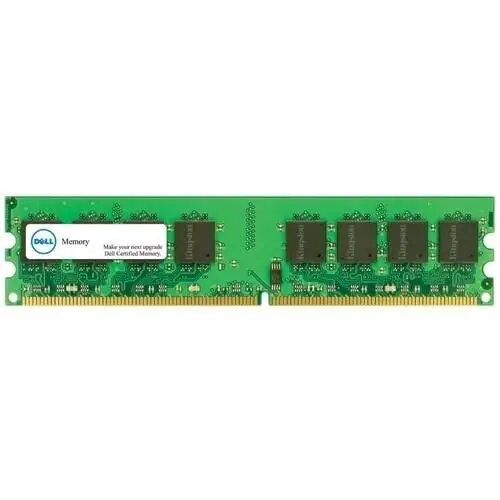
Dell 16GB (2 x 8GB) DDR4 Memory Module Kit
The Dell 16GB DDR4 memory module kit is a high-quality upgrade solution designed to enhance the performance and responsiveness of compatible Dell systems. This kit includes two 8GB modules, providing a total capacity of 16GB to support demanding applications and intensive multitasking. By upgrading your system memory, you can achieve faster data processing speeds and improved overall stability, ensuring your workstation or server operates at peak efficiency.
This memory kit offers significant improvements in system throughput and multitasking capabilities. By utilizing genuine Dell components, users benefit from high compatibility and reliable operation, which minimizes the risk of system errors or performance bottlenecks. The DDR4 technology provides an efficient balance of power consumption and data transfer rates, making it a dependable choice for professional environments where consistent system uptime and responsiveness are critical.
This memory kit is specifically designed for select Dell systems and may not be compatible with motherboards from other manufacturers or older systems that do not support DDR4 technology. It is not intended for high-end gaming rigs that require specialized overclocking memory modules with higher frequency ratings.
To install the memory modules, first ensure that your system is powered off and disconnected from the power source. Open the computer chassis and locate the memory slots on the motherboard. Carefully remove any existing modules if necessary and insert the new Dell 8GB modules into the appropriate slots, ensuring they are firmly seated until the clips lock into place. Once installed, close the chassis, reconnect the power, and restart your system. The BIOS should automatically detect the new memory capacity.
For optimal performance, it is recommended to install the modules in matching pairs to take advantage of dual-channel architecture. Always handle memory modules by the edges to avoid touching the gold contacts, and ensure you are grounded to prevent electrostatic discharge during installation.
{{highlightedFeature.featureTitle}}:
{{getProductFeatureValueById(product, highlightedFeature.featureId)}}
{{ productComparisonGenerationError }}
