
A curated selection of maximum value offers!
In cart {{totalProductsCount}} item(s)
Your cart is empty
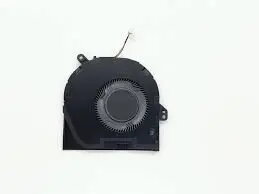
Cooling fan for Dell CN1MT (right-side) — replacement laptop cooling module
This replacement right-side cooling fan is designed as a direct exchange cooling module for compatible Dell laptops that use the CN1MT right-side fan. It provides active heat dissipation for internal components, helping to maintain operating temperatures, reduce thermal throttling and support system stability during extended use. The module is intended for repair or maintenance of devices that originally used the specified right-side cooling fan and matches the form factor and connector orientation required for a direct fit.
The replacement cooling fan restores targeted airflow to the right side of the cooling system, helping to remove heat from the CPU and nearby components. Its design enables straightforward installation in compatible chassis, offering the same mounting points and exhaust direction as the original part. By replacing a worn or failing fan, users can recover cooling efficiency, reduce noise associated with failing bearings and maintain reliable thermal performance under load.
Power off the laptop, disconnect power and remove the battery if applicable before beginning. Open the service panel or keyboard area as required by the device service manual to access the internal cooling assembly. Carefully disconnect the existing right-side fan from the motherboard connector, unfasten any retaining screws or clips, and remove the fan module. Install the replacement module by aligning it with the original mounting points, secure it with the appropriate screws or clips, and reconnect the fan connector to the board. Reassemble the chassis, reinstall the battery if removed, and apply power to verify fan operation and airflow.
Use static-safe precautions when handling internal components and consult the device service manual for disassembly instructions. After installation, monitor system temperatures and fan noise to ensure the replacement functions correctly. If the fan does not spin or generates abnormal noise, power down the device and verify connector seating and mounting; replace the module if defects are detected.
{{highlightedFeature.featureTitle}}:
{{getProductFeatureValueById(product, highlightedFeature.featureId)}}
{{ productComparisonGenerationError }}
