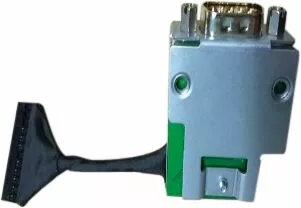
Dell ASSY,CRD,I/O,SERIAL,MT/SFF D10 is an internal serial I/O card that provides a single RS-232 serial port for compatible Dell OptiPlex desktop systems. The card is intended to install on the motherboard I/O header in specified Mini Tower (MT) and Small Form Factor (SFF) models to restore or add legacy serial connectivity. It enables direct wired communication with devices that rely on asynchronous serial communication.
Advantages
This serial port card offers a compact, board-level solution to add RS-232 connectivity without occupying external expansion slots. It integrates with the system I/O header for a clean internal installation and preserves desktop external ports for other uses. The card is suitable for maintaining compatibility with established peripherals and industrial equipment that continue to use serial interfaces.
Suitable for
- Connecting point-of-sale (POS) hardware that uses RS-232 interfaces
- Linking to serial modems and legacy communication devices
- Attaching industrial controllers, barcode scanners or label printers with serial ports
- Accessing serial consoles for network equipment or embedded systems
When it may not be suitable
This internal serial I/O card is not appropriate for systems that lack the specific motherboard I/O header required for installation or for desktops that do not match the compatible MT/SFF OptiPlex models. It does not provide USB-to-serial functionality and is not an external adapter; it requires internal mounting and a matching chassis opening for the connector.
Key specifications
- Interface: RS-232 serial port (DB-9 physical connector)
- Installation: Internal card that connects to system motherboard I/O header
- Form factor compatibility: Designed for specified Mini Tower and Small Form Factor OptiPlex desktops
- Purpose: Adds or restores legacy serial communication capability
How to use
Power off the PC and disconnect it from mains before installing the card. Open the chassis following the system service manual, locate the correct motherboard I/O header and attach the card’s connector to that header. Secure the card to the chassis so the external DB-9 connector aligns with the rear panel opening. Reassemble the case, reconnect power and peripherals, then boot the system. Verify the operating system recognizes the serial port and install any required drivers or BIOS updates specified by the system manufacturer before connecting serial devices.
What to consider before purchase
- Confirm that your OptiPlex model (MT or SFF) supports an internal serial I/O card and has the required I/O header
- Ensure your chassis has an available rear opening for the DB-9 connector alignment
- Check operating system compatibility and availability of drivers for your specific system
- Verify that the connected equipment uses RS-232 signaling and compatible voltage/handshake settings
Usage recommendations
Use shielded serial cables and keep cable runs as short as practical to reduce interference. When connecting industrial devices, confirm handshake and baud rate settings on both ends before deployment. For critical systems, test the serial connection after installation and before integrating into production workflows.