
A curated selection of maximum value offers!
In cart {{totalProductsCount}} item(s)
Your cart is empty
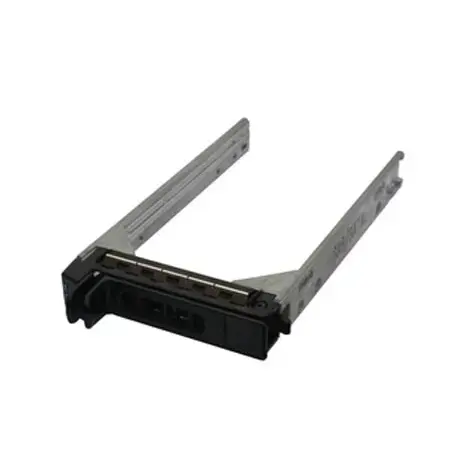
Dell NRX7Y 2.5-inch Hard Drive Carrier Bezel Panel for PowerEdge Servers Silver
The Dell NRX7Y 2.5-inch hard drive carrier bezel panel in silver is an essential server hardware accessory designed for the secure installation and mounting of storage drives in enterprise environments. Specifically engineered for compatibility with Dell PowerEdge servers and blade systems, this bezel panel provides reliable housing for Serial Attached SCSI (SAS) and SATA hard drives. It ensures optimal structural integrity, helps maintain proper airflow within the server chassis, and facilitates straightforward maintenance procedures in data centers and server rooms.
This replacement hard drive caddy offers a dependable solution for server administration by ensuring that storage devices remain securely mounted during operation. Its robust construction supports standard 2.5-inch form factor drives, contributing to efficient space utilization within dense server configurations. The silver color matches standard enterprise equipment aesthetics, while the precise manufacturing ensures seamless integration with compatible server bays without requiring modifications.
This component is not compatible with server chassis from other manufacturers or Dell models that utilize different form factors, such as 3.5-inch drive bays. It is also unsuitable for desktop computers or laptops that do not support enterprise server-grade hot-swap carrier mechanisms.
To install a storage drive using this carrier, insert the 2.5-inch hard drive into the panel cavity, aligning the mounting screw holes carefully. Secure the drive using the appropriate screws provided with your server setup. Once the drive is firmly fixed within the bezel panel, slide the assembly directly into the designated empty hot-swap bay of the compatible Dell PowerEdge server until the release latch engages securely. Ensure the drive is fully seated to guarantee proper electrical connection and airflow.
Usage recommendations: Always power down the server or utilize safe hot-swap procedures according to your operating system and hardware manual before inserting or removing drive carriers. Handle electronic components with standard electrostatic discharge (ESD) protection measures to prevent potential hardware damage.
{{highlightedFeature.featureTitle}}:
{{getProductFeatureValueById(product, highlightedFeature.featureId)}}
{{ productComparisonGenerationError }}
